

Pastey - Efficient Clipboard !
Pastey - Efficient Clipboard ! is made and published by 辉章 何. AppBrain is an independent app data site and isn't affiliated with 辉章 何. The app name, icon, screenshots and description belong to 辉章 何 and are shown as published on the App Store.
AppBrain's verdict
- Rating on App Store
- 5.00
- 1 ratings
- Last updated
- October 20, 2025
It doesn't have enough ratings yet to judge what users think.
Rankings
App Store top chartsApp Store Rankings for Pastey - Efficient Clipboard !
Competitors
Similar apps and more from 辉章 何Alternatives to Pastey - Efficient Clipboard !


More from 辉章 何





Releases
Updates seen on the App Store- Version
- 1.45
- Launched
- February 2024
No changelog data
User feedback
Ratings and reviews on the App StoreComments on Pastey - Efficient Clipboard ! for iOS
We don't have enough comments to show example comments. Please check back later.
Technology
Found in the app by AppBrain- Price
- Free
- App size
- 18.2 MB
- Content rating
- Everyone
Technologies used by Pastey - Efficient Clipboard !
About the app and developer
About Pastey - Efficient Clipboard !
Pastey - Efficient Clipboard ! is a productivity app developed by 辉章 何.
User Ratings
Pastey - Efficient Clipboard ! is rated 5.00 out of 5 stars. The rating is based on one rating ratings.
App Information
Pastey - Efficient Clipboard ! is freely available from the App Store. The app size is 18.17 MB. The latest version available is 1.45. The last update was on October 20, 2025.
Technical Requirements
The app has a content rating of Everyone. The app has been available on the App Store since February 2024.
Developer information for 辉章 何
Address:
Store listing
By 辉章 何, from the App Store


Description by 辉章 何 Written by the developer, not by AppBrain. Click to read.
Pastey is an efficient clipboard management tool designed to increase your productivity. It'll store, manage, edit, and give you quick access to text and image clips. With its simple interface and a bunch of useful features, Pastey is like your right-hand man!
Key Features:
• Tagging: Just tag important clips with one click to find them easily.
• Customizable Hotkeys: Set up shortcuts to quickly launch Pastey and save time.
• Smart Island Support: Pastey can be pasted into the clipboard by clicking on Smart Island, which makes things easier for you.
• Auto-cleaning function: It regularly cleans out useless clipboard records to keep your data neat and tidy.
• Image export function: Quickly export images from the clipboard for easy use in other places.
• Data Import and Export: You can easily import and export clipboard data, and it works across different platforms.
• Desktop Hover Mode: You can quickly copy clipboard contents, avoid switching applications often, and improve operational efficiency.
• Quick access to the status bar: You can quickly view and use the clipboard content through the status bar, so you don't have to open other apps.
• Customized Mobile Keyboard: It'll help you manage your clipboard better on your phone and make it easier to access your content.
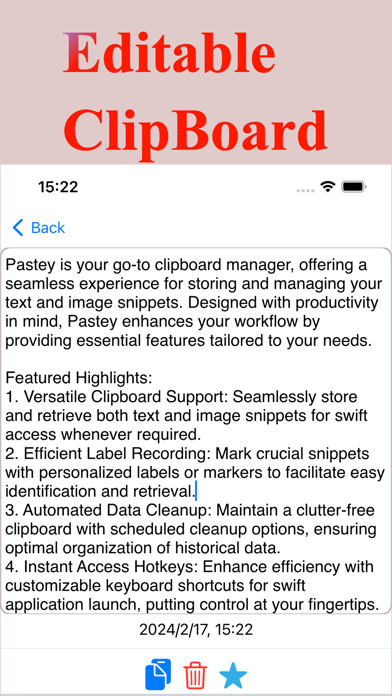
• Editable clipboard content: You can easily modify text and images stored on the clipboard to keep information up-to-date.
Additional features:
• Intelligent search: It's a simple and easy way to find what's on your clipboard.
• iCloud Synchronization: Synchronization across all devices keeps your clipboard content consistent.
• Dynamic interface design: the interface updates in real time based on what the user is doing.
• Multi-functional clipboard support: You can manage text and image clips, and find the info you need quickly.
• Simple Configuration Options: Minimal setup, fastest startup, easy customization of features.
Usage Scenarios:
• Office environment: in a busy workplace, you often need to copy text and images from multiple sources.Pastey helps you manage all clipboard content, avoid duplicate copying, and quickly access clipboard data in desktop hover mode.
• Multitasking: When you're juggling a bunch of tasks, Pastey helps you switch between them quickly and easily find important clipboard content. You can set custom shortcuts and tabs to boost your productivity.
• Content Creation: Whether you're writing, designing, or working on other creative projects, Pastey makes it easy to save and quickly access inspiration, footage, and other content you need, ready to export and apply to your creations.
• Cross-platform use: With Pastey's iCloud sync feature, you can easily sync your clipboard content across devices, like your phone, tablet, or computer, and keep your clipboard consistent.
• Everyday life: For everyday use, you might need to store multiple snippets of text, like shopping lists, frequently used addresses, passwords, etc. Pastey lets you quickly save and manage these snippets without having to worry about losing them or not being able to find them.
• Development and Programming: Programmers can use Pastey to store code snippets and frequently used programming commands for quick copy-and-paste to improve coding efficiency.
• Academic Research: Pastey can help you manage and organize key content copied from different sources, ready to view whenever you need it.
• Personal Projects and Entrepreneurship: If you're a small business owner, freelancer, or working on a personal project, Pastey can help you store and recall relevant information at any time to make sure your project goes smoothly.
Terms of Use: https://www.apple.com/legal/internet-services/itunes/dev/stdeula/