

PatchDoc:File & Code Editor
PatchDoc:File & Code Editor is made and published by 夏骏 倪. AppBrain is an independent app data site and isn't affiliated with 夏骏 倪. The app name, icon, screenshots and description belong to 夏骏 倪 and are shown as published on the App Store.
AppBrain's verdict
- Rating on App Store
- 5.00
- 6 ratings
- Last updated
- August 22, 2026
It doesn't have enough ratings yet to judge what users think.
Rankings
App Store top chartsApp Store Rankings for PatchDoc:File & Code Editor
Competitors
Similar apps and more from 夏骏 倪Alternatives to PatchDoc:File & Code Editor


More from 夏骏 倪


Releases
Updates seen on the App Store- Version
- 3.9
- Launched
- April 2026
No changelog data
User feedback
Ratings and reviews on the App StoreComments on PatchDoc:File & Code Editor for iOS
We don't have enough comments to show example comments. Please check back later.
Technology
Found in the app by AppBrain- Price
- Free
- App size
- 35.2 MB
- Content rating
- Everyone
Technologies used by PatchDoc:File & Code Editor
About the app and developer
About PatchDoc:File & Code Editor
PatchDoc:File & Code Editor is a productivity app developed by 夏骏 倪.
User Ratings
PatchDoc:File & Code Editor is rated 5.00 out of 5 stars. The rating is based on 6 ratings.
App Information
PatchDoc:File & Code Editor is freely available from the App Store. The app size is 35.20 MB. The latest version available is 3.9. The last update was on August 22, 2026.
Technical Requirements
The app has a content rating of Everyone. The app has been available on the App Store since April 2026.
Developer information for 夏骏 倪
Address:
Store listing
By 夏骏 倪, from the App Store


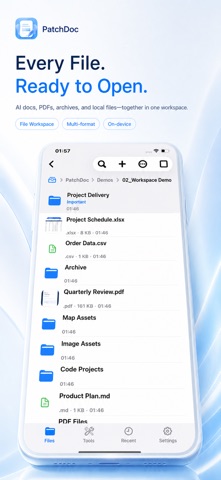
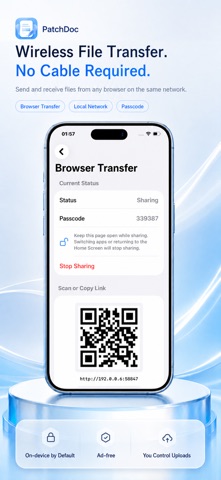


Description by 夏骏 倪 Written by the developer, not by AppBrain. Click to read.
Core Features
- Edit TXT, Markdown, JSON, YAML, CSV, XML, HTML, SVG, LaTeX, source code and configuration files
- Create new files including TXT, Markdown, Python, C++ and other code documents
- Markdown: toggle between source code and preview modes; export as HTML or PDF
- HTML: toggle between source code and preview modes; export to PDF
- PDF tools: reading, annotation, signature, image/text stickers, page management, cropping, compression and format conversion
- Archive support: preview directories and inner files inside ZIP, RAR, 7Z, TAR archives, plus decompression
- Image editor: crop, rotate, color adjustment, text overlay, brush drawing and mosaic blur
- Video toolkit: playback, frame capture, rotation, mute audio, compressed export and SRT subtitle preview
- Built-in local storage: create folders, import files, search, move, rename, delete, compress, pin items, add notes, and transfer files over LAN
- WebDAV / FTP access: read-only browsing with file import; mount external folders or single files
- Home screen widgets for quick shortcuts