It doesn't have enough ratings yet to judge what users think.
Payroll Calendar is made and published by
Knecht, Inc.
AppBrain is an independent app data site and isn't affiliated with Knecht, Inc.
The app name, icon, screenshots and description belong to Knecht, Inc. and are shown as
published on the App Store.
About Payroll Calendar
Payroll Calendar is a productivity app developed by Knecht, Inc.
User Ratings
Payroll Calendar is rated 5.00 out of 5 stars. The rating is based on 8 ratings.
App Information
Payroll Calendar is freely available from the App Store. The app size is 80.68 MB. The latest version available is 1.0.106. The last update was on February 17, 2026.
Technical Requirements
The app has a content rating of Everyone. The app has been available on the App Store since January 2022.
Description by Knecht, Inc.(from the App Store)
■■■ The definitive version of work shift management and payroll application! ■■■
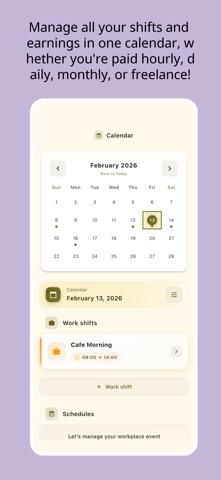
A simple and easy to use work shift management and salary calculation application. It is a free application that allows you to manage your work hours with a calendar.
■■■ Recommended for ■■■
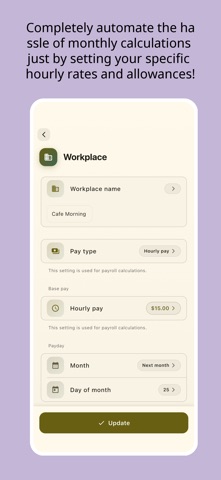
I want to manage your work shift easily. I want to calculate your salary easily. I want to manage multiple workplaces. I want to register hourly and daily wages. I want to calculate transportation expenses and late night wages. I'm looking for an app that can calculate my salary in detail. I want to manage my work shifts in a calendar. I want to upload images of my work schedule and pay stubs. I want to leave notes. I want to start using it for free.
■■■ Main features of this app ■■■
Manage multiple workplaces. Manage work shifts. Payroll calculation and analysis for each workplace. Image attachment function. Screen lock for privacy protection (passcode lock and biometric authentication supported). Data backup function. Data can be transferred even when changing phone models.
■■■ Terms of use, etc. ■■■
Terms of use https://www.knecht.co/guidelines/terms-of-service.html
You can download your data in CSV file format. When you sign in to the app with the same user ID, additional features are available exclusively for monthly charged users on all platforms.
■■■ About Paid Plans ■■■
Restoration when changing models When you change your device, you can restore the previously purchased paid version for free. (Go to Settings=>Paid Version) Please make sure you are logged into AppStore on your iPhone/iPad device with the same AppleID as when you purchased.
Checking and canceling paid plans You can restore your purchases when you changed your iOS devices or reinstalled the app from [Restore Purchases] in the Settings -> Upgrade. Please note that you need to login to your settings in the iOS -> AppStore with the same Apple ID you used before.
About auto-renewal billing Payment will be charged to your Apple ID account at the confirmation of purchase. The subscription automatically renews unless it is canceled at least 24 hours before the end of the current period. Your account will be charged for renewal within 24 hours prior to the end of the current period. You can manage and cancel your subscriptions by going to your App Store account settings after purchase.
Notes on paid plans Those who have paid in-app purchases cannot cancel by any method other than those listed above. Cancellation of the current month's subscription will not be accepted.
Each subscription will automatically renew 3 days before the expiration date for
the same time period. Subscriptions can be cancelled at any time before the renewal.