

PC Microphone: Mic for PC
PC Microphone: Mic for PC is made and published by Purple Night Inc. AppBrain is an independent app data site and isn't affiliated with Purple Night Inc. The app name, icon, screenshots and description belong to Purple Night Inc and are shown as published on the App Store.
AppBrain's verdict
- Best rank
- #6
- Top Paid, Portugal
- Last updated
- August 8, 2026
Rankings
App Store top charts- Highest rank
- #6
- Chart
- Top Paid
- Utilities
- Country
- Portugal
App Store Rankings for PC Microphone: Mic for PC
Top rankings
| Rank | Country | Category | List |
|---|---|---|---|
| 6 | Portugal | Utilities | Top Paid |
| 54 | South Korea | Utilities | Top Paid |
Ranking history in Portugal
Competitors
Similar apps and more from Purple Night IncMore from Purple Night Inc


Releases
Updates seen on the App Store- Version
- 1.1
- Launched
- July 2026
No changelog data
User feedback
Ratings and reviews on the App StoreComments on PC Microphone: Mic for PC for iOS
We don't have enough comments to show example comments. Please check back later.
Technology
Found in the app by AppBrain- Price
- $3.99
- App size
- 1.67 MB
- Content rating
- Everyone
Technologies used by PC Microphone: Mic for PC
About the app and developer
About PC Microphone: Mic for PC
PC Microphone: Mic for PC is an utilities app developed by Purple Night Inc.
User Ratings
The app has no ratings yet.
App Information
PC Microphone: Mic for PC costs $3.99. The app size is 1.67 MB. The latest version available is 1.1. The last update was on August 8, 2026.
Technical Requirements
The app has a content rating of Everyone. The app has been available on the App Store since July 2026.
Developer information for Purple Night Inc
Address:
Frequently asked questions about PC Microphone: Mic for PC
Is PC Microphone: Mic for PC free?
No. PC Microphone: Mic for PC costs $3.99 on the App Store.
Is PC Microphone: Mic for PC still available?
Yes. PC Microphone: Mic for PC is on the App Store, and the last update we saw was on August 8, 2026.
How large is PC Microphone: Mic for PC?
PC Microphone: Mic for PC is 1.67 MB.
Is PC Microphone: Mic for PC suitable for children?
App Store rates the content of PC Microphone: Mic for PC as suitable for everyone.
Who made PC Microphone: Mic for PC?
PC Microphone: Mic for PC was developed by Purple Night Inc. It is listed in the utilities category on the App Store.
Store listing
By Purple Night Inc, from the App Store


Description by Purple Night Inc Written by the developer, not by AppBrain. Click to read.
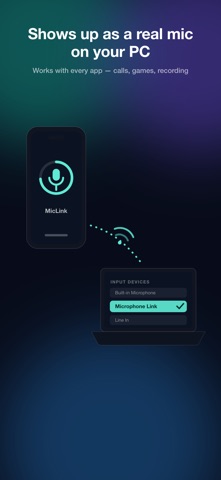
Microphone Link streams your iPhone's mic to your Mac over Wi-Fi and registers it as a real system microphone — so it appears in the input list of every app: video calls, streaming, screen recording, voice memos, anything that uses a mic.
HOW IT WORKS
1. Install the free companion app on your Mac (https://miclink.eggmango.com)
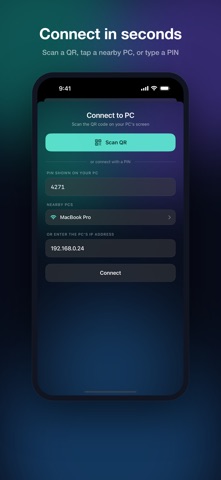
2. Scan the QR code shown on your Mac's screen
3. Select "Microphone Link" as the microphone in any app — done
WHY YOU'LL LIKE IT
• One-scan pairing — scan the QR on your PC and you're connected. No IP addresses, no account, no setup.
• Real microphone device — not a browser trick. Your computer sees a native input device that works everywhere.
• Clear voice — 48 kHz stereo audio over the efficient Opus codec.
• Three latency modes — Low latency (~50 ms) for real-time use, Balanced (~100 ms) for calls, High quality for recording.
• Private by design — audio travels only over your local network and never touches the internet. Pairing is protected by a PIN shown on your computer's screen; the wrong PIN gets no audio.
• Auto-discovery — your iPhone finds nearby computers on the same Wi-Fi and lists them. Can't see the screen? Type the PIN instead.
• Live level meter and mute — see your input level at a glance and mute instantly.
• Keeps streaming in the background while you use other apps.
WHAT YOU NEED
• iPhone with iOS 16 or later
• Mac with macOS 13 or later, Window PC and the free Microphone Link desktop app
• Both devices on the same Wi-Fi network
Visit https://miclink.eggmango.com/