

PC Screenshotter is made and published by Tim Heuer. AppBrain is an independent app data site and isn't affiliated with Tim Heuer. The app name, icon, screenshots and description belong to Tim Heuer and are shown as published on the App Store.
AppBrain's verdict
- Last updated
- January 22, 2026
- Size
- 1.12 MB
User feedback
Ratings and reviews on the App StoreComments on PC Screenshotter for iOS
We don't have enough comments to show example comments. Please check back later.
Store listing
By Tim Heuer, from the App Store
Description by Tim Heuer Written by the developer, not by AppBrain. Click to read.
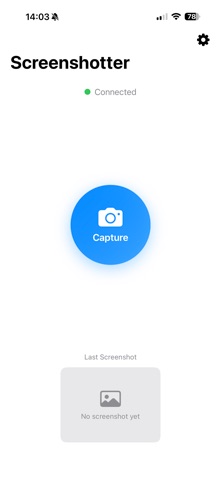
PC Screenshotter turns your iPhone into a remote capture controller and screenshot viewer for your Windows computer. Capture your screen from across the room, preview results instantly on your phone, and save or share screenshots without touching your PC.
Designed as a companion to the PC Screenshotter Windows app, this iOS app provides a focused, lightweight workflow for capturing and managing desktop screenshots directly from your iPhone.
**How It Works**
1. Run the PC Screenshotter companion app on your Windows PC
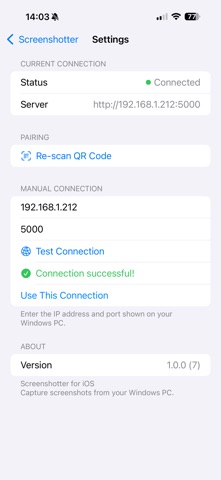
2. Scan the pairing QR code using your iPhone
3. Trigger screen captures remotely
4. Instantly preview, save, or share screenshots on iOS
**What You Can Do on iPhone**
- Remote Capture Control – Trigger screenshots on your PC with a single tap
- Instant Preview – View captured screenshots immediately on your iPhone
- Screenshot History – Browse recent captures in one place
- Save to Photos – Store screenshots directly in your iOS Photos library
- Share Anywhere – Use the iOS Share Sheet to send images to Messages, Mail, AirDrop, and more
- Private & Local – No accounts, no cloud services, no external servers
**Ideal For**
- Presenters capturing slides or live demos
- Educators and trainers recording tutorials
- Streamers and creators grabbing moments on demand
- Anyone who wants fast, wireless screenshot control without interrupting their workflow
**Privacy & Security**
All communication stays on your local network. Screenshots are transferred directly between your PC and iPhone—nothing is uploaded, tracked, or stored externally.
**Requirements**
- A Windows PC running the free PC Screenshotter companion app
- iPhone and PC connected to the same local Wi-Fi network
Safety and technology
Found in the app by AppBrain- Price
- Free
- App size
- 1.12 MB
- Content rating
- Everyone
Technologies used by PC Screenshotter
Releases
Updates seen on the App Store- Version
- 1.0.0
- Launched
- January 2026
No changelog data
Alternatives
Similar apps and more from Tim HeuerAlternatives to PC Screenshotter


More from Tim Heuer


Rankings
App Store top chartsApp Store Rankings for PC Screenshotter
About the app and developer
About PC Screenshotter
PC Screenshotter is an utilities app developed by Tim Heuer.
User Ratings
The app has no ratings yet.
App Information
PC Screenshotter is freely available from the App Store. The app size is 1.12 MB. The latest version available is 1.0.0. The last update was on January 22, 2026.
Technical Requirements
The app has a content rating of Everyone. The app has been available on the App Store since January 2026.
Developer information for Tim Heuer
Address: