

pCon.scan
pCon.scan is made and published by EasternGraphics. AppBrain is an independent app data site and isn't affiliated with EasternGraphics. The app name, icon, screenshots and description belong to EasternGraphics and are shown as published on the App Store.
AppBrain's verdict
- Last updated
- October 12, 2026
Rankings
App Store top chartsApp Store Rankings for pCon.scan
Competitors
Similar apps and more from EasternGraphicsAlternatives to pCon.scan








More from EasternGraphics


Releases
Updates seen on the App Store- Version
- 1.1.1
- Launched
- October 2022
No changelog data
User feedback
Ratings and reviews on the App StoreComments on pCon.scan for iOS
We don't have enough comments to show example comments. Please check back later.
Technology
Found in the app by AppBrain- Price
- Free
- App size
- 2.48 MB
- Content rating
- Everyone
Technologies used by pCon.scan
About the app and developer
About pCon.scan
pCon.scan is a productivity app developed by EasternGraphics.
What is the rating of pCon.scan?
pCon.scan has no ratings yet.
Is pCon.scan free?
pCon.scan is free. The app size is 2.48 MB. The latest version available is 1.1.1. The last update was on October 12, 2026.
What are the requirements for pCon.scan?
The app has a content rating of Everyone. The app has been available on the App Store since October 2022.
Developer information for EasternGraphics
Address:
Store listing
By EasternGraphics, from the App Store

Description by EasternGraphics Written by the developer, not by AppBrain. Click to read.
Core features at a glance:
SCAN ROOMS (LiDAR sensor required).
- AR-based floor plan scanning for iPhone and iPad*:
Quickly create simplified 3D scans of rooms and entire floors (walls, wall elements, objects in the room).
- Real-time visual feedback: The smart dollhouse visualization at the bottom of the application illustrates the scanning progress during room capture. This allows the user to see at any time which objects have already been captured.
*Room scanning requires a device with a LiDAR sensor. Without it, functions such as editing in 3D and sharing imported scans are available.
MANAGE SCANS
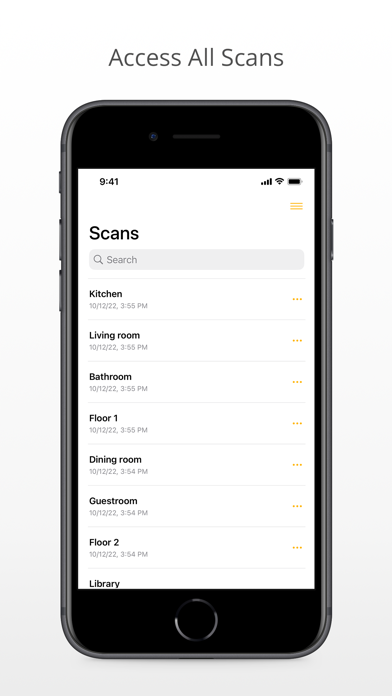
- Keep track of your room scans with a convenient list view. From here, you can share and edit your files, and go to the detail view of the selected 3D scan.
3D VIEW
- In 3D view, virtually navigate through your room, make changes as needed using basic editing tools, and effortlessly share your scan.
SHARE/EXPORT ROOM SCANS
- Share 3D scans selectively:
You decide what to export and in which format (.USDZ or .EOX): just the architecture elements or the entire scan?
- The export format EOX allows for immediate editing in pCon.box, pCon.planner and pCon.roomplanner - a real benefit for pCon users.