PD Meter - Pupillary Distance
PD Meter - Pupillary Distance is made and published by MITSUKO MARGOT KUBOTA ONO. AppBrain is an independent app data site and isn't affiliated with MITSUKO MARGOT KUBOTA ONO. The app name, icon, screenshots and description belong to MITSUKO MARGOT KUBOTA ONO and are shown as published on the App Store.
AppBrain's verdict
- Rating on App Store
- 5.00
- 1 ratings
- Last updated
- August 31, 2026
It doesn't have enough ratings yet to judge what users think.
Rankings
App Store top chartsApp Store Rankings for PD Meter - Pupillary Distance
Competitors
Similar apps and more from MITSUKO MARGOT KUBOTA ONOMore from MITSUKO MARGOT KUBOTA ONO
Releases
Updates seen on the App Store- Version
- 1.2.0
- Launched
- September 2025
No changelog data
User feedback
Ratings and reviews on the App StoreComments on PD Meter - Pupillary Distance for iOS
We don't have enough comments to show example comments. Please check back later.
Technology
Found in the app by AppBrain- Price
- Free
- App size
- 8.02 MB
- Content rating
- Everyone
Technologies used by PD Meter - Pupillary Distance
About the app and developer
About PD Meter - Pupillary Distance
PD Meter - Pupillary Distance is a reference app developed by MITSUKO MARGOT KUBOTA ONO.
What is the rating of PD Meter - Pupillary Distance?
PD Meter - Pupillary Distance is rated 5.00 out of 5 stars, based on one rating ratings.
Is PD Meter - Pupillary Distance free?
PD Meter - Pupillary Distance is free. The app size is 8.02 MB. The latest version available is 1.2.0. The last update was on August 31, 2026.
What are the requirements for PD Meter - Pupillary Distance?
The app has a content rating of Everyone. The app has been available on the App Store since September 2025.
Developer information for MITSUKO MARGOT KUBOTA ONO
Address:
Store listing
By MITSUKO MARGOT KUBOTA ONO, from the App StoreDescription by MITSUKO MARGOT KUBOTA ONO Written by the developer, not by AppBrain. Click to read.
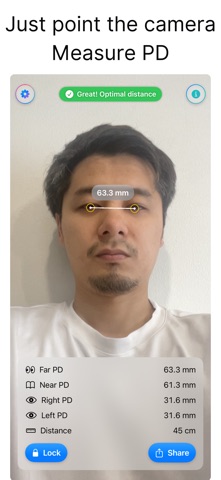
Great for checking glasses fit and as a reference for VR IPD setup.
Just center your face and follow the distance guide.
Shows Far PD, Near PD, Right PD, and Left PD in seconds.
● Features
【Easy measuring】
・Align your face → when the distance guide turns green, measurement starts automatically
・Lock the reading with one tap (values stay fixed)
・Displays Far/ Near (auto) / Right / Left PD and Distance together
【Clear UI】
・Rings and dots overlay the pupil centers for visual confirmation
・Large, easy-to-read measurement card
・Red warning when too near/far, green when optimal distance
【Sharing】
・Share a screenshot with the measurement card as an image
【Privacy】
・No account required / start using immediately
・Processed on device in real time — no images or readings are sent outside the app
【Use cases】
・A reference when choosing glasses frames online
・Helps set VR headset IPD
・Understand monocular PD (Right/Left) to reduce fitting errors
● Notes
・Values are for reference. For prescriptions or high precision, please get an in-store measurement.
・Recommended on devices that support TrueDepth / Face ID.