

PD Pulse Deck is made and published by Noa Meijee. AppBrain is an independent app data site and isn't affiliated with Noa Meijee. The app name, icon, screenshots and description belong to Noa Meijee and are shown as published on the App Store.
AppBrain's verdict
- Last updated
- April 2, 2026
Rankings
App Store top chartsApp Store Rankings for PD Pulse Deck
Competitors
Similar apps and more from Noa MeijeeAlternatives to PD Pulse Deck


Releases
Updates seen on the App Store- Version
- 1.0.2
- Launched
- March 2026
No changelog data
User feedback
Ratings and reviews on the App StoreComments on PD Pulse Deck for iOS
We don't have enough comments to show example comments. Please check back later.
Technology
Found in the app by AppBrain- Price
- Free
- App size
- 9.72 MB
- Content rating
- Everyone
Technologies used by PD Pulse Deck
About the app and developer
About PD Pulse Deck
PD Pulse Deck is a productivity app developed by Noa Meijee.
User Ratings
The app has no ratings yet.
App Information
PD Pulse Deck is freely available from the App Store. The app size is 9.72 MB. The latest version available is 1.0.2. The last update was on April 2, 2026.
Technical Requirements
The app has a content rating of Everyone. The app has been available on the App Store since March 2026.
Developer information for Noa Meijee
Address:
Store listing
By Noa Meijee, from the App Store



Description by Noa Meijee Written by the developer, not by AppBrain. Click to read.
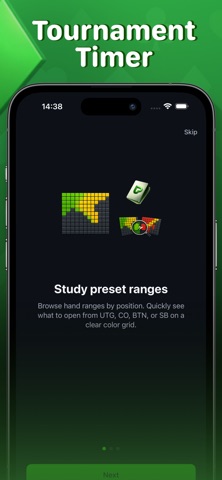
Intervalos helps you quickly navigate preflop ranges by position. You can view a single position or compare two to see how ranges change. The colour grid makes it easy to understand which hands to play, while favourite comparisons and built-in tips simplify learning and analysis.
Temporizador is designed for home tournaments and cash games. It includes ready-made structures as well as full customisation: blind levels, antes, breaks, and durations. During play, you see the current level, remaining time, and progress, with notifications to signal level changes.
Bankroll helps you manage risk and make informed decisions about stakes. Enter your bankroll, game type, and current stake, choose a strategy, and get a clear assessment: whether your stake is safe, whether to move up, or drop down. You can also set goals and keep notes for long-term planning.
The app is built for players who want to structure their game and make decisions based on clear guidelines. It reduces time spent searching for information and brings essential tools into a single workspace.