

PDF± is made and published by Ruizheng Liu. AppBrain is an independent app data site and isn't affiliated with Ruizheng Liu. The app name, icon, screenshots and description belong to Ruizheng Liu and are shown as published on the App Store.
AppBrain's verdict
- Last updated
- December 15, 2023
- Size
- 1.04 MB
User feedback
Ratings and reviews on the App StoreComments on PDF± for iOS
We don't have enough comments to show example comments. Please check back later.
Store listing
By Ruizheng Liu, from the App Store





Screenshots by Ruizheng Liu, from the the App Store listing
Description by Ruizheng Liu Written by the developer, not by AppBrain. Click to read.
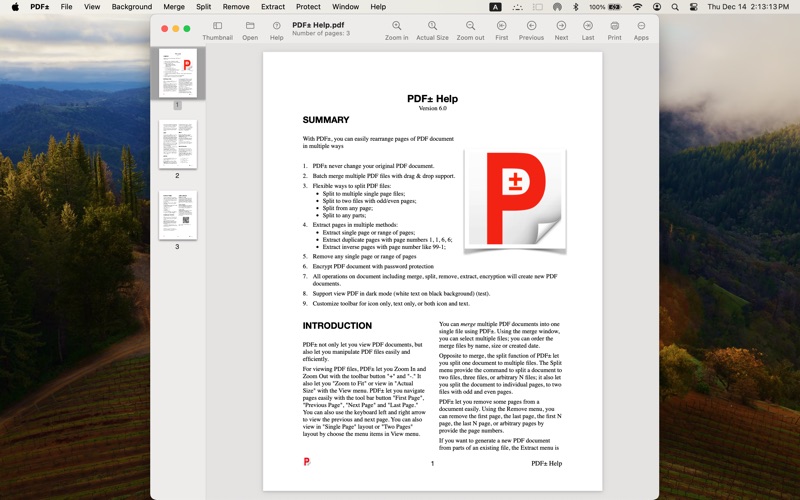
SUMMARY
==========
1. PDF± never change your original PDF document.
2. Batch merge multiple PDF files with drag & drop support.
3. Flexible ways to split PDF files:
Split to multiple single page files;
Split to two files with odd/even pages;
Split from any page;
Split to any parts;
4. Extract pages in multiple methods:
Extract single page or range of pages;
Extract duplicate pages with page numbers 1, 1, 6, 6;
Extract inverse pages with page number like 99-1;
5. Remove any single page or range of pages
6. Encrypt PDF document with password protection
7. Support view PDF in dark mode (white text on black background) (test).
8. Customize toolbar for icon only, text only, or both icon and text.
VIEW
====
Zoom In, Zoom Out, Zoom to Fit, or view Actual Size with the View menu.
Navigate to First Page, Previous Page, Next Page and Last Page.
View in "Single Page" layout or "Two Pages" layout.
MERGE
=======
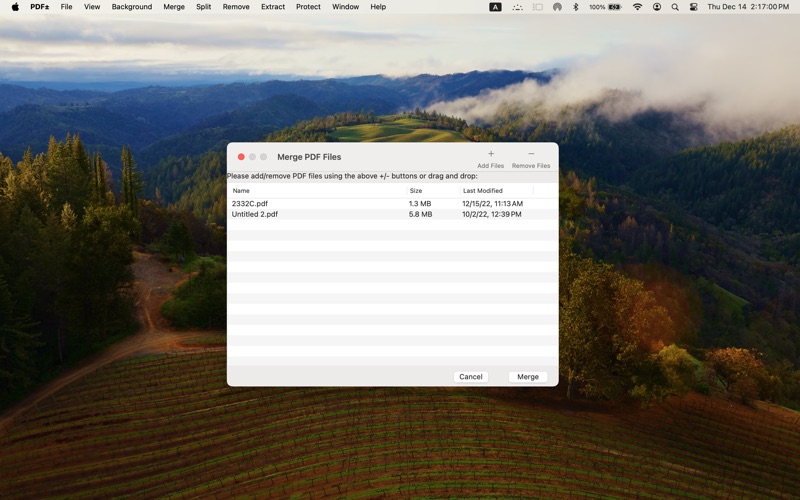
You can merge multiple PDF documents into one single file using PDF±.
To merge multiple files together, go to Merge > Merge PDF files. You can also click on “Merge PDF Documents” on the Welcome window when you first open the app. A new merge window will then appear, and you can click the "+" button to add PDF files or simply drag and drop the files you want to merge into the window. To delete a file, simply click to highlight the file and click the “-“ button. The order of the documents in the final merged file is identical to that displayed in the merge window (you can sort the files by file name, file size or last modified date).
SPLIT
=====
The split function of PDF± let you split a PDF document into multiple files. Click Split > before/after page allows you to split a document before page X or after page X.
You can also split a document into two files, three files, or arbitrary N files by input the number of files. PDF± will try to separate the pages evenly to multiple files.
You can also split a document so that each individual page is a separate file. In addition, you can split a document into two with odd and even pages.
REMOVE PAGES
===============
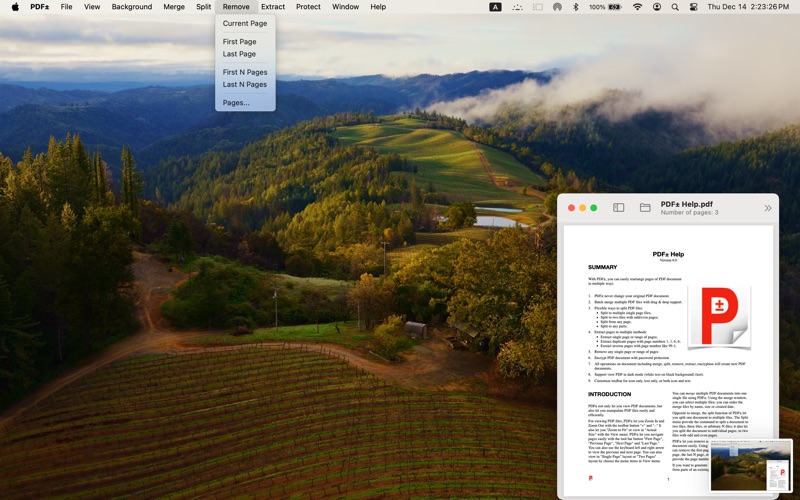
PDF± let you remove pages from a document easily. Using the Remove menu, you can remove the first page, the last page, the first N page, the last N page, or arbitrary pages that you specify by providing the page numbers.
When you click Remove > Pages..., a dialog box will appear let you type the pages or range of pages to remove. You can type the page or range of pages in variant ways. Here are some examples:
1,2,3,10: page 1,2,3,10.
1,4-6: page 1,4,5,6.
1-3,5-7: page 1,2,3,5,6,7.
-5: page 1,2,3,4,5.
50-: page 50 to last page.
EXTRACT PAGES
===============
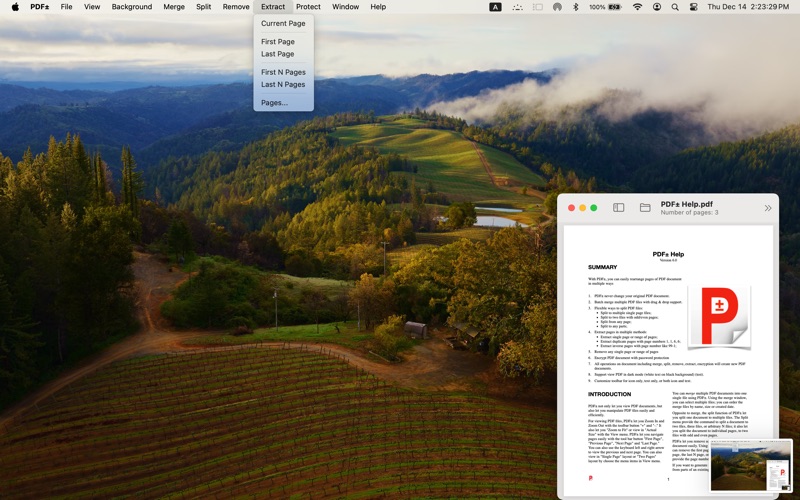
If you want to generate a new PDF document from parts of an existing file, the Extract menu is for you. With Extract, you can create a new PDF file using the first page, the last page, the first N pages, the last N pages, or any pages by provide the page numbers.
By clicking the "Page..." menu item, a dialog box will appear let you type the pages or range of pages to extract.
You can type the page or range of pages in variant ways. Here are some examples:
1,2,3,10: page 1,2,3,10.
1,4-6: page 1,4,5,6.
1-3,5-7: page 1,2,3,5,6,7.
-5: page1,2,3,4,5.
50-: Page 50 to last page.
1,1,,3-5: page 1,1,3,4,5 (yes, pages 1 duplicate)
5-1: page 5,4,3,2,1 (yes, inverse order)
PASSWORD PROTECT
====================
PDF± can also protect your PDF document with encryption by password. You can also remove the encryption if you know the password of a PDF document.
After clicking Protect > Encrypt with Password, a dialog box will appear to type the password. You need to type the password twice and they must be identical, or you will get the error message.
Clicking Protect > Remove Password will also let you remove the encryption of a PDF file if you know the password.
Safety and technology
Found in the app by AppBrain- Price
- $14.99
- App size
- 1.04 MB
- Content rating
- Everyone
Technologies used by PDF±
Releases
Updates seen on the App Store- Version
- 6.0
- Launched
- January 2014
No changelog data
Alternatives
Similar apps and more from Ruizheng LiuMore from Ruizheng Liu





Rankings
App Store top chartsApp Store Rankings for PDF±
This app is not ranked
About the app and developer
About PDF±
PDF± is an utilities app developed by Ruizheng Liu.
User Ratings
The app has no ratings yet.
App Information
PDF± costs $14.99. The app size is 1.04 MB. The latest version available is 6.0. The last update was on December 15, 2023.
Technical Requirements
The app has a content rating of Everyone. The app has been available on the App Store since January 2014.
Developer information for Ruizheng Liu
Address: