

PDF Converter: Docs Scanner
PDF Converter: Docs Scanner is made and published by Komal Gangani. AppBrain is an independent app data site and isn't affiliated with Komal Gangani. The app name, icon, screenshots and description belong to Komal Gangani and are shown as published on the App Store.
AppBrain's verdict
- Rating on App Store
- 4.33
- 6 ratings
- Last updated
- August 11, 2026
- Size
- 58.5 MB
It doesn't have enough ratings yet to judge what users think.
User feedback
Ratings and reviews on the App StoreComments on PDF Converter: Docs Scanner for iOS
We don't have enough comments to show example comments. Please check back later.
Store listing
By Komal Gangani, from the App Store

Description by Komal Gangani Written by the developer, not by AppBrain. Click to read.
The all-in-one PDF powerhouse for iPhone and iPad. Scan documents, convert almost any file to or from PDF, sign, edit, protect, and organize — all in one beautifully designed, privacy-first app. No desktop required.
SCAN ANYTHING, INSTANTLY
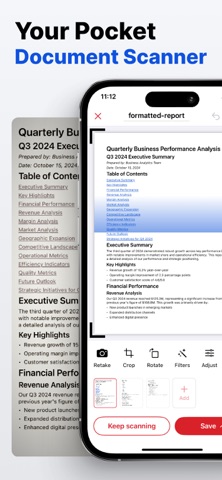
Turn your camera into a pocket scanner. Automatic edge detection and perspective correction deliver crisp, professional scans every time. Capture multi-page documents, receipts, IDs, and even barcodes — then save straight to PDF.
SEARCHABLE TEXT WITH ON-DEVICE OCR
Smart OCR recognizes text in your scans and images, turning every document into a fully searchable, selectable file. It runs entirely on your device in multiple languages — fast, accurate, and private.
THE ULTIMATE FILE CONVERTER
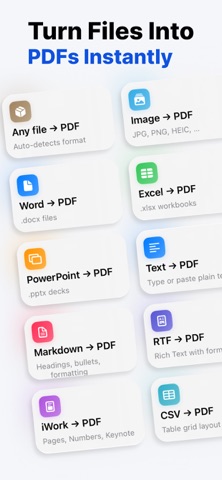
Convert to and from PDF with studio-grade fidelity:
• PDF → Word, Excel, PowerPoint, EPUB, Image, Text, Markdown, HTML, JSON & CSV
• Word, Excel, PowerPoint & Apple Pages/Numbers/Keynote → PDF
• Images (JPEG, PNG, HEIC, TIFF, SVG), RTF, Markdown, HTML, CSV, code & more → PDF
If you have a file, iPDF can turn it into a polished PDF — and back again.
A COMPLETE PDF TOOLKIT
Everything you need to finish the job:
• Merge & split documents
• Reorder, rotate & delete pages
• Compress — even down to a target file size
• Add watermarks, headers, footers & Bates numbering
• Edit metadata, bookmarks & outlines
• Find & replace text
• Compare two PDFs side by side
• Extract images & text
SIGN, FILL & ANNOTATE
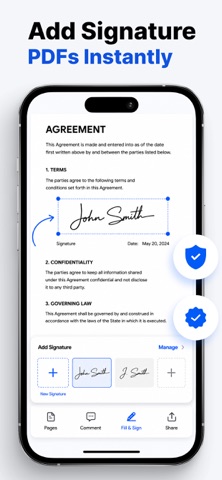
Draw and save your signature, then drop it onto any document in seconds. Fill out forms, highlight, draw, and add notes with a fluid, intuitive markup toolkit.
PROTECT WHAT MATTERS
Lock PDFs with passwords and strong encryption. Permanently redact sensitive information. Add a Face ID / Touch ID app lock so your files stay yours and yours alone.
READ & ORGANIZE WITH EASE
A distraction-free reader with bookmarks, search, and saved reading positions. Keep everything in sync across your devices with iCloud Drive, and import files from any app through the share sheet.
BUILT FOR PRIVACY
Scanning and OCR happen right on your device. Your documents stay in your control — no account required.
MORE TO LOVE
• Siri Shortcuts & App Intents
• Native iPhone & iPad design
• Available in 13 languages
• Fast, modern, and built for the latest iOS
SUBSCRIPTION & PRICING
• $49.99/Yearly and $9.99/Week and $9.99/Week with 3-day free trial
• 3-day free trial, then auto-renews weekly at the price shown before purchase
• Payment charged to your iTunes account at purchase confirmation
• Subscription auto-renews unless canceled ≥24h before the end of the current period
• Manage/cancel anytime in your iTunes account Settings
Privacy Policy: https://appspolicymanager.com/apps/pdf-converter-docs-scanner/privacy-policy
Terms of Use: https://appspolicymanager.com/apps/pdf-converter-docs-scanner/terms
Whether you're a student, a freelancer, or a business professional, iPDF Ultimate replaces a whole stack of apps with one. Download now and take total command of your documents.
Premium subscriptions unlock unlimited access to all tools, with weekly, yearly, and lifetime plans and a free trial. Subscriptions auto-renew; cancel anytime in Settings.
Safety and technology
Found in the app by AppBrain- Price
- Free
- App size
- 58.5 MB
- Content rating
- Everyone
Technologies used by PDF Converter: Docs Scanner
Releases
Updates seen on the App Store- Version
- 2.0.6
- Launched
- June 2026
No changelog data
Alternatives
Similar apps and more from Komal GanganiAlternatives to PDF Converter: Docs Scanner


More from Komal Gangani


Rankings
App Store top chartsApp Store Rankings for PDF Converter: Docs Scanner
About the app and developer
About PDF Converter: Docs Scanner
PDF Converter: Docs Scanner is an utilities app developed by Komal Gangani.
What is the rating of PDF Converter: Docs Scanner?
PDF Converter: Docs Scanner is rated 4.33 out of 5 stars, based on 6 ratings.
Is PDF Converter: Docs Scanner free?
PDF Converter: Docs Scanner is free. The app size is 58.48 MB. The latest version available is 2.0.6. The last update was on August 11, 2026.
What are the requirements for PDF Converter: Docs Scanner?
The app has a content rating of Everyone. The app has been available on the App Store since June 2026.
Developer information for Komal Gangani
Address: