

pdf converter - documents
pdf converter - documents is made and published by Laxay Gajera. AppBrain is an independent app data site and isn't affiliated with Laxay Gajera. The app name, icon, screenshots and description belong to Laxay Gajera and are shown as published on the App Store.
AppBrain's verdict
- Last updated
- October 15, 2025
Rankings
App Store top chartsApp Store Rankings for pdf converter - documents
Competitors
Similar apps and more from Laxay GajeraAlternatives to pdf converter - documents


More from Laxay Gajera


Releases
Updates seen on the App Store- Version
- 1.0
- Launched
- October 2025
No changelog data
User feedback
Ratings and reviews on the App StoreComments on pdf converter - documents for iOS
We don't have enough comments to show example comments. Please check back later.
Technology
Found in the app by AppBrain- Price
- Free
- App size
- 35.4 MB
- Content rating
- Everyone
Technologies used by pdf converter - documents
About the app and developer
About pdf converter - documents
pdf converter - documents is an utilities app developed by Laxay Gajera.
User Ratings
The app has no ratings yet.
App Information
pdf converter - documents is freely available from the App Store. The app size is 35.43 MB. The latest version available is 1.0. The last update was on October 15, 2025.
Technical Requirements
The app has a content rating of Everyone. The app has been available on the App Store since October 2025.
Developer information for Laxay Gajera
Address:
Store listing
By Laxay Gajera, from the App Store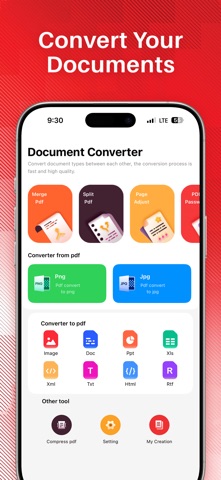




Description by Laxay Gajera Written by the developer, not by AppBrain. Click to read.
Stop juggling multiple apps! With the Ultimate Document Converter Pro, you have the power to transform virtually any file into any popular format, right from your iPhone or iPad. Perfect for students, professionals, and anyone who needs fast, reliable, on-the-go conversion.
Top Features:-
Universal Conversion: Convert documents, images, spreadsheets, and presentations. Supports over 50+ formats!
PDF Powerhouse: Convert PDF to Word, DOCX to PDF, Excel to PDF, and more.
Batch Conversion: Save time by converting multiple files or entire folders in a single tap.
Image & OCR: Convert JPG, PNG, and HEIC images, or use Optical Character Recognition (OCR) to turn scanned documents into editable text.
Format Integrity: Preserves original layouts, fonts, and formatting with industry-leading accuracy.
Seamless Sharing: Save to the Files app, iCloud, Dropbox, Google Drive, or share directly via email and AirDrop.
Secure & Private: Conversions are quick, secure, and completed right on your device for maximum privacy (or via a secure cloud for complex formats).
Supported Formats Include:
DOCX, DOC, PDF, XLS, XLSX, PPT, PPTX, TXT, RTF, HTML, CSV, JPG, PNG, HEIC, EPUB, MOBI, and many more!
The Pro Mobile File Converter: Simplify Your Workflow.
Need to convert a proposal, edit a contract, or compress a large file before your meeting? This app is engineered for speed and precision, ensuring you get perfect conversions every time without losing essential formatting, tables, or images. It's the only document utility you'll ever need for work and study.
Key Productivity Features:-
- Lightning-Fast Conversion: Utilize modern, multi-threaded conversion for 2x faster results than competitors.
- Guaranteed Quality: Retains all original document integrity, including complex tables, charts, and embedded images.
- Intuitive Interface: A clean, minimal design that makes selecting files and choosing formats fast and error-free.
- Document Management: Integrated file browser to organize your converted files, plus easy "Open In" and AirDrop functionality.
- Wide Format Support: Handle all common file types:
- Documents: PDF, DOC, DOCX, PAGES, TXT, RTF, ODT
- Spreadsheets: XLS, XLSX, CSV, NUMBERS
- Presentations: PPT, PPTX, KEY
- Images: JPG, PNG, HEIC, BMP, GIF
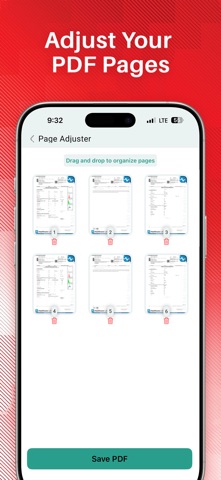
- Security Options: Encrypt or password-protect your output PDF files.
Download now and make file format struggles a thing of the past!
[pdf converter - documents - Pro]
- pdf converter - documents - Pro subscription is billed weekly, monthly or annually at the rate corresponding to the selected plan. In addition, a one-time payment will be offered if needed, which is not one of the subscription plan.
- Payment will be charged to iTunes Account at confirmation of purchase.
- Subscription automatically renews unless auto-renew is turned off at least 24-hours before the end of the current period.
- Account will be charged for renewal within 24-hours prior to the end of the current period, and identify the cost of the renewal.
- Subscriptions may be managed by the user and auto-renewal may be turned off by going to the user's Account Settings after purchase.
- Any unused portion of a free trial period, if offered, will be forfeited when the user purchases a subscription to that publication, where applicable.
[Terms of Use]
https://skyinfotechdeveloper.com/terms_and_condition_ios.html
[Privacy Policy]
https://skyinfotechdeveloper.com/privacy_policy_ios.html