

PDF Converter - Professional
PDF Converter - Professional is made and published by 珮辰 赵. AppBrain is an independent app data site and isn't affiliated with 珮辰 赵. The app name, icon, screenshots and description belong to 珮辰 赵 and are shown as published on the App Store.
AppBrain's verdict
- Last updated
- September 5, 2026
- Size
- 3.09 MB
User feedback
Ratings and reviews on the App StoreComments on PDF Converter - Professional for iOS
We don't have enough comments to show example comments. Please check back later.
Store listing
By 珮辰 赵, from the App Store
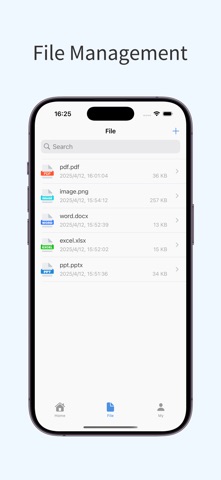

Description by 珮辰 赵 Written by the developer, not by AppBrain. Click to read.
Main Features:
• PDF Conversion: Quickly convert PDF files to Word, Excel, PPT, and images for easy editing and modification.
• File to PDF: Convert Word, Excel, PPT, and images to PDF with just one click, making sharing and printing easier.
• High-Quality Conversion: Retain the original file format, layout, and fonts, ensuring accurate content after conversion.
• Import/Export Functionality: Easily import files and export converted files in various formats for more convenient file management.
• Simple to Use: Intuitive interface, no professional knowledge required, making file conversion easy.
Use Cases:
• Office document processing
• Study material organization
• File sharing and archiving
Download PDF Converter now and enjoy an efficient and convenient file processing experience!
[Auto-Renewal Terms]
We offer auto-renewable subscription services for 1 week, 1 month, and 12 months.
• Payment: Payment will be charged to your iTunes account after confirmation of purchase.
• Renewal: Subscriptions with a free trial will automatically renew to a paid subscription after the trial ends. The payment will be deducted from your iTunes account 24 hours before the current subscription period ends. Renewal charges are based on the selected subscription plan. After successful payment, the subscription period will automatically extend for another cycle.
• Cancel Renewal: To cancel renewal, please turn off the auto-renewal feature at least 24 hours before the current subscription period ends via your iTunes/Apple ID settings. After that, no renewal fees will be charged.
User Agreement: http://oss.qingchengkeji.vip/h5/pdfConvert/user.html
Privacy Policy: http://oss.qingchengkeji.vip/h5/pdfConvert/privacy.html
Subscription Agreement: http://oss.qingchengkeji.vip/h5/pdfConvert/subscribe.html
Safety and technology
Found in the app by AppBrain- Price
- Free
- App size
- 3.09 MB
- Content rating
- Everyone
Technologies used by PDF Converter - Professional
Releases
Updates seen on the App Store- Version
- 1.0.9
- Launched
- January 2025
No changelog data
Alternatives
Similar apps and more from 珮辰 赵Alternatives to PDF Converter - Professional


More from 珮辰 赵


Rankings
App Store top chartsApp Store Rankings for PDF Converter - Professional
About the app and developer
About PDF Converter - Professional
PDF Converter - Professional is an utilities app developed by 珮辰 赵.
What is the rating of PDF Converter - Professional?
PDF Converter - Professional has no ratings yet.
Is PDF Converter - Professional free?
PDF Converter - Professional is free. The app size is 3.09 MB. The latest version available is 1.0.9. The last update was on September 5, 2026.
What are the requirements for PDF Converter - Professional?
The app has a content rating of Everyone. The app has been available on the App Store since January 2025.
Developer information for 珮辰 赵
Address:
Frequently asked questions about PDF Converter - Professional
Is PDF Converter - Professional free?
Yes. PDF Converter - Professional is free on the App Store.
Is PDF Converter - Professional still available?
Yes. PDF Converter - Professional is on the App Store, and the last update we saw was on September 5, 2026.
How large is PDF Converter - Professional?
PDF Converter - Professional is 3.09 MB.
Is PDF Converter - Professional suitable for children?
App Store rates the content of PDF Converter - Professional as suitable for everyone.
Who made PDF Converter - Professional?
PDF Converter - Professional was developed by 珮辰 赵. It is listed in the utilities category on the App Store.
What are the best alternatives to PDF Converter - Professional?
People looking at PDF Converter - Professional also look at these utilities apps: PDF Conversion-Convert To Word, PDF Tools – Convert & Merge, PDF Assist - File Converter, Voice to Text - Speech to Text, QR Maker – Custom QR Code.