




AppBrain's verdict
- Rating on App Store
- 4.75
- 4 ratings
- Last updated
- August 14, 2026
- Size
- 45.3 MB
It doesn't have enough ratings yet to judge what users think.
User feedback
Ratings and reviews on the App StoreComments on PDF Converter & Sign: PDFero for iOS
We don't have enough comments to show example comments. Please check back later.
Store listing
By Mikayil Feyzili, from the App StoreDescription by Mikayil Feyzili Written by the developer, not by AppBrain. Click to read.
Whether you need to turn a jpg, jpeg, png, word, excel, powerpoint, url, text, picture, photo, or scan into a PDF, PDFero makes it fast and easy.
Key Features
Photo & Image to PDF: Convert any pic, picture, or photo into a PDF file.
File to PDF: Transform Word (docx), text, and other files into PDFs for easy sharing.
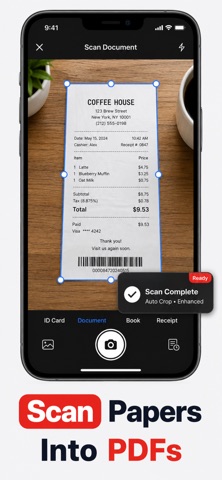
Camera Scanner: Use your iPhone as a scanner and create PDFs instantly.
Export & Print: Share, email, or print your PDFs with a single tap.
Organize Files: Rename, save, and manage your PDF library with ease.
Why PDFero?
Simple yet powerful PDF creator & maker.
Designed for speed, privacy, and convenience.
Perfect for students, professionals, and everyday use.
Disclaimer
Your privacy is our top priority:
Local Conversions: Most file types (images, text, url → pdf, etc.) are processed locally on your device and never leave it.
Secure Server Conversions: For Word, Excel, PPT, and Audio conversions, files are processed via our API on secure servers. All requests are encrypted via HTTPS (SSL). Files are not stored, shared, or sold.
Transparency: No hidden data collection or unauthorized third-party access.
PRICING AND TERMS
We offer 3 subscription types:
Auto-renewal of yearly, monthly, and weekly subscriptions.
Your subscription will automatically renew at the end of each term, and you will be charged through your iTunes account. You can turn off auto-renew from your iTunes account settings, but refunds will not be provided for any unused portion of the term.
Terms of use: https://www.apple.com/legal/internet-services/itunes/dev/stdeula/
Privacy policy: https://owlly.cc/privacy
Download PDFero today and create secure, professional PDFs from your photos, images, and documents!
Safety and technology
Found in the app by AppBrain- Price
- Free
- App size
- 45.3 MB
- Content rating
- Everyone
Technologies used by PDF Converter & Sign: PDFero
Releases
Updates seen on the App Store- Version
- 1.2.1
- Launched
- September 2025
No changelog data
Alternatives
Similar apps and more from Mikayil FeyziliAlternatives to PDF Converter & Sign: PDFero


 Identidade Digital RJ

More from Mikayil Feyzili


Rankings
App Store top chartsApp Store Rankings for PDF Converter & Sign: PDFero
About the app and developer
About PDF Converter & Sign: PDFero
PDF Converter & Sign: PDFero is an utilities app developed by Mikayil Feyzili.
What is the rating of PDF Converter & Sign: PDFero?
PDF Converter & Sign: PDFero is rated 4.75 out of 5 stars, based on 4 ratings.
Is PDF Converter & Sign: PDFero free?
PDF Converter & Sign: PDFero is free. The app size is 45.33 MB. The latest version available is 1.2.1. The last update was on August 14, 2026.
What are the requirements for PDF Converter & Sign: PDFero?
The app has a content rating of Everyone. The app has been available on the App Store since September 2025.
PDF Converter & Sign: PDFero is made and published by Mikayil Feyzili. AppBrain is an independent app data site and isn't affiliated with Mikayil Feyzili. The app name, icon, screenshots and description belong to Mikayil Feyzili and are shown as published on the App Store.
Developer information for Mikayil Feyzili
Address: