PDF Converter Tools: Pdfcan is a productivity app developed by Vikram Singh.
What is the rating of PDF Converter Tools: Pdfcan?
PDF Converter Tools: Pdfcan has no ratings yet.
Is PDF Converter Tools: Pdfcan free?
PDF Converter Tools: Pdfcan is free. The app size is 14.65 MB. The latest version available is 2.0. The last update was on November 12, 2026.
What are the requirements for PDF Converter Tools: Pdfcan?
The app has a content rating of Everyone. The app has been available on the App Store since April 2026.
PDF Converter Tools: Pdfcan is made and published by
Vikram Singh.
AppBrain is an independent app data site and isn't affiliated with Vikram Singh.
The app name, icon, screenshots and description belong to Vikram Singh and are shown as published on the App Store.
Description by Vikram Singh(from the App Store)
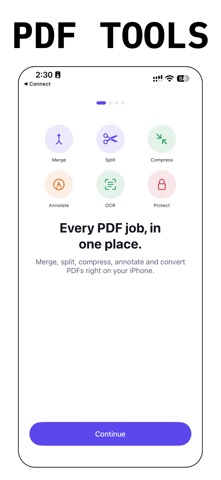
PDFCan (formerly PDFPX) is an all-in-one PDF toolkit. Merge, split, compress, annotate, fill, protect and convert PDFs on your iPhone. Your files are processed on your device.
ABOUT THE NAME CHANGE (VERSION 2.0) PDFPX has been renamed PDFCan. It is the same app and the same App Store listing, updated to version 2.0. PDFPX focused on converting PDF pages to images. PDFCan keeps that and adds the tools listed below.
HOW IT WORKS 1. Pick a tool on the Home screen. 2. Choose your PDFs from Files, or your photos from the photo picker. A protected PDF asks for its password. 3. Set the options, such as the compression level or the page range, and review them. 4. PDFCan processes the file on your device. You see the progress and can cancel at any time. Your original file is never changed; the result is a new file. 5. The result is saved to History automatically and you can preview it. Sharing, saving to Files and printing need PDFCan Pro.
WHAT YOU CAN DO • Merge several PDFs into one, or split a PDF by page range, size or number of pages • Compress a PDF and see the size each level will give before you start • Turn photos into a PDF • Fill in PDF forms and annotate with pen, text, shapes and highlights • Rotate, reorder, extract, remove and crop pages • Add page numbers and text watermarks • Make scanned PDFs searchable with on-device text recognition (OCR) • Redact words you enter, plus emails, phone numbers and long numbers, so they are permanently removed • Protect a PDF with a password, or unlock a PDF you have the password for • Convert PDF pages to images or text, and images, text or web pages to PDF • Compare two PDFs and see what changed • Repair a damaged PDF, or save a flattened archival copy
GOOD TO KNOW • PDFCan does not set a limit on file size, page count or number of photos. Very large files depend on your iPhone's memory and storage and can take longer. • OCR reads printed text, and the result depends on how clear the scan is. Compare checks the text of two PDFs, so scanned pages need OCR first. • Redaction removes the matches PDFCan finds. Check the result before you share it. • The archival copy is a flattened, archive-style PDF. It is not a certified PDF/A file. • Web page to PDF needs an internet connection to load the page. All other tools work offline.
YOUR FILES STAY WITH YOU There is no account and no sign-in. PDFs are processed on your device with Apple's PDF, Vision and PencilKit frameworks, and no document is uploaded. Web page to PDF only loads the address you type. Lock PDFCan with Face ID or your passcode if you want. Open PDFs straight from Files, Mail or Safari.
FREE AND PRO Processing, preview and History are free. Run any tool and preview the result; every result is saved in History automatically. Sharing, saving to Files and printing require PDFCan Pro, an auto-renewing subscription, weekly or yearly. Prices are shown in the app before you subscribe.
SUBSCRIPTION TERMS Payment is charged to your Apple ID account at confirmation of purchase. The subscription renews automatically unless it is canceled at least 24 hours before the end of the current period. Your account is charged for renewal within 24 hours before the end of the current period. Manage or cancel any time in Settings > your name > Subscriptions on your iPhone.
Terms of Use (Apple Standard EULA): https://www.apple.com/legal/internet-services/itunes/dev/stdeula/ Privacy Policy and Support: https://1kbapps.com/pdfcan/
Each subscription will automatically renew 3 days before the expiration date for
the same time period. Subscriptions can be cancelled at any time before the renewal.