PDF Copilot - AI PDF Expert is an overall app developed by Sky Fun.
How many times has PDF Copilot - AI PDF Expert been downloaded?
What is the rating of PDF Copilot - AI PDF Expert?
PDF Copilot - AI PDF Expert is rated 5.00 out of 5 stars, based on 4 ratings.
Is PDF Copilot - AI PDF Expert free?
PDF Copilot - AI PDF Expert is free to download. The APK download size is 209.45 MB. The latest version available is 1.4.2. The last update was on March 26, 2026.
What are the requirements for PDF Copilot - AI PDF Expert?
The app has a content rating of Everyone. The app has been available on Google Play December 2025.
Description
PDF Copilot: All-in-One PDF Convert, Edit & Scan
PDF Copilot is your all-in-one document companion, offering effective tools for PDF conversion, editing, annotation, signing, and scanning. Whether you need to convert PDFs to Word, scan documents into PDF, or extract text from images, PDF Copilot simplifies your workflow with seamless features. With a sleek, intuitive design and advanced technology, this app makes working with PDFs easier and more efficient than ever.
Key Features:
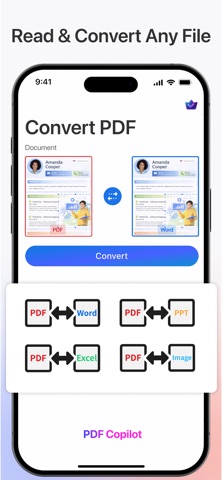
PDF Conversion Easily convert PDFs to Word, Word and Image to PDF, while preserving the original formatting.
Advanced PDF Editing Edit PDFs by adding text, images, shapes, annotations, and more. Perfect for reviewing contracts, reports, and other documents on the go.
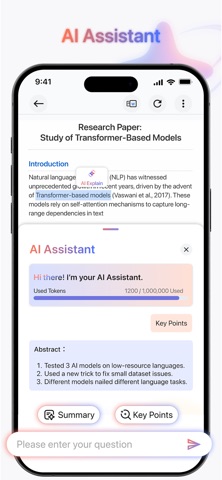
AI PDF Assistant Chat with your files, generate summaries/abstracts, and get instant explanations for any text in your PDFs.
Document Signing & Annotation Digitally sign your PDFs and annotate them with comments, highlights, or shapes to collaborate and finalize documents quickly.
Scan Documents to PDF Transform your physical documents into high-quality PDFs by simply scanning them using your phone’s camera.
Photo-to-PDF Take photos of receipts, business cards, notes, or other documents and automatically create PDFs for easy sharing and storage.
ID & Passport Scanning Quickly scan and create PDFs of your ID or passport using the camera, making document management fast and secure.
Lock PDFs Secure sensitive docs with password protection.
AI-Powered Text Recognition (OCR) Use OCR technology to extract and edit text from scanned images or photos, making it easier to work with documents and receipts.
Why Choose PDF Copilot?
Intelligent Efficiency: Save time and effort with our intelligent tools that automate complex tasks, from OCR to document management.
Seamless Workflow: Convert, edit, scan, and sign PDFs effortlessly – everything you need for document handling in one app.
Perfect for Professionals and Students: Whether you're working with contracts, reports, notes, or personal documents, PDF Copilot has all the tools you need to get the job done.
Fast & Reliable: Our app is optimized for performance, providing fast processing speeds for all your document tasks.
How It Works:
Scan or Upload: Capture photos or upload existing documents.
Edit & Convert: Use the Intelligent tools to convert or edit your PDFs.
Sign & Share: Annotate, sign, and share your finished documents with just a few taps.
Stay Organized and Productive with PDF Copilot
No matter the task, PDF Copilot helps you streamline your document management with powerful tools that adapt to your needs. Whether you're working remotely, on the go, or handling important paperwork, PDF Copilot is the perfect companion for your digital workspace.
Subscription Options: • Monthly Plan • Yearly Plan
Start your 3-day free trial today for unlimited access to all features. Cancel anytime directly from your iPhone Settings.
Terms of Service: https://pdfcopilot.ai/terms-and-conditions Privacy Policy: https://pdfcopilot.ai/privacy-policy
If you have any questions or suggestions about our terms, please contact us at support@pdfcopilot.ai
Each subscription will automatically renew 3 days before the expiration date for
the same time period. Subscriptions can be cancelled at any time before the renewal.