

PDF Editor App | Edit Document
PDF Editor App | Edit Document is made and published by Allied Clicks. AppBrain is an independent app data site and isn't affiliated with Allied Clicks. The app name, icon, screenshots and description belong to Allied Clicks and are shown as published on the App Store.
AppBrain's verdict
Loved by users- Rating on App Store
- 4.56
- 331 ratings
- Last updated
- March 23, 2026
- Size
- 63.3 MB
Users love it: 4.6 stars from 331 ratings.
User feedback
Ratings and reviews on the App StoreComments on PDF Editor App | Edit Document for iOS
We don't have enough comments to show example comments. Please check back later.
Store listing
By Allied Clicks, from the App Store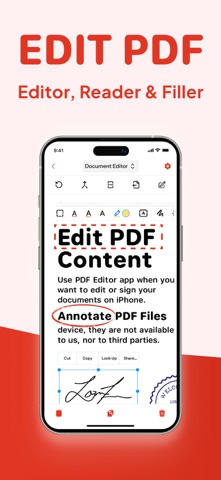


Description by Allied Clicks Written by the developer, not by AppBrain. Click to read.
Introducing PDF Editor, your all-in-one solution for working with PDF documents. Our intuitive app makes it simple to edit PDF, create PDF, and manage PDF files on the go, bringing professional document editing capabilities right to your fingertips.
Transform the way you handle documents with powerful editing features that let you modify PDF text, adjust images, and format content exactly how you want it. Whether you're a business professional, student, or anyone who works with documents, our file editor delivers exceptional results for every task.
Key Features:
New PDF - Create documents from scratch with our comprehensive tools
Manage Pages - Rearrange, rotate, and delete pages with intuitive controls
Compress PDF - Reduce file size while maintaining document quality
Sign PDF - Add digital signatures for professional and legal documents
Redact PDF - Protect sensitive information with secure redaction tools
Comment on PDF - Add notes and feedback for improved collaboration
Annotate PDF - Mark up documents with highlights, underlines, and more
Edit PDF - Modify text, images, and formatting directly in your documents
Split/Merge PDF - Divide large documents or combine multiple files seamlessly
Complete PDF Solution
Our free PDF editor gives you complete control over your paperwork editor needs, functioning as both a full-featured editor and PDF reader in one convenient package. Edit PDF for free without compromising on quality or capabilities – all at no cost.
Smart Document Management
The smart PDF editor technology behind our app adapts to how you work, streamlining your document management process. Reorganize PDF content, reorder PDF pages, and make adjustments with just a few taps.
Need to divide a large document?
Our PDF splitter tool makes it easy to create separate files from a single document, while our compress PDF feature helps you save PDF space without sacrificing quality.
Professional Annotation Tools
Enhance your documents with our comprehensive markup editor tools. Annotate PDF with highlights, underlines, text boxes, and handwritten notes directly on your PDFs.
Sketch on PDF diagrams, use PDF marker tools for important sections, and comment on PDF for collaborators – all within the same application.
Security & Signatures
We take security seriously. Our redact PDF feature ensures sensitive information stays protected, while our PDF signature tool lets you sign PDF documents digitally for legal and business purposes.
Fill out PDF forms, type on PDF fields, and sign PDF files to finalize important paperwork without printing a single page.
Why Should You Choose Our PDF Editor App?
Compatible With All Apple Devices - Our PDF Editor is compatible with all Apple devices – iPhone (iOS 15.0 or later), iPad (iPadOS 15.0 or later), Mac (macOS 12.0 or later and a Mac with Apple M1 chip or later)
Free Premium Trial - Unlock the Full Potential with a Free Trial. Experience all the premium features of our PDF Editor free for 3 days! Choose a subscription plan that best suits your needs and cancel anytime without obligation.
What are you waiting for? No need to download multiple PDF Editor, PDF Scanner, PDF Manager, PDF Organizer or PDF Reader. Make your life easier with PDF Editor app today
Please note: Subscriptions are charged through your App Store account. Subscriptions automatically renew unless canceled at least 24 hours before the end of the current period. Manage your subscription through your App Store account settings after purchase.
Terms of Service - https://www.alliedclicks.com/app-terms.php
Terms of Service for EULA - https://www.apple.com/legal/internet-services/itunes/dev/stdeula/
Refer to our privacy policy for any other issues - https://www.alliedclicks.com/app-privacy.php
Safety and technology
Found in the app by AppBrain- Price
- Free
- App size
- 63.3 MB
- Content rating
- Everyone
Technologies used by PDF Editor App | Edit Document
Releases
Updates seen on the App Store- Version
- 2.0.3
- Launched
- July 2025
No changelog data
Alternatives
Similar apps and more from Allied ClicksMore from Allied Clicks





Also available on Google Play

Rankings
App Store top chartsApp Store Rankings for PDF Editor App | Edit Document
About the app and developer
About PDF Editor App | Edit Document
PDF Editor App | Edit Document is a business app developed by Allied Clicks.
What is the rating of PDF Editor App | Edit Document?
PDF Editor App | Edit Document is rated 4.56 out of 5 stars, based on 330 ratings.
Is PDF Editor App | Edit Document free?
PDF Editor App | Edit Document is free. The app size is 63.34 MB. The latest version available is 2.0.3. The last update was on March 23, 2026.
What are the requirements for PDF Editor App | Edit Document?
The app has a content rating of Everyone. The app has been available on the App Store since July 2025.
Developer information for Allied Clicks
Address:
Frequently asked questions about PDF Editor App | Edit Document
Is PDF Editor App | Edit Document free?
Yes. PDF Editor App | Edit Document is free on the App Store.
Is PDF Editor App | Edit Document still available?
Yes. PDF Editor App | Edit Document is on the App Store, and the last update we saw was on March 23, 2026.
How large is PDF Editor App | Edit Document?
PDF Editor App | Edit Document is 63.34 MB.
Is PDF Editor App | Edit Document suitable for children?
App Store rates the content of PDF Editor App | Edit Document as suitable for everyone.
How do people rate PDF Editor App | Edit Document?
PDF Editor App | Edit Document scores 4.56 out of 5 stars, from 331 ratings on the App Store.
Who made PDF Editor App | Edit Document?
PDF Editor App | Edit Document was developed by Allied Clicks. It is listed in the business category on the App Store.