AppBrain
AppBrain
  • Apps
  • Apps being viewed right now Trending apps today Most popular apps All-time most installed apps Top rated apps iPhone and iPad apps
  • Intelligence ▾
    Intelligence overview → Track any Android app or your whole market
    Track & analyze
    Keyword Tracker & OptimizerTrack & improve Play rankings App Performance ReportOne-off PDF for any app StatisticsFree Android & Play market stats
    Promote your app
    Featured Apps App Links
  • Intelligence
  • Pricing
  • Dashboard
  • Sign up
  • Log in
App Store Apps > Business > PDF Editor-Edit, Fill and Sign
App profile & analytics · Business · Data updated 2026-10-23
PDF Editor-Edit, Fill and Sign icon

PDF Editor-Edit, Fill and Sign

by Conteza LLC · Free · Version 1.2
Availability On the App Store since June 2026 ↗
Rating on App Store
–
Rating
–
0 reviews
Best rank
–
not in the top lists
Last updated
October 7, 2026
1.2

PDF Editor-Edit, Fill and Sign is made and published by Conteza LLC. AppBrain is an independent app data site and isn't affiliated with Conteza LLC. The app name, icon, screenshots and description belong to Conteza LLC and are shown as published on the App Store.

About PDF Editor-Edit, Fill and Sign

PDF Editor-Edit, Fill and Sign is a business app developed by Conteza LLC.

User Ratings

The app has no ratings yet.

App Information

PDF Editor-Edit, Fill and Sign is freely available from the App Store. The app size is 45.42 MB. The latest version available is 1.2. The last update was on October 7, 2026.

Technical Requirements

The app has a content rating of Everyone. The app has been available on the App Store since June 2026.

Description by Conteza LLC (from the App Store)
PDF Editor: Edit, Read, Sign & Convert PDF
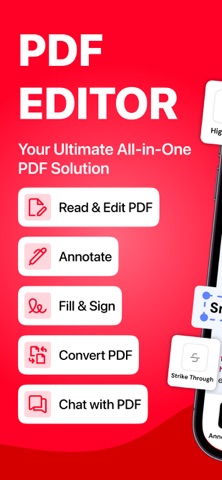
Manage all your documents in one place with PDF Editor, an all in one app to edit, read, sign, convert, and analyze PDF files. Whether you need to update a document, add an electronic signature, read a PDF, or get quick answers with AI, this PDF editor app gives you the tools to handle your documents easily.

Edit PDF Documents with Ease
Make changes to your PDF files without complicated steps. Edit existing text, correct errors, add new text, and insert images to customize your documents. Whether you're updating a report, modifying a form, or preparing a professional document, use the PDF editor to make your files look the way you want.

PDF Editing Features:
Edit existing text and update PDF content.
Add new text and insert images into documents.
Make changes to PDF files with easy editing tools.
Customize documents for personal or professional use.

Read PDF Files Anytime, Anywhere
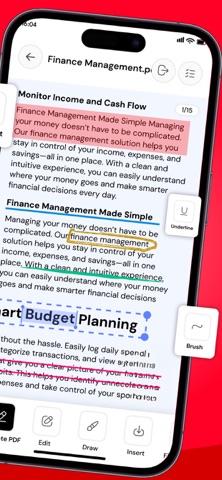
Enjoy a smooth PDF reading experience with the built-in PDF reader. Open and view your documents, navigate through pages, and access important information whenever you need it. Use reading tools to highlight important text, add comments, and listen to documents with text-to-speech.

PDF Reader Features:
Open and read PDF documents with ease.
Highlight important text and passages.
Add comments and notes to PDF files.
Access your documents for convenient reading.

Sign PDF Documents Electronically
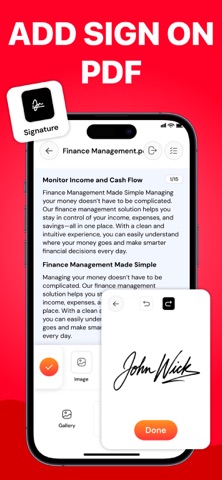
Sign PDF files directly in the app without printing or scanning documents. Add your electronic signature to contracts, forms, agreements, and other important files. Complete your paperwork digitally and keep your document workflow simple.

PDF Signature Features:
Add electronic signatures to PDF documents.
Sign forms, agreements, and business documents.
Complete paperwork digitally.
Make signed documents ready to share.

AI PDF Chat, Summary & Analysis
Understand lengthy documents faster with the AI powered PDF assistant. Chat with your PDF, ask questions about its content, and get relevant answers without manually searching through every page. Summarize lengthy files, identify key information, and analyze document content to make reading and reviewing easier.

AI PDF Features:

Chat with PDF files and ask questions.
Generate summaries of lengthy documents.
Analyze PDF content and identify key points.
Find information and understand documents faster.
Get AI-powered assistance while reviewing files.

Convert PDF Files to Different Formats:
Convert documents to and from PDF using the built-in PDF converter. Whether you need to change a PDF into another file format or convert supported files into PDF, manage your document conversions in one convenient place.

Why Use PDF Editor?
PDF editor for updating text and images.
AI PDF chat for questions, summaries, and analysis.
PDF converter for supported file formats.
Multiple document tools in one convenient app.

Whether you're a student reviewing study materials, a professional managing business documents, or someone handling everyday paperwork, PDF Editor helps you work with PDF files more efficiently.

Download PDF Editor today to edit, read, sign, chat with AI, and convert your documents in one place!

Note:
Payment will be charged to your iTunes account at confirmation of purchase. Your subscription will automatically renew unless auto-renew is turned off at least 24-hours before the end of the current subscription period. Your account will be charged for renewal within 24-hours prior to the end of the current subscription period. The auto-renewal will cost the same price you were originally charged for the subscription. You can manage your subscriptions and turn off auto-renewal by going to your Account Settings on the App Store after purchase. Read our Terms of Service and Privacy Policy for more information.
Privacy Policy:
https://conteza.com/privacy-policy.html
Terms of Use:
https://conteza.com/terms-and-conditions.html
Show more Show less

More data about PDF Editor-Edit, Fill and Sign

Price Free
Rating No ratings
Ranking Not ranked
Version 1.2
App size 45.4 MB
Suitable for Everyone

Screenshots

PDF Editor-Edit, Fill and Sign Screenshot 1 of 8
PDF Editor-Edit, Fill and Sign Screenshot 2 of 8
PDF Editor-Edit, Fill and Sign Screenshot 3 of 8
PDF Editor-Edit, Fill and Sign Screenshot 4 of 8
PDF Editor-Edit, Fill and Sign Screenshot 5 of 8
PDF Editor-Edit, Fill and Sign Screenshot 6 of 8
PDF Editor-Edit, Fill and Sign Screenshot 7 of 8
PDF Editor-Edit, Fill and Sign Screenshot 8 of 8
Screenshots by Conteza LLC, from the the App Store listing
Official page on the App Store

Alternatives to PDF Editor-Edit, Fill and Sign

PDF Converter:Scanner & Reader icon PDF Converter:Scanner & Reader
Tahir Jamil
0.0
Free
Receipt Scanner: AI Expense icon Receipt Scanner: AI Expense
淑丽 王
4.5
Free
2 ratings
PDF Editor - Read, Scan & Sign icon PDF Editor - Read, Scan & Sign
Clixade Ltd
0.0
Free
AI Receipt Scanner & Warranty icon AI Receipt Scanner & Warranty
Kateryna Petrenko
0.0
Free
Kinz icon Kinz
JO
0.0
Free
Forex Titan icon Forex Titan
DANIEL AMOOTI MWESIGWA
4.9
Free
13 ratings
Web Docs Viewer icon Web Docs Viewer
Thi hong ngoc Dang
0.0
Free
Starrd icon Starrd
Starrd Technologies Pvt Ltd
0.0
Free

More from Conteza LLC

AI Logo Generator & Maker App icon AI Logo Generator & Maker App
Conteza LLC
4.5
Free
316 ratings
Resume Builder ~ CV Maker icon Resume Builder ~ CV Maker
Conteza LLC
4.0
Free
33 ratings
Tattoo AI - Tattoo Generator . icon Tattoo AI - Tattoo Generator .
Conteza LLC
3.6
Free
19 ratings
Smart Printer : AirPrinter App icon Smart Printer : AirPrinter App
Conteza LLC
3.9
Free
10 ratings
Storage Cleaner_ Phone Cleanup icon Storage Cleaner_ Phone Cleanup
Conteza LLC
5.0
Free
3 ratings
The Last Elf: Survival & RPG icon The Last Elf: Survival & RPG
Conteza LLC
2.7
Free
3 ratings
AI Keyboard & Chat Assistant icon AI Keyboard & Chat Assistant
Conteza LLC
5.0
Free
1 ratings
Fax App: Send Fax from Iphone! icon Fax App: Send Fax from Iphone!
Conteza LLC
1.0
Free
1 ratings

Changelog of PDF Editor-Edit, Fill and Sign

No changelog data

Developer information for Conteza LLC

Conteza LLC

Address:

Share PDF Editor-Edit, Fill and Sign

Comments on PDF Editor-Edit, Fill and Sign for iOS

We don't have enough comments to show example comments. Please check back later.

App Store Rankings for PDF Editor-Edit, Fill and Sign

This app is not ranked

Technologies used by PDF Editor-Edit, Fill and Sign

Today's trending apps Top new apps Price drops on Google Play Popular Business Apps Apps other people are watching
PDF Converter:Scanner & Reader icon PDF Converter:Scanner & Reader
Receipt Scanner: AI Expense icon Receipt Scanner: AI Expense
PDF Editor - Read, Scan & Sign icon PDF Editor - Read, Scan & Sign
AI Receipt Scanner & Warranty icon AI Receipt Scanner & Warranty
Kinz icon Kinz
Forex Titan icon Forex Titan
Web Docs Viewer icon Web Docs Viewer
Starrd icon Starrd
Overview Alternatives Reviews Rankings Technology
AppBrain Intelligence premium content

Subscribe now to get full and unlimited access to AppBrain Intelligence. You'll have access to:

  • App Intelligence dashboard (performance timeline, competitor comparison, country rankings, insight cards)
  • Detailed ranking data per app
  • Full timeline per developer
  • Device market shares data per country
  • Unlimited keyword tracking
1 Month

$75/mo
(billed every month)

SAVE 0%
Subscribe
3 Months

$65/mo
($195 billed every 3 months)

SAVE 13%
Subscribe
1 Year

$57.50/mo
($690 billed every year)

SAVE 23%
Subscribe
Each subscription will automatically renew 3 days before the expiration date for the same time period. Subscriptions can be cancelled at any time before the renewal.

AppBrain is an app data site, we track rankings, ratings, installs for all apps and games on Google Play and the App Store. AppBrain doesn't host app files or APKs, all install links go directly to the official store. All trademarks are owned by their respective owners. As an Amazon Associate AppBrain earns from qualifying purchases.

More apps

  • Top Android apps being viewed
  • Rock Identifier: AI Gem ID
  • Digital Clock & Battery Charge
  • View Lunyb

App statistics

  • Android statistics
  • Google Play Developer stats
  • Trending Android Apps
  • Trending iOS apps
  • Top popular Apps
  • Buy the best Android phone
  • Buy & sell app businesses

About AppBrain

  • Contact
  • Privacy
  • Documentation
  • DMCA takedowns
  • Articles
  • Blog
  • How to improve the earnings of your ad units
© 2010-2026 - AppBrain