

PDF Editor, Edit PDF Documents
PDF Editor, Edit PDF Documents is made and published by Dzine Media. AppBrain is an independent app data site and isn't affiliated with Dzine Media. The app name, icon, screenshots and description belong to Dzine Media and are shown as published on the App Store.



AppBrain's verdict
- Rating on App Store
- 4.44
- 16 ratings
- Last updated
- January 8, 2026
- Size
- 37.2 MB
It doesn't have enough ratings yet to judge what users think.
User feedback
Ratings and reviews on the App StoreComments on PDF Editor, Edit PDF Documents for iOS
We don't have enough comments to show example comments. Please check back later.
Store listing
By Dzine Media, from the App StoreDescription by Dzine Media Written by the developer, not by AppBrain. Click to read.
This is a powerful and innovative application designed and programmed to handle all your PDF management needs.
Whether you’re a student handling academic notes, a business professional viewing posters/brochures, or a casual user having tons of PDF photos, our editor app provides plenty of features that’ll help you view, edit, sign, annotate, and even share your PDFs without putting much effort.
USPs of PDF Editor and Reader
View and Read PDF Docs
Our app allows you to open and read PDF files no matter what the size. You can customize your viewing experience by changing the layout or you can simply zoom in or out for better readability.
Edit PDF Text
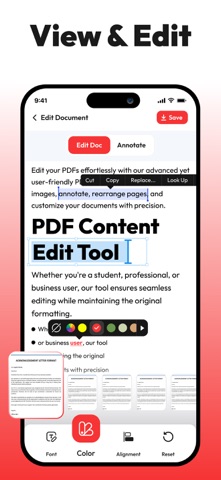
Users can easily modify text in the PDF document. Our app allows you to change font size, style, colors, and alignment, and make other amends. You can make quick corrections on your iPhone without requiring premium software or a desktop.
Annotate PDFs
With this PDF editor, you can easily add comments to the document, highlight text, underline sentences, and even add notes to your PDFs. The drawing tool allows users to add annotations and customize colors for markups.
E-Signatures
You can also fill out PDF forms quickly without changing the format or use the signature feature to add your e-signature to documents. You can create, save, and reuse your signature without any hassle.
Organize Pages
The PDF editor app allows you to rearrange, delete, rotate, or extract pages from your documents in a matter of seconds. You can also merge multiple PDFs into one, or split a large file into smaller, more manageable parts.
Document Security
Users can keep documents safe and secure by setting passwords or applying other encryption options. You can control who can access your PDF content and can restrict unauthorized editing or copying of content.
Cloud Integration
Sync in the PDF editor with popular cloud services such as iCloud, Dropbox, Google Drive, and OneDrive to access your PDFs across all your devices. Edit and save directly to your preferred storage space.
Export and Share
You can save your edited PDFs in various formats, including PDF, JPG/PNG, and Word documents. The app also allows you to share your documents via email, messaging apps, or directly to iCloud storage.
Why Choose this PDF Editor?
• PDF editor and reader comes with a simple and clean interface which makes it easy to use even for new and non-technical users just getting started.
• The app is optimized for speed and responsiveness, providing a smooth experience even with large or complex documents.
• PDF editor combines all the tools you need in one app; this way you don’t need to juggle multiple apps to get your work done. Everything you need is under one dashboard.
• Our team always listens to user feedback and continuously improves the app with new features, bug fixes, and enhancements to make PDF editing easier and more efficient.
This PDF editor has been programmed and designed for all kinds of users who need to edit, sign, and share documents, contracts, reports, etc. which makes it an ideal utility for anyone who needs a reliable editing solution.
Download our PDF Editor today and take full control over your PDFs on your iPhone or iPad. Say goodbye to premium PDF managers and get an all-in-one solution for your iOS devices!
Support URL:https://www.trostun.com/contact-us/
Terms of Use: https://www.trostun.com/terms-of-use/
Safety and technology
Found in the app by AppBrain- Price
- Free
- App size
- 37.2 MB
- Content rating
- Everyone
Technologies used by PDF Editor, Edit PDF Documents
Releases
Updates seen on the App Store- Version
- 1.1.9
- Launched
- February 2025
No changelog data
Alternatives
Similar apps and more from Dzine MediaMore from Dzine Media



Rankings
App Store top chartsApp Store Rankings for PDF Editor, Edit PDF Documents
About the app and developer
About PDF Editor, Edit PDF Documents
PDF Editor, Edit PDF Documents is a business app developed by Dzine Media.
What is the rating of PDF Editor, Edit PDF Documents?
PDF Editor, Edit PDF Documents is rated 4.44 out of 5 stars, based on 16 ratings.
Is PDF Editor, Edit PDF Documents free?
PDF Editor, Edit PDF Documents is free. The app size is 37.18 MB. The latest version available is 1.1.9. The last update was on January 8, 2026.
What are the requirements for PDF Editor, Edit PDF Documents?
The app has a content rating of Everyone. The app has been available on the App Store since February 2025.
Developer information for Dzine Media
Address: