

PDF Editor: Edit, Sign & Scan
PDF Editor: Edit, Sign & Scan is made and published by LOOP MOBILE FZCO. AppBrain is an independent app data site and isn't affiliated with LOOP MOBILE FZCO. The app name, icon, screenshots and description belong to LOOP MOBILE FZCO and are shown as published on the App Store.
AppBrain's verdict
- Rating on App Store
- 4.47
- 15 ratings
- Last updated
- October 22, 2026
It doesn't have enough ratings yet to judge what users think.
Rankings
App Store top chartsApp Store Rankings for PDF Editor: Edit, Sign & Scan
Competitors
Similar apps and more from LOOP MOBILE FZCOAlternatives to PDF Editor: Edit, Sign & Scan


More from LOOP MOBILE FZCO


Releases
Updates seen on the App Store- Version
- 1.0.7
- Launched
- February 2026
No changelog data
User feedback
Ratings and reviews on the App StoreComments on PDF Editor: Edit, Sign & Scan for iOS
We don't have enough comments to show example comments. Please check back later.
Technology
Found in the app by AppBrain- Price
- Free
- App size
- 47.5 MB
- Content rating
- Everyone
Technologies used by PDF Editor: Edit, Sign & Scan
About the app and developer
About PDF Editor: Edit, Sign & Scan
PDF Editor: Edit, Sign & Scan is an utilities app developed by LOOP MOBILE FZCO.
What is the rating of PDF Editor: Edit, Sign & Scan?
PDF Editor: Edit, Sign & Scan is rated 4.47 out of 5 stars, based on 15 ratings.
Is PDF Editor: Edit, Sign & Scan free?
PDF Editor: Edit, Sign & Scan is free. The app size is 47.48 MB. The latest version available is 1.0.7. The last update was on October 22, 2026.
What are the requirements for PDF Editor: Edit, Sign & Scan?
The app has a content rating of Everyone. The app has been available on the App Store since February 2026.
Developer information for LOOP MOBILE FZCO
Address:
Frequently asked questions about PDF Editor: Edit, Sign & Scan
Is PDF Editor: Edit, Sign & Scan free?
Yes. PDF Editor: Edit, Sign & Scan is free on the App Store.
Is PDF Editor: Edit, Sign & Scan still available?
Yes. PDF Editor: Edit, Sign & Scan is on the App Store, and the last update we saw was on October 22, 2026.
How large is PDF Editor: Edit, Sign & Scan?
PDF Editor: Edit, Sign & Scan is 47.48 MB.
Is PDF Editor: Edit, Sign & Scan suitable for children?
App Store rates the content of PDF Editor: Edit, Sign & Scan as suitable for everyone.
How do people rate PDF Editor: Edit, Sign & Scan?
PDF Editor: Edit, Sign & Scan scores 4.47 out of 5 stars, from 15 ratings on the App Store.
Who made PDF Editor: Edit, Sign & Scan?
PDF Editor: Edit, Sign & Scan was developed by LOOP MOBILE FZCO. It is listed in the utilities category on the App Store.
What are the best alternatives to PDF Editor: Edit, Sign & Scan?
People looking at PDF Editor: Edit, Sign & Scan also look at these utilities apps: PDFly - PDF Editor & Scanner, Clean Master: Storage Saver, Space Cleaner: Clean & Swipe, Cleanivo AI, QR & Barcode Scanner: Pro.
Store listing
By LOOP MOBILE FZCO, from the App Store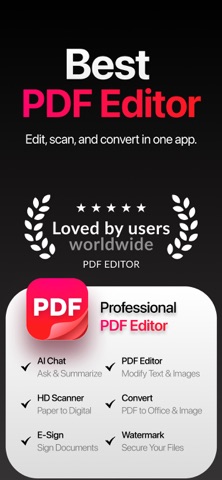


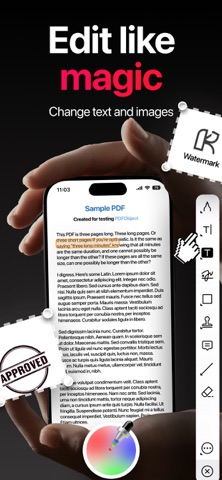


Description by LOOP MOBILE FZCO Written by the developer, not by AppBrain. Click to read.
Meet PDF Editor, the ultimate all-in-one PDF toolkit built for speed, simplicity, and serious productivity.
Scan, read, convert, edit, organize, protect, and sign your documents in seconds — everything you need to work with PDFs, all in one powerful app.
Phone Scanner:
• iPhone and iPad Scanner: Scan documents, notes, receipts, IDs or anything and save as high-quality PDF. Multi-page PDF supported.
• Text recognition (OCR): Convert scanned text and images into searchable, editable PDFs with high accuracy.
• Photo to PDF: Turn your camera photos into professional PDF documents instantly.
PDF Converter:
• JPG / PNG to PDF: Convert images into single or multi-page PDFs.
• Office to PDF: Convert Word, Excel, PowerPoint files into PDF format.
• PDF to Office: Turn PDFs into editable Word, Excel, and PowerPoint files.
• Extract images from PDF: Export high-quality images from any PDF file
PDF Editor:
• Annotate PDF: Highlight text, add notes, comments, drawings or images to your PDF.
• Fill and sign forms: Complete PDF forms and add your e-signature with ease.
• PDF Reader: View, edit and manage PDFs stored on your device or in the cloud anytime
ORGANIZE, OPTIMIZE AND PROTECT DOCUMENTS:
• Compress PDF: Reduce file size while preserving quality.
• Merge PDF: Combine multiple documents into one PDF file.
• Split PDF: Split pages or extract specific pages into new PDFs.
• Rotate PDF: Adjust and rotate pages as needed.
• PDF Protection: Add or remove password protection.
• Add page numbers: Customize position, size and style of page numbers.
• Watermark PDF: Add text or image watermark with full control over placement and transparency.
CLOUD INTEGRATION:
• Connect iCloud, Google Drive and Dropbox.
• Open, edit, save and share documents directly from the cloud
Upgrade to PDF Genie Premium and unlock the full power of this all-in-one PDF scanner, converter, editor and signer with an auto-renewable subscription.
Subscriptions renew automatically unless cancelled at least 24 hours before the end of the current period.
You can manage or cancel anytime in your App Store account settings.
More Subscription Information:
- Weekly plan, annual plan and lifetime are available.
- Payment will be charged to your Apple ID account at confirmation of purchase.
- Subscription automatically renews unless auto-renew is turned off at least 24 hours before the end of the current period.
- Within 24-hours prior to the end of the current period, the account will be charged for the renewal of the subscription, indicating the cost of the renewal.
- You can manage subscriptions and turn off auto-renewal after purchase by going to your App Store account settings.
- Any unused portion of a free trial period, if offered, will be forfeited when purchasing a subscription.
Privacy Policy: https://loopmobile.io/privacy.html
Terms of Use: https://loopmobile.io/tos.html