

PDF Editor & Files Converter.
PDF Editor & Files Converter. is made and published by Sofiya Pliskun. AppBrain is an independent app data site and isn't affiliated with Sofiya Pliskun. The app name, icon, screenshots and description belong to Sofiya Pliskun and are shown as published on the App Store.
AppBrain's verdict
- Rating on App Store
- 4.51
- 70 ratings
- Last updated
- October 15, 2026
It doesn't have enough ratings yet to judge what users think.
Rankings
App Store top chartsApp Store Rankings for PDF Editor & Files Converter.
Releases
Updates seen on the App Store- Version
- 1.5
- Launched
- April 2026
No changelog data
User feedback
Ratings and reviews on the App StoreComments on PDF Editor & Files Converter. for iOS
We don't have enough comments to show example comments. Please check back later.
Technology
Found in the app by AppBrain- Price
- Free
- App size
- 50.0 MB
- Content rating
- Everyone
Technologies used by PDF Editor & Files Converter.
About the app and developer
About PDF Editor & Files Converter.
PDF Editor & Files Converter. is a business app developed by Sofiya Pliskun.
User Ratings
PDF Editor & Files Converter. is rated 4.51 out of 5 stars. The rating is based on 70 ratings.
App Information
PDF Editor & Files Converter. is freely available from the App Store. The app size is 50.03 MB. The latest version available is 1.5. The last update was on October 15, 2026.
Technical Requirements
The app has a content rating of Everyone. The app has been available on the App Store since April 2026.
Developer information for Sofiya Pliskun
Address:
Store listing
By Sofiya Pliskun, from the App Store

Description by Sofiya Pliskun Written by the developer, not by AppBrain. Click to read.
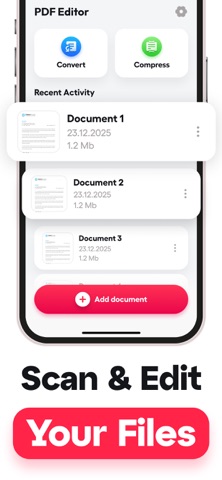
Designed for professionals, students, and anyone who needs to work with documents on the go. Whether you are signing contracts, combining research papers, or converting images to PDFs for email attachments, this app provides the tools you need.
HOW IT WORKS
The app uses advanced optical character recognition to scan physical documents with your camera, automatically detecting page boundaries and correcting perspective distortion. Text editing works through direct PDF manipulation, allowing you to modify existing content or add new text, signatures, and annotations. File conversion processes happen locally on your device, supporting formats including JPEG, PNG, Word documents, and Excel spreadsheets.
KEY FEATURES
Document Scanning with Auto-Enhancement — Point your camera at any document and the app automatically detects edges, corrects lighting, and removes shadows. Works with receipts, contracts, handwritten notes, whiteboards, and multi-page documents.
Direct PDF Text Editing — Modify existing text in PDFs without converting to other formats first. Change font sizes, colors, and alignment while maintaining original document layout.
Page Management and Organization — Merge multiple PDFs into single files, split large documents, reorder pages by dragging, delete unwanted pages, and rotate pages to correct orientation.
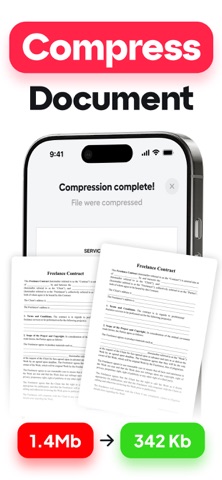
Multi-Format File Conversion — Convert images to PDFs, Word documents to PDFs, Excel files to PDFs, and PDFs back to editable Word format. Batch convert multiple files simultaneously.
Digital Signature Integration — Create and save multiple signature styles, sign documents with finger or stylus, position signatures anywhere on the page with tamper-evident security.
WHO USES THIS APP
Business professionals who travel frequently and need to sign contracts, review proposals, or send documentation while away from their office computers.
College students managing research papers and assignments who need to combine PDFs, annotate readings, and convert handwritten notes to digital format.
Real estate agents who handle multiple contracts daily and need to quickly edit terms, add signatures, and scan property documents.
Small business owners processing invoices, receipts, and contracts who want to digitize paper documents without expensive desktop software.
HOW TO GET STARTED
1. Download and open the app to access the main document library
2. Tap the camera icon to scan your first document or import existing files
3. Use the edit tools to modify text, add signatures, or organize pages
SUBSCRIPTION
Annual Plan: $19.99 per year — less than $2 per month
Weekly Plan: $4.99 per week
Payment charged to iTunes Account at purchase confirmation. Subscription auto-renews unless cancelled 24 hours before period ends. Manage subscriptions in iTunes Account settings.
Privacy Policy:
https://docs.google.com/document/d/1Y5OkX_3hJjDIzl5hY31wqtL76fMD2Dm0S8SnmN4ZfOQ/edit?usp=sharing
Terms of Use:
https://docs.google.com/document/d/1B6mlOnVehBJoKdsB1YTD6MqdFw3h0T4InDxe9Lf6140/edit?usp=sharing