

PDF Editor Master
PDF Editor Master is made and published by kushal patel. AppBrain is an independent app data site and isn't affiliated with kushal patel. The app name, icon, screenshots and description belong to kushal patel and are shown as published on the App Store.
AppBrain's verdict
- Last updated
- March 27, 2025
- Size
- 16.4 MB
User feedback
Ratings and reviews on the App StoreComments on PDF Editor Master for iOS
We don't have enough comments to show example comments. Please check back later.
Store listing
By kushal patel, from the App Store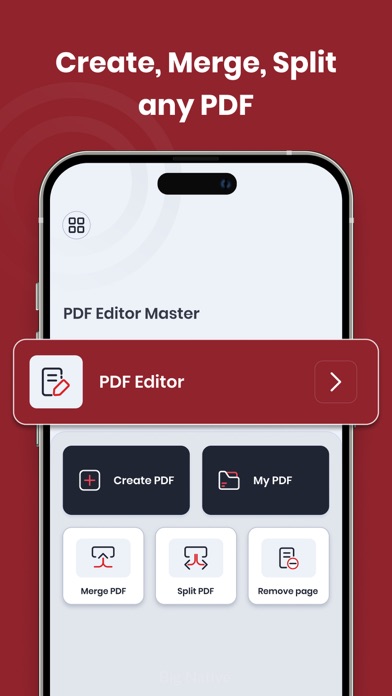



Description by kushal patel Written by the developer, not by AppBrain. Click to read.
1.PDF Editor:
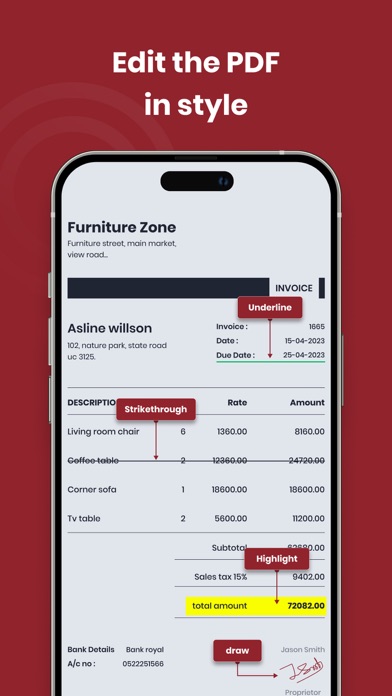
Edit your PDF files with ease using a range of options. Underline or strikethrough text to highlight important information. Draw or write on your PDFs to add annotations or comments. Copy text from your PDFs for further use. Erase specific text to make revisions. Save your edited PDFs and even rename them for easy organisation.
2.Create PDF:
Effortlessly create PDFs with a customised title. Arrange the position of text with options for left, centre, or right alignment. Add descriptions to provide context. Preview your PDFs before finalizing and creating them. Create professional-looking PDFs tailored to your needs.
3.My PDF:
Access all your saved PDFs in one place. Easily locate specific PDFs by applying filters based on importance. Quickly find all PDFs, edited PDFs, merged PDFs, spliced PDFs, removed pages, and created PDFs. Simplify your PDF management and retrieval process.
4.Merge PDF:
Combine multiple PDFs into a single document seamlessly. Select the PDFs you want to merge and save the merged file. Consolidate related content and streamline your PDF collection.
5.Split PDF:
Efficiently split PDFs into separate files based on your requirements. Choose to split by single pages, specific page ranges, or by entering specific page numbers. Customise your PDF splitting process to extract the necessary content effortlessly.
6.Remove Page:
Easily remove specific pages from your PDFs. Browse through your PDFs, view all pages, and selectively remove particular pages. Refine your PDF content by removing unwanted or irrelevant pages.
Download app now and unlock a world of possibilities for managing and customising your PDF documents. Enhance your productivity, organisation, and document management with this versatile PDF editing app.
Features:
• Powerful PDF editing capabilities, including underlining, striking, drawing, writing, copying, and erasing text
• Create customised PDFs with title, text positioning, and descriptions
• Convenient access to all saved PDFs with filters for easy navigation
• Merge multiple PDFs into a single document
• Split PDFs by single pages, specific page ranges, or page numbers
• Remove specific pages from PDFs for refined content
Safety and technology
Found in the app by AppBrain- Price
- Free
- App size
- 16.4 MB
- Content rating
- Everyone
Technologies used by PDF Editor Master
Releases
Updates seen on the App Store- Version
- 1.1.2
- Launched
- July 2023
No changelog data
Alternatives
Similar apps and more from kushal patelAlternatives to PDF Editor Master








More from kushal patel



Rankings
App Store top chartsApp Store Rankings for PDF Editor Master
About the app and developer
About PDF Editor Master
PDF Editor Master is an utilities app developed by kushal patel.
What is the rating of PDF Editor Master?
PDF Editor Master has no ratings yet.
Is PDF Editor Master free?
PDF Editor Master is free. The app size is 16.43 MB. The latest version available is 1.1.2. The last update was on March 27, 2025.
What are the requirements for PDF Editor Master?
The app has a content rating of Everyone. The app has been available on the App Store since July 2023.
Developer information for kushal patel
Address:
Frequently asked questions about PDF Editor Master
Is PDF Editor Master free?
Yes. PDF Editor Master is free on the App Store.
Is PDF Editor Master still available?
Yes. PDF Editor Master is on the App Store, and the last update we saw was on March 27, 2025.
How large is PDF Editor Master?
PDF Editor Master is 16.43 MB.
Is PDF Editor Master suitable for children?
App Store rates the content of PDF Editor Master as suitable for everyone.
Who made PDF Editor Master?
PDF Editor Master was developed by kushal patel. It is listed in the utilities category on the App Store.
What are the best alternatives to PDF Editor Master?
People looking at PDF Editor Master also look at these utilities apps: PDF Reader & PDF Viewer App, PDF Editor - Reader, Ring Zone - Ringtone Maker, Land Area Finder with MAP, Call Recorder Voice Recording.