AppBrain
AppBrain
  • Apps
  • Apps being viewed right now Trending apps today Most popular apps All-time most installed apps Top rated apps iPhone and iPad apps
  • Intelligence ▾
    Intelligence overview → Track any Android app or your whole market
    Track & analyze
    Keyword Tracker & OptimizerTrack & improve Play rankings App Performance ReportOne-off PDF for any app StatisticsFree Android & Play market stats
    Promote your app
    Featured Apps App Links
  • Intelligence
  • Pricing
  • Dashboard
  • Sign up
  • Log in
App Store Apps > Productivity > PDF Editor: Merge & Sign PDF
PDF Editor: Merge & Sign PDF icon

PDF Editor: Merge & Sign PDF

by Ishrak khan · Productivity · Free
On the App Store since April 2026 · Data updated 2026-10-20

PDF Editor: Merge & Sign PDF is made and published by Ishrak khan. AppBrain is an independent app data site and isn't affiliated with Ishrak khan. The app name, icon, screenshots and description belong to Ishrak khan and are shown as published on the App Store.

AppBrain's verdict

Rating on App Store
5.00
1 ratings
Last updated
September 15, 2026
Size
91.0 MB

It doesn't have enough ratings yet to judge what users think.

Official page on the App Store

User feedback

Ratings and reviews on the App Store

Comments on PDF Editor: Merge & Sign PDF for iOS

We don't have enough comments to show example comments. Please check back later.

Store listing

By Ishrak khan, from the App Store
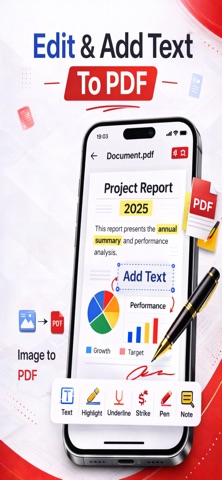
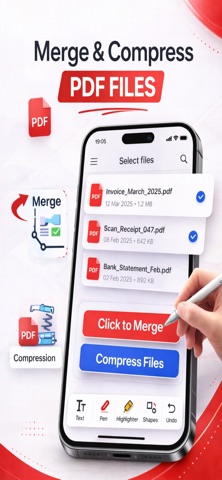
PDF Editor: Merge & Sign PDF Screenshot 1 of 5
PDF Editor: Merge & Sign PDF Screenshot 2 of 5
PDF Editor: Merge & Sign PDF Screenshot 3 of 5
PDF Editor: Merge & Sign PDF Screenshot 4 of 5
PDF Editor: Merge & Sign PDF Screenshot 5 of 5
Screenshots by Ishrak khan, from the the App Store listing
Description by Ishrak khan Written by the developer, not by AppBrain. Click to read.
PDF Editor is a Complete PDF toolkit for iPhone that lets you edit, sign, fill, annotate, merge, and create PDF documents wherever you go.

Whether you're working with business documents, school assignments, applications, contracts, receipts, or everyday paperwork, PDF Editor gives you the tools to work with your PDFs from one convenient place.

Powerful PDF Editing Tools

Add text to your PDF documents and customize your files directly from your iPhone.

- Add information wherever you need it
- Customize your PDF documents
- Work with your documents without printing

Sign PDF Documents

Sign important documents directly from your iPhone.

- Create your digital signature
- Add signatures to PDF documents
- Sign contracts, applications, and paperwork
- Complete documents without printing

Fill PDF Forms

Complete PDF forms quickly and conveniently.

- Type into PDF forms
- Fill out form fields
- Add information to documents
- Sign forms when required
- Save completed documents

Annotate PDFs

Review documents and highlight the information that matters.

- Highlight important content
- Add annotations and notes
- Mark up PDF documents
- Review and work with PDFs on your iPhone

Image to PDF

Turn your photos and images into professional PDF documents.

- Convert images to PDF
- Create PDFs from photos
- Select images from your device
- Create PDF documents from your images

Merge PDFs

Bring multiple PDF documents together in one file.

- Merge multiple PDF files
- Combine documents into a single PDF
- Keep related documents together

Your Complete PDF Toolkit

From editing and signing documents to filling forms, annotating files, merging PDFs, and converting images to PDF, PDF Editor gives you powerful tools for working with documents wherever you are.

Whether you're a student, professional, business owner, or simply managing everyday paperwork, PDF Editor helps you handle your PDF documents from one convenient place.

Download PDF Editor and take your PDF workflow with you wherever you go.

Terms of Use (EULA): https://www.apple.com/legal/internet-services/itunes/dev/stdeula/
Privacy Policy : https://sites.google.com/view/privacypolicy-image-to-pdf-ios/home
Official page on the App Store

Safety and technology

Found in the app by AppBrain
Price
Free
App size
91.0 MB
Content rating
Everyone

Technologies used by PDF Editor: Merge & Sign PDF

Releases

Updates seen on the App Store
Version
1.0.11
Launched
April 2026

No changelog data

Alternatives

Similar apps and more from Ishrak khan

Alternatives to PDF Editor: Merge & Sign PDF

Chapter: Replace A Bad Habit icon Chapter: Replace A Bad Habit
BoxChannels LLC
3.2
Free
4 ratings
SkillForge - Skill Tracker icon SkillForge - Skill Tracker
ANASTASIYA BATURYNA
0.0
Free
ClearToday:  Todo & StandBy icon ClearToday: Todo & StandBy
Shenzhen Chengsi Technology Co., Ltd.
5.0
Free
1 ratings
Habit Tracker: Habitin icon Habit Tracker: Habitin
Sih Han Chen
0.0
Free
Track&ROLL ESSv2 icon Track&ROLL ESSv2
Simon Soo
0.0
Free
Cover Letter Maker - Get Hired icon Cover Letter Maker - Get Hired
OneRack
4.9
Free
9 ratings
Track&ROLL ESS icon Track&ROLL ESS
Simon Soo
2.0
Free
1 ratings
Dale: Countdown & Year Tracker icon Dale: Countdown & Year Tracker
Sanjay Pathak
4.2
Free
14 ratings

More from Ishrak khan

Stockfish 19 Chess Engine icon Stockfish 19 Chess Engine
Ishrak khan
3.0
$4.99
1 ratings

Rankings

App Store top charts

App Store Rankings for PDF Editor: Merge & Sign PDF

This app is not ranked

About the app and developer

About PDF Editor: Merge & Sign PDF

PDF Editor: Merge & Sign PDF is a productivity app developed by Ishrak khan.

What is the rating of PDF Editor: Merge & Sign PDF?

PDF Editor: Merge & Sign PDF is rated 5.00 out of 5 stars, based on one rating ratings.

Is PDF Editor: Merge & Sign PDF free?

PDF Editor: Merge & Sign PDF is free. The app size is 91.01 MB. The latest version available is 1.0.11. The last update was on September 15, 2026.

What are the requirements for PDF Editor: Merge & Sign PDF?

The app has a content rating of Everyone. The app has been available on the App Store since April 2026.

Developer information for Ishrak khan

Ishrak khan

Address:

Share PDF Editor: Merge & Sign PDF

Today's trending apps Apps other people are watching Top new apps Price drops on Google Play Popular Productivity Apps
Chapter: Replace A Bad Habit icon Chapter: Replace A Bad Habit
SkillForge - Skill Tracker icon SkillForge - Skill Tracker
ClearToday:  Todo & StandBy icon ClearToday: Todo & StandBy
Habit Tracker: Habitin icon Habit Tracker: Habitin
Track&ROLL ESSv2 icon Track&ROLL ESSv2
Cover Letter Maker - Get Hired icon Cover Letter Maker - Get Hired
Track&ROLL ESS icon Track&ROLL ESS
Dale: Countdown & Year Tracker icon Dale: Countdown & Year Tracker
Overview Alternatives Reviews Rankings Technology
AppBrain Intelligence premium content

Subscribe now to get full and unlimited access to AppBrain Intelligence. You'll have access to:

  • App Intelligence dashboard (performance timeline, competitor comparison, country rankings, insight cards)
  • Detailed ranking data per app
  • Full timeline per developer
  • Device market shares data per country
  • Unlimited keyword tracking
1 Month

$75/mo
(billed every month)

SAVE 0%
Subscribe
3 Months

$65/mo
($195 billed every 3 months)

SAVE 13%
Subscribe
1 Year

$57.50/mo
($690 billed every year)

SAVE 23%
Subscribe
Each subscription will automatically renew 3 days before the expiration date for the same time period. Subscriptions can be cancelled at any time before the renewal.

AppBrain is an app data site, we track rankings, ratings, installs for all apps and games on Google Play and the App Store. AppBrain doesn't host app files or APKs, all install links go directly to the official store. All trademarks are owned by their respective owners.

More apps

  • Top Android apps being viewed
  • View Mugen Anime
  • PicFusion Lab
  • ScreenPad: Remote Mouse for PC

App statistics

  • Android statistics
  • Google Play Developer stats
  • Trending Android Apps
  • Trending iOS apps
  • Top popular Apps
  • Buy the best Android phone
  • Buy & sell app businesses

About AppBrain

  • Contact
  • Privacy
  • Documentation
  • DMCA takedowns
  • Blog
  • Free webpage for your Android app
© 2010-2026 - AppBrain