AppBrain
AppBrain
  • Apps
  • Apps being viewed right now Trending apps today Most popular apps All-time most installed apps Top rated apps iPhone and iPad apps
  • Intelligence ▾
    Intelligence overview → Track any Android app or your whole market
    Track & analyze
    Keyword Tracker & OptimizerTrack & improve Play rankings App Performance ReportOne-off PDF for any app StatisticsFree Android & Play market stats
    Promote your app
    Featured Apps App Links
  • Intelligence
  • Pricing
  • Dashboard
  • Sign up
  • Log in
App Store Apps > Productivity > PDF Editor: Sign, Fill & Scan
PDF Editor: Sign, Fill & Scan icon

PDF Editor: Sign, Fill & Scan

by Beijing iDOTOOLS Technology Co., Ltd · Productivity · Free
On the App Store since April 2026 · Data updated 2026-10-20

PDF Editor: Sign, Fill & Scan is made and published by Beijing iDOTOOLS Technology Co., Ltd. AppBrain is an independent app data site and isn't affiliated with Beijing iDOTOOLS Technology Co., Ltd. The app name, icon, screenshots and description belong to Beijing iDOTOOLS Technology Co., Ltd and are shown as published on the App Store.

AppBrain's verdict

Rating on App Store
5.00
3 ratings
Last updated
September 2, 2026

It doesn't have enough ratings yet to judge what users think.

Official page on the App Store

Rankings

App Store top charts

App Store Rankings for PDF Editor: Sign, Fill & Scan

This app is not ranked

Competitors

Similar apps and more from Beijing iDOTOOLS Technology Co., Ltd

Alternatives to PDF Editor: Sign, Fill & Scan

Password Manager: Vault Safe icon Password Manager: Vault Safe
GZ Medi Group (HK) Company Limited
0.0
Free
AI Transcribe Now - Note Taker icon AI Transcribe Now - Note Taker
GZ Medi Group (HK) Company Limited
5.0
Free
4 ratings
TransVoice: speech to text icon TransVoice: speech to text
思远 李
5.0
Free
1 ratings
Takeoff Check List icon Takeoff Check List
PopChunk LLC
0.0
Free
Sign PDF: eSign & Fill Forms icon Sign PDF: eSign & Fill Forms
DECLAN JOHN NANTON
5.0
Free
1 ratings
Knowes HA icon Knowes HA
Housing Insight Ltd
0.0
Free
Screenshot AI: Gallery Cleaner icon Screenshot AI: Gallery Cleaner
Sultan Seidalin
1.0
Free
1 ratings
PDF Pocket: Scanner & Editor icon PDF Pocket: Scanner & Editor
勇 王
4.0
Free
1 ratings

More from Beijing iDOTOOLS Technology Co., Ltd

Photo translator-translate now icon Photo translator-translate now
Beijing iDOTOOLS Technology Co., Ltd
4.6
Free
37 ratings
App Lock - App Blocker &Vault icon App Lock - App Blocker &Vault
Beijing iDOTOOLS Technology Co., Ltd
4.9
Free
22 ratings
口算批改-小学数学口算天天练,计算题检查 icon 口算批改-小学数学口算天天练,计算题检查
Beijing iDOTOOLS Technology Co., Ltd
4.3
Free
3 ratings
Secret Photo Vault: Hide Safe icon Secret Photo Vault: Hide Safe
Beijing iDOTOOLS Technology Co., Ltd
0.0
Free
AR Ruler: Tape Measure App icon AR Ruler: Tape Measure App
Beijing iDOTOOLS Technology Co., Ltd
0.0
Free
计算器-高级科学计算函数计算器 icon 计算器-高级科学计算函数计算器
Beijing iDOTOOLS Technology Co., Ltd
0.0
Free

Releases

Updates seen on the App Store
Version
1.0.7
Launched
April 2026

No changelog data

User feedback

Ratings and reviews on the App Store

Comments on PDF Editor: Sign, Fill & Scan for iOS

We don't have enough comments to show example comments. Please check back later.

Technology

Found in the app by AppBrain
Price
Free
App size
41.2 MB
Content rating
Everyone

Technologies used by PDF Editor: Sign, Fill & Scan

About the app and developer

About PDF Editor: Sign, Fill & Scan

PDF Editor: Sign, Fill & Scan is a productivity app developed by Beijing iDOTOOLS Technology Co., Ltd.

What is the rating of PDF Editor: Sign, Fill & Scan?

PDF Editor: Sign, Fill & Scan is rated 5.00 out of 5 stars, based on 3 ratings.

Is PDF Editor: Sign, Fill & Scan free?

PDF Editor: Sign, Fill & Scan is free. The app size is 41.15 MB. The latest version available is 1.0.7. The last update was on September 2, 2026.

What are the requirements for PDF Editor: Sign, Fill & Scan?

The app has a content rating of Everyone. The app has been available on the App Store since April 2026.

Developer information for Beijing iDOTOOLS Technology Co., Ltd

Beijing iDOTOOLS Technology Co., Ltd

Address:

Share PDF Editor: Sign, Fill & Scan

Store listing

By Beijing iDOTOOLS Technology Co., Ltd, from the App Store
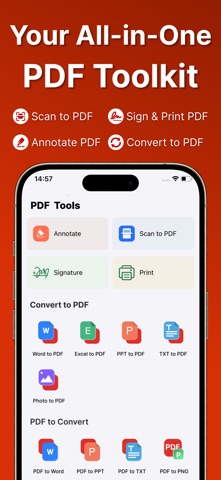
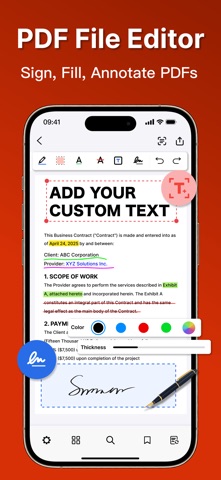
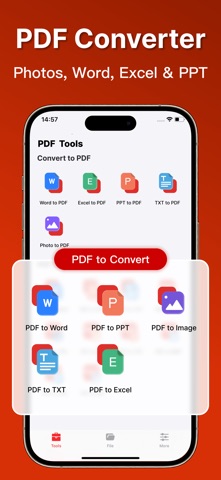
PDF Editor: Sign, Fill & Scan Screenshot 1 of 5
PDF Editor: Sign, Fill & Scan Screenshot 2 of 5
PDF Editor: Sign, Fill & Scan Screenshot 3 of 5
PDF Editor: Sign, Fill & Scan Screenshot 4 of 5
PDF Editor: Sign, Fill & Scan Screenshot 5 of 5
Screenshots by Beijing iDOTOOLS Technology Co., Ltd, from the the App Store listing
Description by Beijing iDOTOOLS Technology Co., Ltd Written by the developer, not by AppBrain. Click to read.
Meet your all-in-one PDF editor — one app to sign, fill, annotate, scan, convert, and print, so you never have to juggle separate tools to finish your paperwork.

Whether you’re a student marking up class notes or a professional signing contracts and archiving receipts, this PDF editor takes you from paper to finished PDF in just a few taps — fast, clean, and effortless.

PDF Editor — Sign & Fill
- Add handwritten or electronic signatures to any PDF
- Fill in forms and insert text anywhere on the page
- Place, resize, and reposition signatures freely
- Save signatures for fast, one-tap reuse

Smart Document Scanner
- Auto-detect document edges for precise, clean scans
- OCR technology extracts searchable text from images
- Turn receipts, notes, and paper files into digital PDFs
- Clarity enhancement for crisp, readable output

Photo & Image to PDF
- Convert JPG, PNG, and any photo to PDF instantly
- Batch-convert multiple images into a single PDF
- Word, Excel, PPT, TXT, and images to PDF
- PDF to Word, PPT, TXT, JPG, and PNG

PDF Annotation and Markup
- Highlight, underline, and strikethrough text
- Sticky notes, comments, and custom text insertion
- Area highlight with fully customizable colors
- Professional markup tools for study and work

PDF Reading Experience
- Vertical, continuous, and two-page view modes
- Adjustable brightness and independent cover mode
- Fast text search to jump to any position instantly
- Tag important pages for quick reference

Efficient PDF File Management
- Thumbnail view for fast page navigation
- Filter by All, Annotated, or Tagged Pages
- One-tap import from iPhone Files, Photos, or other apps
- Print PDFs directly via AirPrint to any compatible printer

From class notes to contracts and receipts — the all-in-one PDF editor that makes every task fast, clean, and effortless. Sign, fill, annotate, scan, convert, and print, all in one place.

* In order to use PDF Editor App you need to purchase the PDF Editor App which is an subscription. Payment will be charged to iTunes Account at confirmation of purchase and auto-renews at the same price unless disabled in iTunes Account Settings at least 24 hours before the end of the current period. Your subscription can be managed in your iTunes Account Settings. Any unused portion of a free trial period, if offered, will be forfeited when you purchase a subscription.

Links:
Terms of Service: https://10d7baee.pdf-7mv.pages.dev/PDFTermsConditions_en.html
Privacy: https://pdf-7mv.pages.dev/pdfPrivacyPolicy_en
Official page on the App Store
Apps other people are watching Price drops on Google Play Popular Productivity Apps Top new apps Today's trending apps
Password Manager: Vault Safe icon Password Manager: Vault Safe
AI Transcribe Now - Note Taker icon AI Transcribe Now - Note Taker
TransVoice: speech to text icon TransVoice: speech to text
Takeoff Check List icon Takeoff Check List
Sign PDF: eSign & Fill Forms icon Sign PDF: eSign & Fill Forms
Knowes HA icon Knowes HA
Screenshot AI: Gallery Cleaner icon Screenshot AI: Gallery Cleaner
PDF Pocket: Scanner & Editor icon PDF Pocket: Scanner & Editor
Overview Alternatives Reviews Rankings Technology
AppBrain Intelligence premium content

Subscribe now to get full and unlimited access to AppBrain Intelligence. You'll have access to:

  • App Intelligence dashboard (performance timeline, competitor comparison, country rankings, insight cards)
  • Detailed ranking data per app
  • Full timeline per developer
  • Device market shares data per country
  • Unlimited keyword tracking
1 Month

$75/mo
(billed every month)

SAVE 0%
Subscribe
3 Months

$65/mo
($195 billed every 3 months)

SAVE 13%
Subscribe
1 Year

$57.50/mo
($690 billed every year)

SAVE 23%
Subscribe
Each subscription will automatically renew 3 days before the expiration date for the same time period. Subscriptions can be cancelled at any time before the renewal.

AppBrain is an app data site, we track rankings, ratings, installs for all apps and games on Google Play and the App Store. AppBrain doesn't host app files or APKs, all install links go directly to the official store. All trademarks are owned by their respective owners.

More apps

  • Top Android apps being viewed
  • TREK: Total Interface (Large)
  • Toddler Food
  • Mine Maze 3D

App statistics

  • Android statistics
  • Google Play Developer stats
  • Trending Android Apps
  • Trending iOS apps
  • Top popular Apps
  • Buy the best Android phone
  • Buy & sell app businesses

About AppBrain

  • Contact
  • Privacy
  • Documentation
  • DMCA takedowns
  • Blog
  • How to improve the earnings of your ad units
© 2010-2026 - AppBrain