

PDF Editor: Sign Offline
PDF Editor: Sign Offline is made and published by Robert Pinl. AppBrain is an independent app data site and isn't affiliated with Robert Pinl. The app name, icon, screenshots and description belong to Robert Pinl and are shown as published on the App Store.
AppBrain's verdict
- Rating on App Store
- 1.00
- 1 ratings
- Last updated
- October 12, 2026
It doesn't have enough ratings yet to judge what users think.
Rankings
App Store top chartsApp Store Rankings for PDF Editor: Sign Offline
Competitors
Similar apps and more from Robert PinlMore from Robert Pinl


Releases
Updates seen on the App Store- Version
- 2.2.1
- Launched
- December 2025
No changelog data
User feedback
Ratings and reviews on the App StoreComments on PDF Editor: Sign Offline for iOS
We don't have enough comments to show example comments. Please check back later.
Technology
Found in the app by AppBrain- Price
- Free
- App size
- 31.4 MB
- Content rating
- Everyone
Technologies used by PDF Editor: Sign Offline
About the app and developer
About PDF Editor: Sign Offline
PDF Editor: Sign Offline is a productivity app developed by Robert Pinl.
User Ratings
PDF Editor: Sign Offline is rated 1.00 out of 5 stars. The rating is based on one rating ratings.
App Information
PDF Editor: Sign Offline is freely available from the App Store. The app size is 31.44 MB. The latest version available is 2.2.1. The last update was on October 12, 2026.
Technical Requirements
The app has a content rating of Everyone. The app has been available on the App Store since December 2025.
Developer information for Robert Pinl
Address:
Store listing
By Robert Pinl, from the App Store



Description by Robert Pinl Written by the developer, not by AppBrain. Click to read.
Online PDF editors send your file to a server. This one never does. You merge, split, sign, scan, and lock documents on your iPhone or iPad. No account. No internet required.
Built for contracts, invoices, and files you would rather keep private.
Pro unlocks:
• Sign with your finger or Apple Pencil, then reuse the signature later
• Merge PDFs and drag pages into order
• Split a file at any page
• Reorder, rotate, or delete pages
• Scan paper into a PDF with the camera
• Build a PDF from photos, or export pages as JPG or PNG
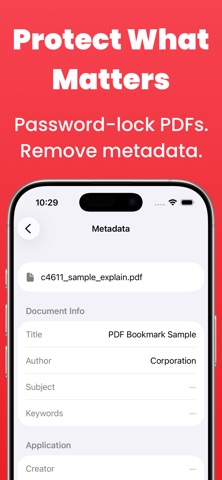
• Password-protect a file and limit printing or copying
• Remove a password you already know
• Strip hidden metadata before you share a file
What stays on your phone
• Works in airplane mode
• No cloud uploads
• No ads
• No analytics
• Nothing leaves your device
Terms of Use:
https://www.apple.com/legal/internet-services/itunes/dev/stdeula/