Download Android Apps and Games
AppBrain
  • Apps
  • Apps being viewed right now Trending apps today Most popular apps All-time most downloaded apps Top rated apps iPhone and iPad apps
  • Intelligence ▾
    Intelligence overview → Track any Android app or your whole market
    Track & analyze
    Keyword Tracker & OptimizerTrack & improve Play rankings App Performance ReportOne-off PDF for any app StatisticsFree Android & Play market stats
    Promote your app
    Featured Apps App Links
  • Intelligence
  • Pricing
  • Dashboard
  • Sign up
  • Log in
Last updated on: 2026-09-23
App Store Apps > Productivity > PDF Expert Lite: Scan & Edit
PDF Expert Lite: Scan & Edit icon

PDF Expert Lite: Scan & Edit

1.1
APP TEAM
0.00
0 reviews
Free

PDF Expert Lite: Scan & Edit Screenshot 1 of 6
PDF Expert Lite: Scan & Edit Screenshot 2 of 6
PDF Expert Lite: Scan & Edit Screenshot 3 of 6
PDF Expert Lite: Scan & Edit Screenshot 4 of 6
PDF Expert Lite: Scan & Edit Screenshot 5 of 6
PDF Expert Lite: Scan & Edit Screenshot 6 of 6
Download from the App Store

About PDF Expert Lite: Scan & Edit

PDF Expert Lite: Scan & Edit is a productivity app developed by APP TEAM.

User Ratings

The app has no ratings yet.

App Information

PDF Expert Lite: Scan & Edit is FREE to download. The download size is 5.92 MB. The latest version available is 1.1. The last update was on August 8, 2026.

Technical Requirements

The app has a content rating of Medium Maturity. The app has been available on the App Store since May 2026.

Description
DF Expert Lite is the all-in-one PDF tool for iPhone and iPad. Scan paper documents with your camera, annotate, sign, fill forms, merge, split, compress, and protect your PDFs — all without leaving the app.

FREE TO USE — 1 free action per day, no account needed. Upgrade to Pro for unlimited everything with a single one-time payment.

— SCAN & DIGITISE —
Turn paper documents into searchable PDFs in seconds using your camera. Auto-enhance, Black & White, Grayscale, and Color filters give every scan a clean, professional look. Reorder or delete pages before saving.

— ANNOTATE —
Highlight, underline, and strikethrough text. Draw freehand with the ink tool. Add text boxes, stamps (Approved, Confidential, Draft, and more), or custom stamps. Permanently redact sensitive information with the built-in redaction tool.

— SIGN DOCUMENTS —
Draw your signature with your finger or type it in a handwriting font. Save multiple signatures and place them on any page with a single tap. No third-party accounts or internet connection required.

— FILL PDF FORMS —
Tap any form field and type directly into it. Save the completed form as a new PDF ready to share or print.

— MERGE & SPLIT —
Combine multiple PDFs into one document in seconds. Split any PDF by page range or extract individual pages — perfect for sharing specific sections without sending the whole file.

— COMPRESS PDFs —
Reduce file size without losing readability. Choose from High Quality, Balanced, or Small Size to find the right balance before sending by email or uploading to cloud storage.

— OCR TEXT RECOGNITION —
Make scanned documents fully searchable and copy-pasteable. PDF Expert Lite reads the text on every page and embeds a searchable text layer — all on-device, no data sent anywhere.

— PASSWORD PROTECTION —
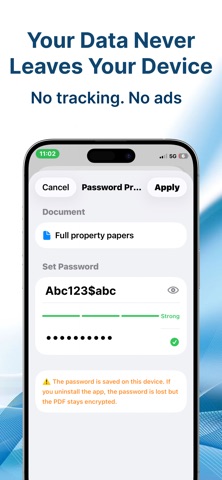
Lock any PDF with a password before sharing. Encrypted using standard PDF security so the file stays protected in any PDF reader.

— ORGANISE YOUR LIBRARY —
Create folders to keep documents organised. Sort by name, date, or file size. Rename and delete files with a long press. Full search across your entire library.

— ICLOUD SYNC —
Enable iCloud Drive sync to access your PDFs across all your Apple devices. Works seamlessly in the background.

— APP LOCK —
Protect your documents with Face ID, Touch ID, or your device passcode. Choose to lock every time you open the app or only after an idle timeout.

— BUILT FOR IPHONE & IPAD —
Full support for both iPhone and iPad, including Split View on iPad. Optimised for iOS 16 and later.

PRO — ONE-TIME PURCHASE
Upgrade to PDF Expert Lite Pro for unlimited daily actions. No subscription. No recurring charge. Pay once, use forever.
Show more Show less

More data about PDF Expert Lite: Scan & Edit

Price Free to download
Rating No ratings
Ranking Not ranked
Version 1.1
App download size 5.92 MB
Maturity Medium Maturity

Alternative downloads for the PDF Expert Lite: Scan & Edit app

MarkWrite icon MarkWrite
Guy Shaviv
0.0
Free
Calendar Pro: Daily Planner icon Calendar Pro: Daily Planner
xita apps
0.0
Free
Routine – Daily Planner icon Routine – Daily Planner
Tech Atlas LLC
0.0
Free
Vondel: Writing App icon Vondel: Writing App
CurrentLabs B.V.
0.0
Free
JustNotes - Notetaking/Markup icon JustNotes - Notetaking/Markup
Neel Roy
0.0
Free
Sticky Notes : StickMe icon Sticky Notes : StickMe
Vincent CORRU
0.0
Free
Scenarist icon Scenarist
Mykola Viunyk
5.0
Free
3 ratings
Temp Mail by Tempmails icon Temp Mail by Tempmails
Emre Can Islambey
5.0
Free
2 ratings

More from APP TEAM

Card Wallet: Cards Organizer icon Card Wallet: Cards Organizer
APP TEAM
5.0
Free
1 ratings
Wifi Router Tools - Scanner icon Wifi Router Tools - Scanner
APP TEAM
5.0
Free
1 ratings
Find My Phone - Clap Finder icon Find My Phone - Clap Finder
APP TEAM
0.0
Free
SmartRemote: TV Wi-Fi Control icon SmartRemote: TV Wi-Fi Control
APP TEAM
0.0
Free
AI Skills - Prompts & Courses icon AI Skills - Prompts & Courses
APP TEAM
0.0
Free
Vault - Safe Storage icon Vault - Safe Storage
APP TEAM
0.0
Free
AI Doc Scanner: PDF & OCR icon AI Doc Scanner: PDF & OCR
APP TEAM
0.0
Free
DB Sense- Sound Level Meter icon DB Sense- Sound Level Meter
APP TEAM
0.0
Free

Changelog of PDF Expert Lite: Scan & Edit

No changelog data

Developer information for APP TEAM

APP TEAM

Address:

Share PDF Expert Lite: Scan & Edit

Comments on PDF Expert Lite: Scan & Edit for iOS

We don't have enough comments to show example comments. Please check back later.

App Store Rankings for PDF Expert Lite: Scan & Edit

This app is not ranked

Technologies used by PDF Expert Lite: Scan & Edit

Apps on sale Popular Productivity Apps Today's trending apps Top new apps Apps other people are watching
MarkWrite icon MarkWrite
Calendar Pro: Daily Planner icon Calendar Pro: Daily Planner
Routine – Daily Planner icon Routine – Daily Planner
Vondel: Writing App icon Vondel: Writing App
JustNotes - Notetaking/Markup icon JustNotes - Notetaking/Markup
Sticky Notes : StickMe icon Sticky Notes : StickMe
Scenarist icon Scenarist
Temp Mail by Tempmails icon Temp Mail by Tempmails

Back to top
AppBrain Intelligence premium content

Subscribe now to get full and unlimited access to AppBrain Intelligence. You'll have access to:

  • App Intelligence dashboard (performance timeline, competitor comparison, country rankings, insight cards)
  • Detailed ranking data per app
  • Full timeline per developer
  • Device market shares data per country
  • Unlimited keyword tracking
1 Month

$75/mo
(billed every month)

SAVE 0%
Subscribe
3 Months

$65/mo
($195 billed every 3 months)

SAVE 13%
Subscribe
1 Year

$57.50/mo
($690 billed every year)

SAVE 23%
Subscribe
Each subscription will automatically renew 3 days before the expiration date for the same time period. Subscriptions can be cancelled at any time before the renewal.

AppBrain is a directory focused on discovering great apps and games. We give statistics, rankings and search options that Google Play and the App Store don't have. All trademarks are owned by their respective owners. AppBrain doesn't offer APKs or binaries, and always lets users install the official version from Google Play or the App Store.

More apps

  • Top Android apps being viewed
  • GymBAIT: AI Fitness Coach
  • Hanuman Chalisa by Amitabh Bachchan
  • The Book of Enoch: Audio Bible

App statistics

  • Android statistics
  • Google Play Developer stats
  • Trending Android Apps
  • Trending iOS apps
  • Top popular Apps
  • Buy the best Android phone

About AppBrain

  • Contact
  • Privacy
  • Documentation
  • DMCA takedowns
  • Articles
  • Blog
  • Android App Marketing: Learn how to better market your Android app
© 2010-2026 - AppBrain