
PDF Fill&Sign-Adobe PDF editor
PDF Fill&Sign-Adobe PDF editor is made and published by YXTECH LTD. AppBrain is an independent app data site and isn't affiliated with YXTECH LTD. The app name, icon, screenshots and description belong to YXTECH LTD and are shown as published on the App Store.
AppBrain's verdict
Established- Rating on App Store
- 5.00
- 2 ratings
- Last updated
- November 30, 2021
- Size
- 45.3 MB
It doesn't have enough ratings yet to judge what users think.
User feedback
Ratings and reviews on the App StoreComments on PDF Fill&Sign-Adobe PDF editor for iOS
We don't have enough comments to show example comments. Please check back later.
Store listing
By YXTECH LTD, from the App Store


Description by YXTECH LTD Written by the developer, not by AppBrain. Click to read.
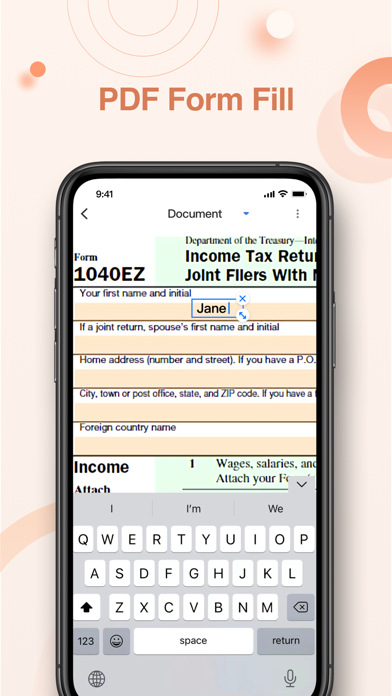
For those on the go and those who work from home, PDF Fill & Sign makes filling and signing documents very simple.
Download it now for FREE!
Features:
* Fill doucment
Open a Pdf from any App with PDF Fill&Sign. Tap to enter text or handwrite in form fields.
Choose variety of colors and pen thickness.
Pdf content Zoom In / Zoom Out.
* e-Signature
Create your signature with your finger, or use a signature on scanned paper, then apply your signature or initials to the form.
* Share with email or IM
Save forms in PDF or picture, and send to others immediately via email or IM.
Other features:
* Extract Texts from Image, OCR
* Optimize Scan Quality
* Quick Export PDF/JPEG Files
* AirPrint & Fax Documents
Payment models for Premium subscription:
-$ 4.99/month
Purchase Premium to unlock all the paid features. Subscription fee will be charged monthly.
Payment will be charged to iTunes Account at confirmation of purchase. Subscription automatically renews unless auto-renewal is turned off at least 24 hours before the end of the current period.
Your account will be charged for your renewal plan within 24 hours prior to the end of the current period. Subscriptions may be managed by the user and auto-renewal may by turned off by going to the user's Account Settings after purchase.
Your trial will end immediately if you paid for the subscription within the product.
Terms of Use:
https://text-ocr.com/userterms-pdfsign-en
Privacy Policy:
https://text-ocr.com/privacy-pdfsign-en
Safety and technology
Found in the app by AppBrain- Price
- Free
- App size
- 45.3 MB
- Content rating
- Everyone
Technologies used by PDF Fill&Sign-Adobe PDF editor
Releases
Updates seen on the App Store- Version
- 8.0.1
- Launched
- September 2021
No changelog data
Alternatives
Similar apps and more from YXTECH LTDAlternatives to PDF Fill&Sign-Adobe PDF editor





More from YXTECH LTD


Rankings
App Store top chartsApp Store Rankings for PDF Fill&Sign-Adobe PDF editor
About the app and developer
About PDF Fill&Sign-Adobe PDF editor
PDF Fill&Sign-Adobe PDF editor is a productivity app developed by YXTECH LTD.
User Ratings
PDF Fill&Sign-Adobe PDF editor is rated 5.00 out of 5 stars. The rating is based on 2 ratings.
App Information
PDF Fill&Sign-Adobe PDF editor is freely available from the App Store. The app size is 45.33 MB. The latest version available is 8.0.1. The last update was on November 30, 2021.
Technical Requirements
The app has a content rating of Everyone. The app has been available on the App Store since September 2021.
Developer information for YXTECH LTD
Address: