Download Android Apps and Games
AppBrain
  • Apps
  • Apps being viewed right now Trending apps today Most popular apps All-time most downloaded apps Top rated apps
  • Intelligence ▾
    Intelligence overview → Track any Android app or your whole market
    Track & analyze
    Keyword Tracker & OptimizerTrack & improve Play rankings App Performance ReportOne-off PDF for any app StatisticsFree Android & Play market stats
    Promote your app
    Featured Apps App Links
  • Intelligence
  • Pricing
  • Dashboard
  • Sign up
  • Log in
Last updated on: 2026-07-09
App Store Apps > Utilities > PDF Maker & Document Scanner
PDF Maker & Document Scanner icon

PDF Maker & Document Scanner

1.7.6
ZOHIAGADA LTD
4.62
110 reviews
Free

PDF Maker & Document Scanner Screenshot 1 of 9
PDF Maker & Document Scanner Screenshot 2 of 9
PDF Maker & Document Scanner Screenshot 3 of 9
PDF Maker & Document Scanner Screenshot 4 of 9
PDF Maker & Document Scanner Screenshot 5 of 9
PDF Maker & Document Scanner Screenshot 6 of 9
PDF Maker & Document Scanner Screenshot 7 of 9
PDF Maker & Document Scanner Screenshot 8 of 9
PDF Maker & Document Scanner Screenshot 9 of 9
Download from the App Store

About PDF Maker & Document Scanner

PDF Maker & Document Scanner is an overall app developed by ZOHIAGADA LTD.

Download Statistics

User Ratings

PDF Maker & Document Scanner is rated 4.62 out of 5 stars. The rating is based on 110 ratings.

App Information

PDF Maker & Document Scanner is FREE to download. The APK download size is 41.57 MB. The latest version available is 1.7.6. The last update was on June 26, 2026.

Technical Requirements

The app has a content rating of Everyone. The app has been available on Google Play March 2025.

Description
Someone needs it as a PDF, but you only have a photo, scan, or file? Turn it into a PDF from your camera, gallery, or imported files, then fix the order, rename the document, and share the final version. Get the file ready before the next thing interrupts you!

Most PDF jobs are not big projects. It is usually one form, a few pages from class, a receipt, a signed paper, or several pictures that would look better as a single file. Most of the time, it is easier to use a simple PDF creator than open a larger editor just to handle one quick file.

Create PDFs from everyday files

The app is built around simple PDF creation from everyday phone content. Use photos, images, camera scans, or imported files, then make a PDF you can rename, reorder, and export when the document looks right.

Scan paper documents

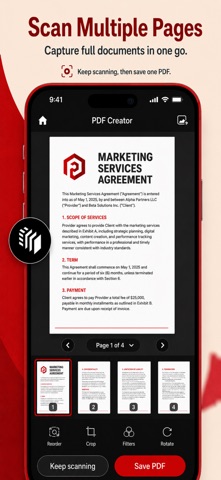
For pages you still have in front of you, the camera scanner keeps things simple. Capture printed documents, school notes, forms, receipts, letters, or office papers, then save them as PDF files instead of sending plain photos.

Convert photos and images

A lot of documents start as pictures now. Use the image converter to take photos from your gallery, place them in the right order, and make a PDF that looks cleaner when you need to send, upload, print, or store it.

Import saved files

For saved files, you do not need to scan anything again or turn the file into images first. Import the supported file, make it into a PDF, rename it if the name is too vague, and keep the finished document ready for sharing or later use.

What you can do:

- Create PDF files from photos, images, scans, and files
- Scan paper documents with your camera
- Convert pictures from your gallery into PDF files
- Import supported files and save them as PDFs
- Start a PDF from a blank canvas
- Rename files so they are easier to recognize
- Reorder pages before exporting
- Manage pages inside your PDF documents
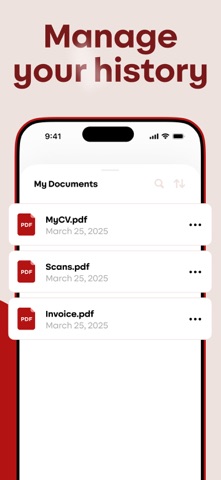
- Keep a history of created PDFs
- Share or export files quickly

Everyday PDF tasks

The app works well for everyday situations, not only office work. You might use it for class notes, homework, signed papers, forms, invoices, receipts, personal records, travel documents, confirmations, or quick camera scans. It is also useful when someone asks you to “send it as a PDF” and you only have the original as a photo or file.

Photo to PDF, scan to PDF, file to PDF

Photo to PDF is simple: choose images, check the page order, and create the document. Scan to PDF is just as direct: use the camera, capture the paper, and save it as a PDF. File to PDF is there when you want to import a supported file and turn it into something easier to share.

Organize pages before sharing

The page tools are useful when the first version is not quite right. Move pages around, give the PDF a clearer name, keep track of recent files, and send the final version without digging through a confusing workflow.

Simple PDF creation

This is more of a practical PDF creator than a complicated document workspace. You can scan, import, create, rename, reorder, and share, without getting pulled into a long editing process. For everyday PDFs from photos, images, files, and paper scans, that is usually what matters most.

Use it to:

- Turn photos into one PDF
- Scan a paper document
- Save images as a PDF file
- Create a PDF from imported files
- Reorder pages before sending
- Rename a document for easier tracking
- Share a clean PDF instead of loose images
- Keep recent PDF files in one place

A good PDF tool should save time, not add more steps. This app gives you the basic workflow most people need: choose the source, create the PDF, fix the order, rename it, and share or export the result.

Download our app when you need a PDF from photos, scans, images, or files without opening a complicated editor. Create documents from your camera, gallery, blank canvas, or imported files, then organize pages and share the finished PDF. Turn the thing you have into the file they need!
Show more Show less

More data about PDF Maker & Document Scanner

Price Free to download
Rating 4.62 based on 110 ratings
Ranking Not ranked
Version 1.7.6
App download size 41.6 MB
Suitable for Everyone

More from ZOHIAGADA LTD

AI ASMR Video Generator: CALMR icon AI ASMR Video Generator: CALMR
ZOHIAGADA LTD
4.6
Free
221 ratings

Changelog of PDF Maker & Document Scanner

No changelog data

Developer information for ZOHIAGADA LTD

ZOHIAGADA LTD

Address:

Share PDF Maker & Document Scanner

Comments on PDF Maker & Document Scanner for iOS

We don't have enough comments to show example comments. Please check back later.

App Store Rankings for PDF Maker & Document Scanner

This app is not ranked

Technologies used by PDF Maker & Document Scanner

Popular Overall Apps on sale Today's trending apps Top new apps Apps other people are watching
More hot apps 🔥

Back to top
AppBrain Intelligence premium content

Subscribe now to get full and unlimited access to AppBrain Intelligence. You'll have access to:

  • App Intelligence dashboard (performance timeline, competitor comparison, country rankings, insight cards)
  • Detailed ranking data per app
  • Full timeline per developer
  • Device market shares data per country
1 Month

$75/mo
(billed every month)

SAVE 0%
Subscribe
3 Months

$65/mo
($195 billed every 3 months)

SAVE 13%
Subscribe
1 Year

$57.50/mo
($690 billed every year)

SAVE 23%
Subscribe
Each subscription will automatically renew 3 days before the expiration date for the same time period. Subscriptions can be cancelled at any time before the renewal.

AppBrain is a directory focused on discovering great apps and games. We give statistics, rankings and search options that Google Play and the App Store don't have. All trademarks are owned by their respective owners. AppBrain doesn't offer APKs or binaries, and always lets users install the official version from Google Play or the App Store.

More apps

  • Top Android apps being viewed
  • Stylist - AI Clothes Changer
  • View Marwari Store
  • AI Voice Clone & TTS Maker Android App

Android Statistics

  • Android statistics
  • Google Play Developer stats
  • Trending Android Apps
  • Top popular Apps
  • Buy the best Android phone

About AppBrain

  • Contact
  • Privacy
  • Documentation
  • DMCA takedowns
  • Articles
  • Blog
  • Android Interstitial Ads: Best practices to optimize your app's earnings
© 2010-2026 - AppBrain