AppBrain
AppBrain
  • Apps
  • Apps being viewed right now Trending apps today Most popular apps All-time most installed apps Top rated apps iPhone and iPad apps
  • Intelligence ▾
    Intelligence overview → Track any Android app or your whole market
    Track & analyze
    Keyword Tracker & OptimizerTrack & improve Play rankings App Performance ReportOne-off PDF for any app StatisticsFree Android & Play market stats
    Promote your app
    Featured Apps App Links
  • Intelligence
  • Pricing
  • Dashboard
  • Sign up
  • Log in
App Store Apps > Productivity > PDF Markup Pro
PDF Markup Pro icon

PDF Markup Pro

1.0
Chris Barnhart
0.00
0 reviews
$29.99

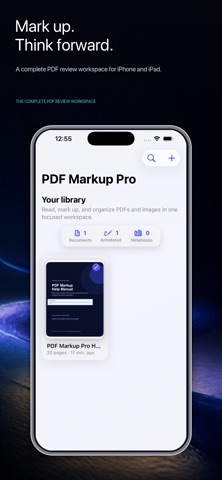
PDF Markup Pro Screenshot 1 of 10
PDF Markup Pro Screenshot 2 of 10
PDF Markup Pro Screenshot 3 of 10
PDF Markup Pro Screenshot 4 of 10
PDF Markup Pro Screenshot 5 of 10
PDF Markup Pro Screenshot 6 of 10
PDF Markup Pro Screenshot 7 of 10
PDF Markup Pro Screenshot 8 of 10
PDF Markup Pro Screenshot 9 of 10
PDF Markup Pro Screenshot 10 of 10
Screenshots by Chris Barnhart, from the the App Store listing
View on the App Store

AppBrain's verdict on PDF Markup Pro

Last updated
September 23, 2026
Size
5.77 MB
Official page on the App Store

About PDF Markup Pro

PDF Markup Pro is a productivity app developed by Chris Barnhart.

User Ratings

The app has no ratings yet.

App Information

PDF Markup Pro costs $29.99. The app size is 5.77 MB. The latest version available is 1.0. The last update was on September 23, 2026.

Technical Requirements

The app has a content rating of Everyone. The app has been available on the App Store since September 2026.

PDF Markup Pro is made and published by Chris Barnhart. AppBrain is an independent app data site and isn't affiliated with Chris Barnhart. The app name, icon, screenshots and description belong to Chris Barnhart and are shown as published on the App Store.

Description by Chris Barnhart (from the App Store)
Meet PDF Markup Pro — a faster, cleaner way to read, annotate, review, and share PDFs on iPhone and iPad.

Whether you're reviewing a contract, marking up a presentation, taking notes on a document, or sending feedback to someone else, PDF Markup Pro gives you powerful tools without getting in your way.

MARK UP PDFs NATURALLY

Write, draw, highlight, and annotate directly on your PDFs using Apple Pencil or your finger.

On iPad, enjoy the precision of Apple Pencil or simply use touch. On iPhone, mark up documents naturally with your finger wherever you are.

POWERFUL PDF REVIEW

Go beyond basic annotation.

• Review markups across your documents
• Quickly find the feedback that matters
• Add text and comments
• Capture voice comments when typing is too slow
• Create cleaner diagrams and callouts with shape snapping
• Search documents without losing your place

MAGIC TEXT

Interact with text directly inside your PDF workflow. Magic Text makes reviewing and working with document content faster and more intuitive.

ORGANIZE WITH NOTEBOOKS

Keep related PDFs together in notebooks instead of hunting through folders.

Perfect for:

• Contracts and agreements
• Presentations and reports
• School and research documents
• Plans and specifications
• Client reviews
• Real estate documents
• Creative feedback
• Personal documents

REVIEW EVERYTHING IN ONE PLACE

PDF Markup Pro makes it easy to review annotations across an entire notebook, helping you move from individual pages to the bigger picture.

CREATE THE RIGHT PDF FOR THE JOB

When you're finished, choose how you want to share your work.

Export:

• Editable PDFs
• Flattened PDFs
• Notes summaries
• Review Copies with dedicated space for feedback

Your original document stays useful while your review becomes easier to understand and share.

BUILT FOR IPHONE AND IPAD

Review and mark up PDFs anywhere.

Use your finger for quick edits and annotations on iPhone. Switch to iPad for a larger workspace, using touch or Apple Pencil whenever you want more precision.

No special accessory required.

NO CLUTTER. JUST YOUR DOCUMENT.

PDF Markup Pro is designed around the document itself. Powerful tools are there when you need them and out of the way when you don't.

From a quick signature or highlight to a detailed multi-document review, PDF Markup Pro gives you one focused workspace for working with PDFs.

Download PDF Markup Pro and make your next PDF review faster.
Show more Show less

More data about PDF Markup Pro

Price $29.99
Rating No ratings
Ranking Not ranked
Version 1.0
App size 5.77 MB
Suitable for Everyone

Share PDF Markup Pro

User feedback
Ratings and reviews on the App Store

Comments on PDF Markup Pro for iOS

We don't have enough comments to show example comments. Please check back later.

Safety and technology
Found in the app by AppBrain
Price
$29.99
App size
5.77 MB
Content rating
Everyone

Technologies used by PDF Markup Pro

Changelog of PDF Markup Pro

Updates seen on the App Store
Version
1.0
Launched
September 2026

No changelog data

Alternatives
Similar apps and more from Chris Barnhart

More from Chris Barnhart

Screenshot Hero AI icon Screenshot Hero AI
Chris Barnhart
5.0
$1.99
1 ratings
Go Time - Always on time icon Go Time - Always on time
Chris Barnhart
5.0
$1.99
1 ratings
Mini Merchants icon Mini Merchants
Chris Barnhart
5.0
$1.99
1 ratings
Maurice OS icon Maurice OS
Chris Barnhart
0.0
$9.99
Rankings
App Store top charts

App Store Rankings for PDF Markup Pro

This app is not ranked
About the app and developer

Developer information for Chris Barnhart

Chris Barnhart

Address:

Frequently asked questions about PDF Markup Pro

Is PDF Markup Pro free?

No. PDF Markup Pro costs $29.99 on the App Store.

Is PDF Markup Pro still available?

Yes. PDF Markup Pro is on the App Store, and the last update we saw was on September 23, 2026.

How large is PDF Markup Pro?

PDF Markup Pro is 5.77 MB.

Is PDF Markup Pro suitable for children?

App Store rates the content of PDF Markup Pro as suitable for everyone.

Who made PDF Markup Pro?

PDF Markup Pro was developed by Chris Barnhart. It is listed in the productivity category on the App Store.

Top new apps Popular Productivity Apps Today's trending apps Apps other people are watching Price drops on Google Play
More hot apps 🔥
Overview Reviews Rankings Technology
AppBrain Intelligence premium content

Subscribe now to get full and unlimited access to AppBrain Intelligence. You'll have access to:

  • App Intelligence dashboard (performance timeline, competitor comparison, country rankings, insight cards)
  • Detailed ranking data per app
  • Full timeline per developer
  • Device market shares data per country
  • Unlimited keyword tracking
  • AI assistant access via MCP (Claude, Cursor or any MCP client)
1 Month

$75/mo
(billed every month)

SAVE 0%
Subscribe
3 Months

$65/mo
($195 billed every 3 months)

SAVE 13%
Subscribe
1 Year

$57.50/mo
($690 billed every year)

SAVE 23%
Subscribe
Each subscription will automatically renew 3 days before the expiration date for the same time period. Subscriptions can be cancelled at any time before the renewal.

AppBrain is an app data site, we track rankings, ratings, installs for all apps and games on Google Play and the App Store. AppBrain doesn't host app files or APKs, all install links go directly to the official store. All trademarks are owned by their respective owners.

More apps

  • Top Android apps being viewed
  • Zentro Sports - Us Sports
  • Splittr - Expense Splitting
  • View Break Speed

App statistics

  • Android statistics
  • Google Play Developer stats
  • Trending Android Apps
  • Trending iOS apps
  • Top popular Apps
  • Buy the best Android phone
  • Buy & sell app businesses

About AppBrain

  • Contact
  • Privacy
  • Documentation
  • DMCA takedowns
  • Blog
  • The best curated Android app categories
© 2010-2026 - AppBrain