

PDF nano: PDF Editor & Reader
PDF nano: PDF Editor & Reader is made and published by Thamer Mohammed. AppBrain is an independent app data site and isn't affiliated with Thamer Mohammed. The app name, icon, screenshots and description belong to Thamer Mohammed and are shown as published on the App Store.
AppBrain's verdict
- Rating on App Store
- 5.00
- 1 ratings
- Last updated
- October 17, 2026
- Size
- 24.5 MB
It doesn't have enough ratings yet to judge what users think.
User feedback
Ratings and reviews on the App StoreComments on PDF nano: PDF Editor & Reader for iOS
We don't have enough comments to show example comments. Please check back later.
Store listing
By Thamer Mohammed, from the App Store




Description by Thamer Mohammed Written by the developer, not by AppBrain. Click to read.
Key Features:
1. Foldable iPhone Duo & iPad Experience:
• Seven Postures Adaptation: Automatic layout across foldable and dual-display devices.
• Dual-Screen Book Mode: Side-by-side reading with automatic hinge isolation to prevent content clipping.
• Tabletop Mode: Bottom screen transforms into a control deck for drawing, signing, and scrubbing without covering the document.
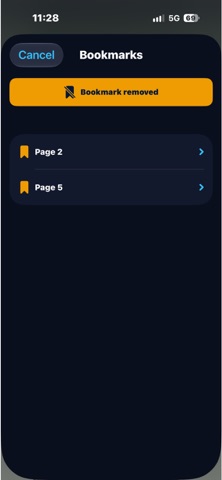
• Dynamic iPad Sidebar: Instant browsing of thumbnails, outlines, and bookmarks beside your canvas.
• High-Contrast Navigation Pill: Prominent back button for effortless touch accessibility and zero status-bar overlap.
2. AI Document Assistant (Beta):
• Instant executive summaries of lengthy reports, extracting decisions and action items.
• Precision risk analysis and contractual obligation detection.
• Verifiable Q&A with answers grounded in direct textual citations from your document.
• Encrypted Cloud Privacy: Powered by Apple Intelligence and Private Cloud Compute (PCC) to process documents securely without logging or storing data.
*Note: AI features require Apple Intelligence-compatible devices.
3. Offline Document Translation (Beta):
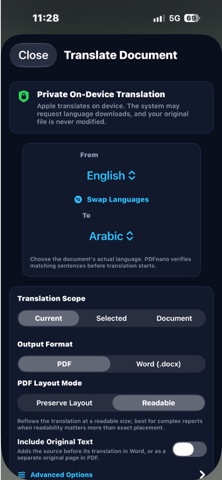
• Full-document PDF translation entirely offline while preserving layouts, fonts, and tables.
• Batch approval to accelerate processing for files up to 100 pages.
• Granular paragraph review with selective editing for each translated block.
*Note: Translation operates fully on-device. Machine translations may contain errors.
4. Advanced Reading & Viewing:
• Dual-Page Continuous View: True book-like reading with native RTL Arabic and LTR layout.
• Distraction-Free Guard: Locks editing overlays during reading mode to prevent accidental markups.
• Fast-Scrub Vertical Scroll: High-velocity thumb scrubber for jumping through hundreds of pages.
• Full Interface Adaptation: Precision safe-area integration around the Dynamic Island and status bar.
• Smart Double-Tap Zoom: Rapid focus scaling with an intuitive floating navigation capsule.
• OCR Visual Search: Direct in-document search across scanned PDFs with fuzzy and multi-word query support.
5. Conversion & Smart Scanning:
• High-Fidelity PDF to Word (.docx) conversion preserving tables and formatting.
• Accurate Table Extraction to Excel (.xlsx) with automatic data type inference.
• Camera Document Scanner to digitize receipts and paperwork into clean PDFs.
• High-quality PDF-to-Image and multi-image-to-PDF conversion pipelines.
6. Editing, Signing & Organization:
• Digital signatures: Create, position, and cryptographically sign contracts and forms.
• Complete markup suite: Freehand drawing, highlighters, custom text boxes, and annotations.
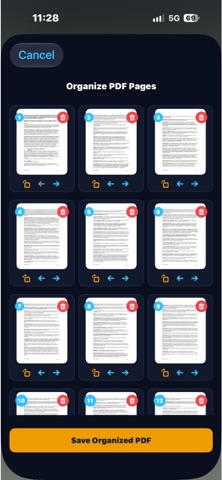
• Page management: Reorder, rotate, extract, or delete pages with fluid drag-and-drop.
• Merge & Split: Combine multiple PDFs into one or split large documents into individual files.
• Smart PDF Compression: Reduce file size for rapid sharing via email and messaging apps.
7. Industry-Leading Privacy & Security:
• 100% On-Device Processing: Reading, editing, translation, OCR, and conversion run locally without uploading files to external servers.
• Cryptographic Apple Privacy: AI Assistant requests are strictly restricted to Apple Private Cloud Compute (PCC).
• Visual face and sensitive data blurring with hidden metadata sanitization.
• Password encryption, native AirPrint support, and Home Screen widgets.
Free tier includes daily tool quotas. Unlock unlimited access via in-app purchase.
Standard Terms of Use (EULA):
https://www.apple.com/legal/sla/
Safety and technology
Found in the app by AppBrain- Price
- Free
- App size
- 24.5 MB
- Content rating
- Everyone
Technologies used by PDF nano: PDF Editor & Reader
Releases
Updates seen on the App Store- Version
- 3.0
- Launched
- July 2026
No changelog data
Alternatives
Similar apps and more from Thamer MohammedAlternatives to PDF nano: PDF Editor & Reader



More from Thamer Mohammed


Rankings
App Store top chartsApp Store Rankings for PDF nano: PDF Editor & Reader
About the app and developer
About PDF nano: PDF Editor & Reader
PDF nano: PDF Editor & Reader is a productivity app developed by Thamer Mohammed.
User Ratings
PDF nano: PDF Editor & Reader is rated 5.00 out of 5 stars. The rating is based on one rating ratings.
App Information
PDF nano: PDF Editor & Reader is freely available from the App Store. The app size is 24.52 MB. The latest version available is 3.0. The last update was on October 17, 2026.
Technical Requirements
The app has a content rating of Everyone. The app has been available on the App Store since July 2026.
Developer information for Thamer Mohammed
Address:
Frequently asked questions about PDF nano: PDF Editor & Reader
Is PDF nano: PDF Editor & Reader free?
Yes. PDF nano: PDF Editor & Reader is free on the App Store.
Is PDF nano: PDF Editor & Reader still available?
Yes. PDF nano: PDF Editor & Reader is on the App Store, and the last update we saw was on October 17, 2026.
How large is PDF nano: PDF Editor & Reader?
PDF nano: PDF Editor & Reader is 24.52 MB.
Is PDF nano: PDF Editor & Reader suitable for children?
App Store rates the content of PDF nano: PDF Editor & Reader as suitable for everyone.
How do people rate PDF nano: PDF Editor & Reader?
PDF nano: PDF Editor & Reader has one rating of 5.00 stars on the App Store.
Who made PDF nano: PDF Editor & Reader?
PDF nano: PDF Editor & Reader was developed by Thamer Mohammed. It is listed in the productivity category on the App Store.
What are the best alternatives to PDF nano: PDF Editor & Reader?
People looking at PDF nano: PDF Editor & Reader also look at these productivity apps: Scanify : Universal Scanner, PDF Pro Reader Edit-Converter, PDFz: PDF Scanner & Editor, Lyonesse: AI Transcript & Chat, BrainWave: Sharp Mind ™.