

PDF pages Extractor & Splitter
PDF pages Extractor & Splitter is made and published by Ruchira Ramesh. AppBrain is an independent app data site and isn't affiliated with Ruchira Ramesh. The app name, icon, screenshots and description belong to Ruchira Ramesh and are shown as published on the App Store.
AppBrain's verdict
- Last updated
- March 21, 2021
Rankings
App Store top chartsApp Store Rankings for PDF pages Extractor & Splitter
Competitors
Similar apps and more from Ruchira RameshMore from Ruchira Ramesh






Releases
Updates seen on the App Store- Version
- 7.1
- Launched
- December 2017
No changelog data
User feedback
Ratings and reviews on the App StoreComments on PDF pages Extractor & Splitter for iOS
We don't have enough comments to show example comments. Please check back later.
Technology
Found in the app by AppBrain- Price
- $3.99
- App size
- 14.8 MB
- Content rating
- Everyone
Technologies used by PDF pages Extractor & Splitter
About the app and developer
About PDF pages Extractor & Splitter
PDF pages Extractor & Splitter is a business app developed by Ruchira Ramesh.
User Ratings
The app has no ratings yet.
App Information
PDF pages Extractor & Splitter costs $3.99. The app size is 14.80 MB. The latest version available is 7.1. The last update was on March 21, 2021.
Technical Requirements
The app has a content rating of Everyone. The app has been available on the App Store since December 2017.
Developer information for Ruchira Ramesh
Address:
Frequently asked questions about PDF pages Extractor & Splitter
Is PDF pages Extractor & Splitter free?
No. PDF pages Extractor & Splitter costs $3.99 on the App Store.
Is PDF pages Extractor & Splitter still available?
Yes. PDF pages Extractor & Splitter is on the App Store, and the last update we saw was on March 21, 2021.
How large is PDF pages Extractor & Splitter?
PDF pages Extractor & Splitter is 14.80 MB.
Is PDF pages Extractor & Splitter suitable for children?
App Store rates the content of PDF pages Extractor & Splitter as suitable for everyone.
Who made PDF pages Extractor & Splitter?
PDF pages Extractor & Splitter was developed by Ruchira Ramesh. It is listed in the business category on the App Store.
Store listing
By Ruchira Ramesh, from the App Store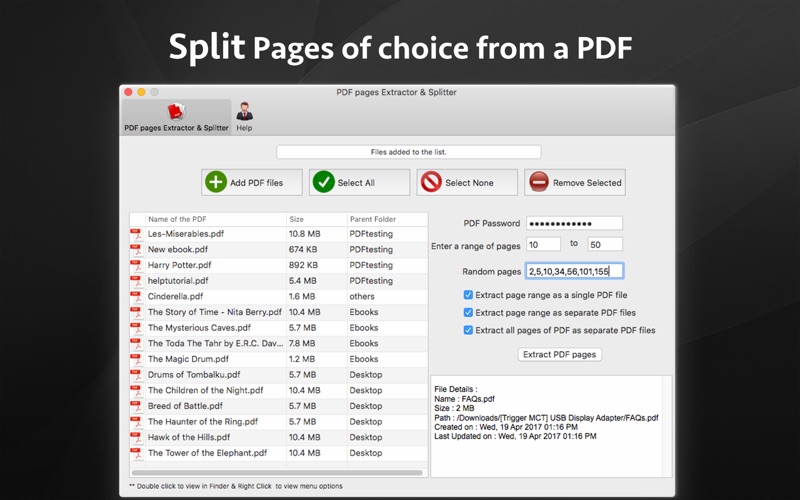

Description by Ruchira Ramesh Written by the developer, not by AppBrain. Click to read.
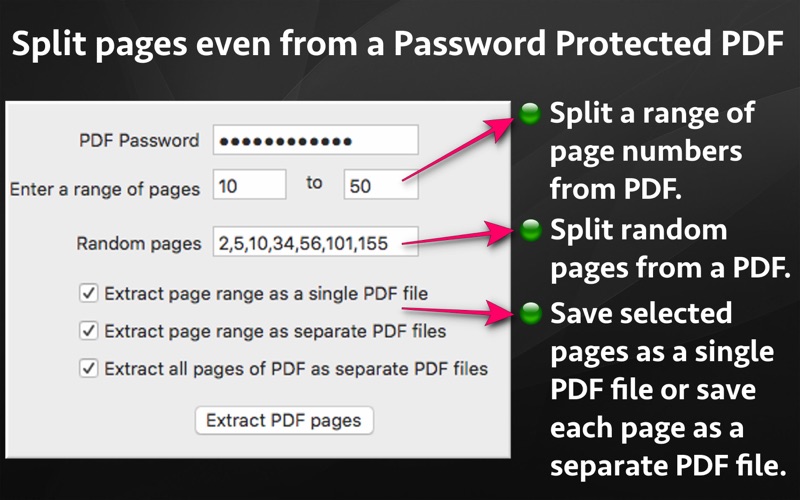
The application also supports Password Protected PDF files. This means that the application could easily extract pages even from PDF files that are protected by a password. Also, the application removes the password from the extracted pages.
(Note: You will have to enter the password in application.)
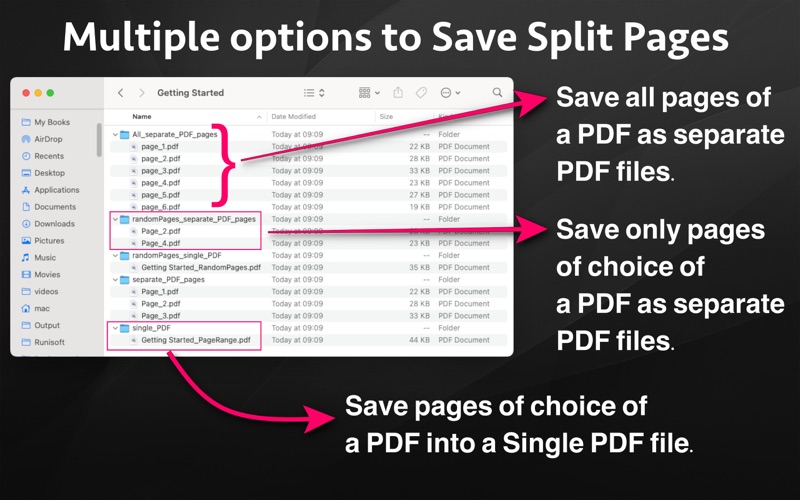
Using the application, you could specify a range of the pages to be extracted and saved.For example, if you want to extract from page 10 to page 20 of a PDF file, you could specify this range of 10 to 20 in the application. The application will extract these pages and save them either as a single PDF file or each page as a separate PDF file as per your choice.
Sometimes, we want to extract random pages from PDF. For example, if you want to extract only pages numbered 2,6,8,25, and 50 from PDF, this could be done as well. Inside the application just specify all page numbers separated by comma. The application will extract these random pages and save them either as a single PDF file or as a separate pdf file as per your choice.
If you want to extract all pages of PDF and save each of these pages as separate PDF, you could do this as well.
The extracted pages could be saved in following three ways :
a) All pages of choice could be extracted and saved as a single PDF file.
b) Each extracted page could be saved as a separate PDF file.
c) All pages of the PDF could be saved as a separate PDF file.
Benefits :
-- Reduce the file size by only taking the pages that are needed.
-- Share only the PDF containing the required pages.
-- Save PDF files without password
-- Remove unwanted pages from a PDF
-- Maintain documentation easily by extracting and keeping only important pages from a PDF.
-- Extracted pages could be easily used inside a document or a presentation.This makes documentation and presentation easy to prepare.