

PDF Photos - PicBinder
PDF Photos - PicBinder is made and published by Juan David Granados Figueroa. AppBrain is an independent app data site and isn't affiliated with Juan David Granados Figueroa. The app name, icon, screenshots and description belong to Juan David Granados Figueroa and are shown as published on the App Store.
AppBrain's verdict
- Last updated
- June 10, 2026
Rankings
App Store top chartsApp Store Rankings for PDF Photos - PicBinder
Competitors
Similar apps and more from Juan David Granados FigueroaMore from Juan David Granados Figueroa

Releases
Updates seen on the App Store- Version
- 1.0.1
- Launched
- May 2026
No changelog data
User feedback
Ratings and reviews on the App StoreComments on PDF Photos - PicBinder for iOS
We don't have enough comments to show example comments. Please check back later.
Technology
Found in the app by AppBrain- Price
- Free
- App size
- 33.2 MB
- Content rating
- Everyone
Technologies used by PDF Photos - PicBinder
About the app and developer
About PDF Photos - PicBinder
PDF Photos - PicBinder is a productivity app developed by Juan David Granados Figueroa.
User Ratings
The app has no ratings yet.
App Information
PDF Photos - PicBinder is freely available from the App Store. The app size is 33.25 MB. The latest version available is 1.0.1. The last update was on June 10, 2026.
Technical Requirements
The app has a content rating of Everyone. The app has been available on the App Store since May 2026.
Developer information for Juan David Granados Figueroa
Address:
Store listing
By Juan David Granados Figueroa, from the App Store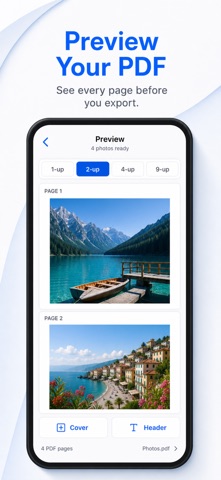


Description by Juan David Granados Figueroa Written by the developer, not by AppBrain. Click to read.
Pick photos from your library, arrange pages in the right order, preview the final document, choose a layout, add a cover or header, crop or rotate images, select compression, then save, print, or share one polished PDF.
It is built for quick everyday jobs like school assignments, receipts, forms, notes, homework, paperwork, and photo documents.
What you can do:
- Convert photos, JPG, JPEG, and pictures into PDF files.
- Combine multiple photos into one PDF.
- Preview every PDF page before export.
- Choose simple page layouts, including multi-photo pages.
- Add an optional cover page and editable header text.
- Keep pages in the order you choose.
- Crop, rotate, and clean up edges before export.
- Compress PDFs before sharing.
- Save, update, copy, print, or send through the iOS share sheet.
PDF Photos - PicBinder is designed to be simple, fast, and private. Create the PDF you need without a complicated editor or scanner suite.
Terms of Use (EULA): https://www.apple.com/legal/internet-services/itunes/dev/stdeula/