




AppBrain's verdict
- Last updated
- July 17, 2026
- Size
- 64.7 MB
User feedback
Ratings and reviews on the App StoreComments on PDF Print - Templates for iOS
We don't have enough comments to show example comments. Please check back later.
Store listing
By HARUN ADAL, from the App StoreDescription by HARUN ADAL Written by the developer, not by AppBrain. Click to read.
• • Transform the way you work with PDF documents! Whether you’re a student, teacher, or professional. PDFPrint-Template empowers you to organize, annotate, and design your documents without wasting paper.
• • Rich Template Library: Math worksheets, daily planners, habit trackers, and calendars are now at your fingertips! Generate output-ready professional pages in seconds.
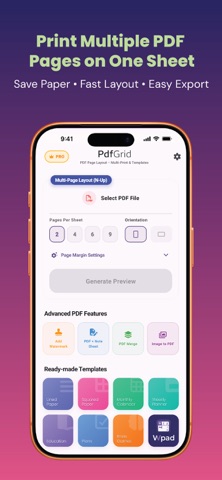
• N-Up Layout (Eco-Friendly)
Save paper by arranging multiple PDF pages (2, 4, 6+) on a single sheet.
• Brain Games & Education
Instant customizable math exercises and learning materials for all levels.
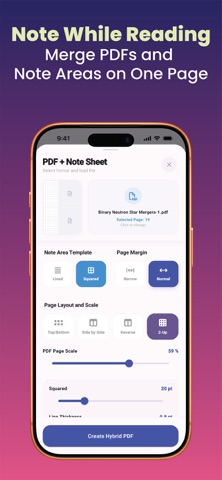
• Hybrid Note Sheets
Add ruled, squared, or blank note-taking sections directly onto your PDF pages.
• Professional Watermarking
Secure documents with custom "DRAFT" or "CONFIDENTIAL" watermarks.
• PDF Merge & Filters
Merge multiple files and filter pages to keep your documents perfectly organized.
• WPAD Editor
A powerful text editor to create professional documents from scratch and export as PDF.
• • Transform your photos into professional PDF documents instantly!
• Pdf Grid is the ultimate utility to convert, edit, and arrange your images into clean, high-quality PDF files. Whether you need to compile receipts, organize document scans, create a photo album, or print multiple images in a grid layout (N-up printing), Pdf Grid provides a seamless, secure, and lightning-fast experience directly on your iPhone or iPad.
• Instant Image to PDF Conversion: Convert any photos, PNG, or JPEG files into high-resolution PDFs in one tap.
• Custom Grid Layouts (N-up Printer): Arrange 2, 4, 6, 8, or more images on a single sheet of paper. Perfect for saving paper, creating flashcards, or printing compact reports.
• Built-in Rich Editor: Crop, rotate, and enhance your photos before converting. Ensure your documents look professional every time.
• Local & Secure: Your privacy is our top priority. All conversions are performed locally on your device. No internet connection required, and no data ever leaves your device.
• No Watermarks: Keep your documents clean and professional. We never add watermarks or logos to your PDFs.
• Organize & Share: Rename, save, or share your generated PDFs instantly via AirDrop, Email, WhatsApp, or any other app.
• Beautiful & Intuitive UI: Enjoy a modern, sleek interface with full support for Dark Mode and Light Mode.
• Streamline your PDF workflow today. Download Pdf Grid and enjoy the easiest way to manage, convert, and print your images!
Safety and technology
Found in the app by AppBrain- Price
- Free
- App size
- 64.7 MB
- Content rating
- Everyone
Technologies used by PDF Print - Templates
Releases
Updates seen on the App Store- Version
- 1.0.8
- Launched
- May 2026
No changelog data
Alternatives
Similar apps and more from HARUN ADALAlternatives to PDF Print - Templates


Rankings
App Store top chartsApp Store Rankings for PDF Print - Templates
About the app and developer
About PDF Print - Templates
PDF Print - Templates is a productivity app developed by HARUN ADAL.
User Ratings
The app has no ratings yet.
App Information
PDF Print - Templates is freely available from the App Store. The app size is 64.71 MB. The latest version available is 1.0.8. The last update was on July 17, 2026.
Technical Requirements
The app has a content rating of Everyone. The app has been available on the App Store since May 2026.
PDF Print - Templates is made and published by HARUN ADAL. AppBrain is an independent app data site and isn't affiliated with HARUN ADAL. The app name, icon, screenshots and description belong to HARUN ADAL and are shown as published on the App Store.
Developer information for HARUN ADAL
Address: