AppBrain
AppBrain
  • Apps
  • Apps being viewed right now Trending apps today Most popular apps All-time most installed apps Top rated apps iPhone and iPad apps
  • Intelligence ▾
    Intelligence overview → Track any Android app or your whole market
    Track & analyze
    Keyword Tracker & OptimizerTrack & improve Play rankings App Performance ReportOne-off PDF for any app StatisticsFree Android & Play market stats
    Promote your app
    Featured Apps App Links
  • Intelligence
  • Pricing
  • Dashboard
  • Sign up
  • Log in
App Store Apps > Productivity > PDF Reader & Document Scanner
PDF Reader & Document Scanner icon

PDF Reader & Document Scanner

27
Moses Julius
5.00
1 reviews
Free

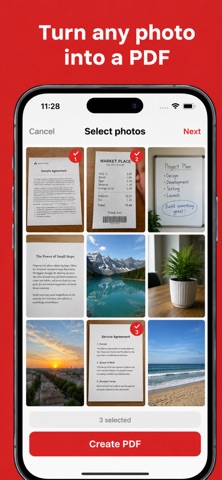
PDF Reader & Document Scanner Screenshot 1 of 6
PDF Reader & Document Scanner Screenshot 2 of 6
PDF Reader & Document Scanner Screenshot 3 of 6
PDF Reader & Document Scanner Screenshot 4 of 6
PDF Reader & Document Scanner Screenshot 5 of 6
PDF Reader & Document Scanner Screenshot 6 of 6
Screenshots by Moses Julius, from the the App Store listing
View on the App Store

About PDF Reader & Document Scanner

PDF Reader & Document Scanner is a productivity app developed by Moses Julius.

User Ratings

PDF Reader & Document Scanner is rated 5.00 out of 5 stars. The rating is based on one rating ratings.

App Information

PDF Reader & Document Scanner is freely available from the App Store. The app size is 76.20 MB. The latest version available is 27. The last update was on October 4, 2026.

Technical Requirements

The app has a content rating of Everyone. The app has been available on the App Store since November 2024.

Description by Moses Julius (from the App Store)
PROFESSIONAL PDF TOOL – READ, SCAN & CONVERT!

PDF Viewer is your powerful, all-in-one solution to handle documents with ease. View, scan, and manage PDF files instantly with a clean and intuitive interface. Get access to professional tools like OCR and Text-to-Speech (TTS) to make your document handling smarter.

Why Choose Our PDF Viewer?

Complete PDF Suite: Reader, Scanner, OCR, and TTS Voice combined in one app.

100% Private & Secure: Your files stay on your device. We prioritize your privacy with no cloud uploads.

High Performance: Lightweight design that opens even large documents smoothly without lag.

Key Features:

Smart PDF Scanner: Capture high-quality scans of receipts, books, and handwritten notes.

Image to PDF Converter: Instantly turn your JPG or PNG photos into professional PDF documents.

OCR (Text Extraction): Extract and copy text from scanned images for easy editing.

Read (TTS): Listen to your documents on the go with our built-in voice reader.

Merge & Split: Organize your files by combining multiple PDFs or separating specific pages.

Offline Access: Work anytime, anywhere—no internet connection required.

Upgrade to Premium:


Unlock an ad-free experience for uninterrupted productivity.

Get full access to all advanced professional tools.

Download now and experience the most reliable PDF tool for your daily tasks!

Privacy policy: https://sites.google.com/view/lovelypdfapp/home
terms and condition : https://sites.google.com/view/lovelypdfapp/termscondition
Show more Show less

More data about PDF Reader & Document Scanner

Price Free
Rating 5.00 based on a single rating
Ranking Not ranked
Version 27
App size 76.2 MB
Suitable for Everyone

More from Moses Julius

Word of God Bible icon Word of God Bible
Moses Julius
3.8
Free
5 ratings
Learn Hebrew easy way icon Learn Hebrew easy way
Moses Julius
3.2
Free
4 ratings
Blood Pressure Tracker Max icon Blood Pressure Tracker Max
Moses Julius
5.0
Free
3 ratings
Ai Text to Speech:Flow Vocal icon Ai Text to Speech:Flow Vocal
Moses Julius
5.0
Free
3 ratings
kalam e khuda urdu bible icon kalam e khuda urdu bible
Moses Julius
4.0
Free
2 ratings
Convert to PDF Pro Max Go icon Convert to PDF Pro Max Go
Moses Julius
5.0
Free
1 ratings
Box Breathing Coach: Calm icon Box Breathing Coach: Calm
Moses Julius
5.0
Free
1 ratings
Scientific Calculator & Units icon Scientific Calculator & Units
Moses Julius
5.0
Free
1 ratings

Changelog of PDF Reader & Document Scanner

No changelog data

Developer information for Moses Julius

Moses Julius

Address:

Share PDF Reader & Document Scanner

Comments on PDF Reader & Document Scanner for iOS

We don't have enough comments to show example comments. Please check back later.

App Store Rankings for PDF Reader & Document Scanner

This app is not ranked

Technologies used by PDF Reader & Document Scanner

Today's trending apps Top new apps Apps other people are watching Price drops on Google Play Popular Productivity Apps
More hot apps 🔥
AppBrain Intelligence premium content

Subscribe now to get full and unlimited access to AppBrain Intelligence. You'll have access to:

  • App Intelligence dashboard (performance timeline, competitor comparison, country rankings, insight cards)
  • Detailed ranking data per app
  • Full timeline per developer
  • Device market shares data per country
  • Unlimited keyword tracking
1 Month

$75/mo
(billed every month)

SAVE 0%
Subscribe
3 Months

$65/mo
($195 billed every 3 months)

SAVE 13%
Subscribe
1 Year

$57.50/mo
($690 billed every year)

SAVE 23%
Subscribe
Each subscription will automatically renew 3 days before the expiration date for the same time period. Subscriptions can be cancelled at any time before the renewal.

AppBrain is an app data site, we track rankings, ratings, installs for all apps and games on Google Play and the App Store. AppBrain doesn't host app files or APKs, all install links go directly to the official store. All trademarks are owned by their respective owners.

More apps

  • Top Android apps being viewed
  • Solitaire Angel - Card Puzzle
  • Santander Cash Nexus Sign
  • Figurine AI: 3D Figurine Maker

App statistics

  • Android statistics
  • Google Play Developer stats
  • Trending Android Apps
  • Trending iOS apps
  • Top popular Apps
  • Buy the best Android phone
  • Buy & sell app businesses

About AppBrain

  • Contact
  • Privacy
  • Documentation
  • DMCA takedowns
  • Blog
  • The AppBrain advertising system
© 2010-2026 - AppBrain