

PDF Reader Pro - Edit & Sign
PDF Reader Pro - Edit & Sign is made and published by Amar Singh Ahirwar. AppBrain is an independent app data site and isn't affiliated with Amar Singh Ahirwar. The app name, icon, screenshots and description belong to Amar Singh Ahirwar and are shown as published on the App Store.
AppBrain's verdict
- Last updated
- June 10, 2026
Rankings
App Store top chartsApp Store Rankings for PDF Reader Pro - Edit & Sign
Competitors
Similar apps and more from Amar Singh AhirwarAlternatives to PDF Reader Pro - Edit & Sign






More from Amar Singh Ahirwar


Releases
Updates seen on the App Store- Version
- 1.1.2
- Launched
- October 2025
No changelog data
User feedback
Ratings and reviews on the App StoreComments on PDF Reader Pro - Edit & Sign for iOS
We don't have enough comments to show example comments. Please check back later.
Technology
Found in the app by AppBrain- Price
- Free
- App size
- 12.9 MB
- Content rating
- Everyone
Technologies used by PDF Reader Pro - Edit & Sign
About the app and developer
About PDF Reader Pro - Edit & Sign
PDF Reader Pro - Edit & Sign is an utilities app developed by Amar Singh Ahirwar.
What is the rating of PDF Reader Pro - Edit & Sign?
PDF Reader Pro - Edit & Sign has no ratings yet.
Is PDF Reader Pro - Edit & Sign free?
PDF Reader Pro - Edit & Sign is free. The app size is 12.90 MB. The latest version available is 1.1.2. The last update was on June 10, 2026.
What are the requirements for PDF Reader Pro - Edit & Sign?
The app has a content rating of Everyone. The app has been available on the App Store since October 2025.
Developer information for Amar Singh Ahirwar
Address:
Frequently asked questions about PDF Reader Pro - Edit & Sign
Is PDF Reader Pro - Edit & Sign free?
Yes. PDF Reader Pro - Edit & Sign is free on the App Store.
Is PDF Reader Pro - Edit & Sign still available?
Yes. PDF Reader Pro - Edit & Sign is on the App Store, and the last update we saw was on June 10, 2026.
How large is PDF Reader Pro - Edit & Sign?
PDF Reader Pro - Edit & Sign is 12.90 MB.
Is PDF Reader Pro - Edit & Sign suitable for children?
App Store rates the content of PDF Reader Pro - Edit & Sign as suitable for everyone.
Who made PDF Reader Pro - Edit & Sign?
PDF Reader Pro - Edit & Sign was developed by Amar Singh Ahirwar. It is listed in the utilities category on the App Store.
What are the best alternatives to PDF Reader Pro - Edit & Sign?
People looking at PDF Reader Pro - Edit & Sign also look at these utilities apps: Contacts Backup & Sync, LetterSnap: Send letters, NESCO Distribution App, JPG to PDF: Scanner, Fontie Keyboard Fonts & Emoji.
Store listing
By Amar Singh Ahirwar, from the App Store
Description by Amar Singh Ahirwar Written by the developer, not by AppBrain. Click to read.
WHY PDF EDITOR PRO?
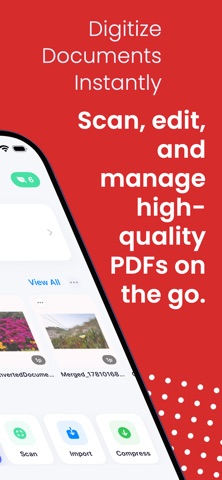
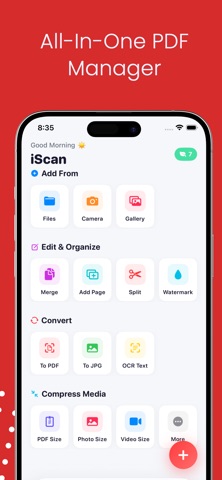
20+ Professional PDF Tools in One App
Lightning-fast performance and smooth interface
Industry-leading compression algorithms
Professional-grade document scanner
Secure offline processing - 100% privacy guaranteed
Cloud sync across all your Apple devices
No subscriptions required for basic features
COMPLETE PDF TOOLKIT
EDIT AND ANNOTATE
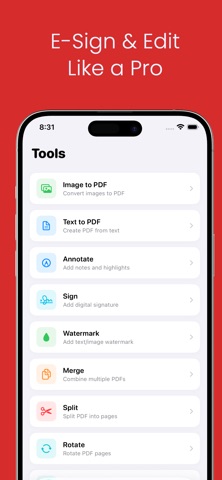
Add text, shapes, and drawings to PDFs
Highlight, underline, and strikethrough text
Insert images, stamps, and stickers
Add custom watermarks to protect documents
Delete, rotate, and rearrange pages
Professional PDF editing made simple
DIGITAL SIGNATURES
Create and save custom signatures
Sign documents with finger or stylus
Fill out and sign forms electronically
Add date stamps and text fields
Perfect for contracts, agreements, and forms
DOCUMENT SCANNER
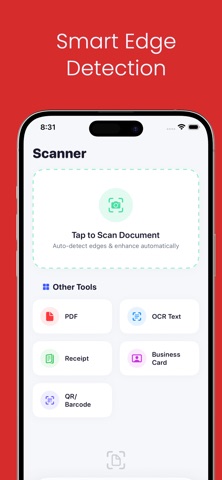
Scan documents with your camera
Auto edge detection and perspective correction
Multi-page document scanning
High-quality image processing
Convert scans to searchable PDFs with OCR
ORGANIZE PDFs
Merge multiple PDFs into one document
Split PDFs into separate files
Reorder pages with drag and drop
Rotate pages individually or in batches
Extract specific pages from PDFs
Delete unwanted pages
CONVERT AND EXTRACT
Convert PDFs to images (JPG, PNG)
Extract images from PDF documents
OCR text recognition for scanned documents
Convert images to PDF format
Export to Word, Excel formats (Premium)
SMART COMPRESSION
Reduce file sizes dramatically while maintaining quality
PDF Compression - Up to 90% size reduction
Photo Compression - Smart quality optimization
Video Compression - HD quality preservation
Audio Compression - Optimize sound files
Batch processing for multiple files
Before/after preview for comparison
SECURITY AND PRIVACY
Password protect sensitive documents
Biometric authentication (Face ID/Touch ID)
Private folder for confidential files
Offline processing - your files never leave device
No data collection or tracking
End-to-end encryption for cloud sync
Upgrade to Premium and unlock:
Unlimited PDF operations (no daily limits)
OCR text recognition for all languages
Advanced watermarking tools
Batch conversion and processing
Priority cloud sync
Export to Word, Excel, PowerPoint
Remove all advertisements
Premium customer support
Access to beta features
Lifetime updates
PERFECT FOR EVERYONE
STUDENTS - Scan lecture notes and textbooks, annotate study materials, sign and submit assignments, compress files for email submission
PROFESSIONALS - Sign contracts on the go, edit and review documents, compress presentations for sharing, merge reports into single PDFs
BUSINESSES - Process invoices and receipts, manage legal documents, create professional proposals, secure sensitive information
HOME USERS - Organize household documents, scan bills and receipts, fill out forms digitally, archive important papers
KEY FEATURES AT A GLANCE
Open PDF, Word, Excel, PowerPoint files
Annotate with text, shapes, drawings
Highlight and mark up documents
Digital signature creation and signing
Custom watermarks and stamps
Document scanner with OCR
Merge and split PDFs
Rotate and reorder pages
Extract images and text
Convert PDFs to images
Advanced file compression (PDF, photo, video, audio)
Password protection
Cloud synchronization
Dark mode support
iPad Pro and Apple Pencil support
Offline functionality
No registration required for basic features
DOWNLOAD NOW FREE
Start managing your documents like a pro! Download PDF Editor Pro today and experience the most complete PDF toolkit for iOS.
Made for iOS users worldwide
Copyright 2025 PDF Editor Pro