PDF Rocket: Signature Creator is a productivity app developed by Rasul Aghakishiyev.
User Ratings
PDF Rocket: Signature Creator is rated 4.86 out of 5 stars. The rating is based on 50 ratings.
App Information
PDF Rocket: Signature Creator is freely available from the App Store. The app size is 23.12 MB. The latest version available is 1.4.1. The last update was on October 13, 2026.
Technical Requirements
The app has a content rating of Everyone. The app has been available on the App Store since September 2025.
PDF Rocket: Signature Creator is made and published by
Rasul Aghakishiyev.
AppBrain is an independent app data site and isn't affiliated with Rasul Aghakishiyev.
The app name, icon, screenshots and description belong to Rasul Aghakishiyev and are shown as published on the App Store.
Description by Rasul Aghakishiyev(from the App Store)
PDF Rocket turns your iPhone or iPad into a complete PDF editor for everyday paperwork. Sign agreements, complete forms, organize files, and keep important documents moving without printing, faxing, or waiting. Whether you need a reliable document signer for business, school, or personal use, PDF Rocket helps you handle PDFs quickly with a smooth mobile workflow.
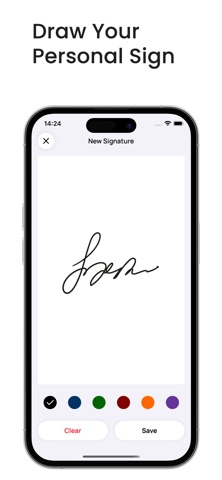
Use the built-in signature creator to add professional-looking signatures to contracts, invoices, applications, and approvals in seconds. Save your preferred signature styles for future use and keep your signing process consistent across documents. If you work with digital paperwork often, PDF Rocket gives you a fast way to prepare and send signed files from anywhere.
Need to scan documents while away from your desk? PDF Rocket includes a smart scanner pdf tool that captures paper records, receipts, IDs, and printed forms and turns them into clean digital PDFs. This makes it simple to bring physical paperwork into one secure mobile hub, ready for signing, sharing, or editing whenever needed.
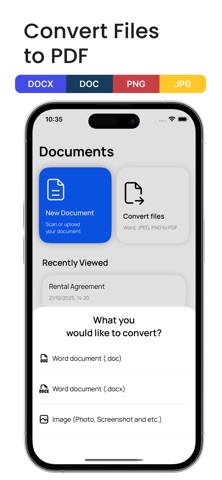
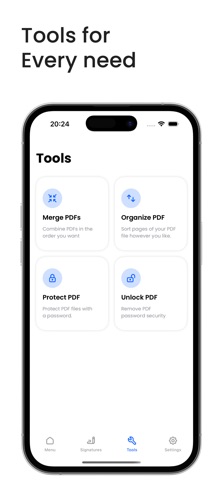
Beyond signing, PDF Rocket works as a practical editor pdf solution for common PDF tasks. Fill out forms, insert text, add dates, place checkmarks, and update pages directly from your device. You can also merge multiple PDFs into one file, reorder pages, rotate sheets, or remove anything unnecessary before sending. For users looking for a compact pdf converter and editing toolkit in one app, PDF Rocket delivers speed and convenience.
Security matters when working with sensitive documents. PDF Rocket helps protect private files with password options for confidential contracts, records, and business paperwork. If you need to work with your own protected PDFs, the app also supports unlocking for authorized use. From legal paperwork to travel records, your files stay organized and better protected throughout the process.
PDF Rocket is designed for people who want a dependable rocket-powered workflow for modern paperwork. From scan documents tasks to form completion and polished signatures, the app supports a wide range of daily needs in one place. Use it for work orders, tax papers, rental agreements, school forms, onboarding packets, and more. If you want a mobile PDF editor, scanner, and document signer that keeps your documents ready wherever you are, PDF Rocket is built to help.
Privacy Policy: https://sites.google.com/view/privacy-pdf-sign-fill/privacy Terms of Use: https://sites.google.com/view/pdf-sign-fill-terms/terms
Each subscription will automatically renew 3 days before the expiration date for
the same time period. Subscriptions can be cancelled at any time before the renewal.