AppBrain
AppBrain
  • Apps
  • Apps being viewed right now Trending apps today Most popular apps All-time most installed apps Top rated apps iPhone and iPad apps
  • Intelligence ▾
    Intelligence overview → Track any Android app or your whole market
    Track & analyze
    Keyword Tracker & OptimizerTrack & improve Play rankings App Performance ReportOne-off PDF for any app StatisticsFree Android & Play market stats
    Promote your app
    Featured Apps App Links
  • Intelligence
  • Pricing
  • Dashboard
  • Sign up
  • Log in
App Store Apps > Productivity > PDF Scanner・Doc Scanner App
PDF Scanner・Doc Scanner App icon

PDF Scanner・Doc Scanner App

by Hazel Mobile · Productivity · Free
On the App Store since February 2022 · Data updated 2026-10-31

PDF Scanner・Doc Scanner App is made and published by Hazel Mobile. AppBrain is an independent app data site and isn't affiliated with Hazel Mobile. The app name, icon, screenshots and description belong to Hazel Mobile and are shown as published on the App Store.

AppBrain's verdict

Rating on App Store
4.63
91 ratings
Last updated
April 24, 2024

It doesn't have enough ratings yet to judge what users think.

Official page on the App Store

Rankings

App Store top charts

App Store Rankings for PDF Scanner・Doc Scanner App

This app is not ranked

Competitors

Similar apps and more from Hazel Mobile

Alternatives to PDF Scanner・Doc Scanner App

PDF Scanner・Document Scanner icon PDF Scanner・Document Scanner
Games Wing
4.6
Free
2.1K ratings
QR Scanner & Reader Barcode icon QR Scanner & Reader Barcode
Hot VPN
4.2
Free
4 ratings
Photo to PDF - Image Converter icon Photo to PDF - Image Converter
Asad Ahsan
4.5
Free
103 ratings
Document Scanner by Lufick icon Document Scanner by Lufick
Lufick
4.8
Free
1.5K ratings
Atom PDF - OCR & Edit Document icon Atom PDF - OCR & Edit Document
BHIPSTER WORLD NETWORK TECH LIMITED
4.8
Free
4 ratings

More from Hazel Mobile

Commando Strike: Shooting Game icon Commando Strike: Shooting Game
Hazel Mobile
4.3
$19.99
510 ratings
QR & Barcode Scanner Expert icon QR & Barcode Scanner Expert
Hazel Mobile
4.1
Free
300 ratings
Translate・Language Translator icon Translate・Language Translator
Hazel Mobile
4.5
Free
159 ratings
Sticker Maker・Stickers & Emoji icon Sticker Maker・Stickers & Emoji
Hazel Mobile
4.4
Free
109 ratings
Girl Games: Makeup Games icon Girl Games: Makeup Games
Hazel Mobile
3.9
Free
76 ratings
Mega Real Racing Car Games icon Mega Real Racing Car Games
Hazel Mobile
4.2
Free
72 ratings
Offline Music Player: Song icon Offline Music Player: Song
Hazel Mobile
4.2
Free
72 ratings
Plane Simulator: Airplane icon Plane Simulator: Airplane
Hazel Mobile
3.6
Free
35 ratings

Releases

Updates seen on the App Store
Version
1.4.5
Launched
February 2022

No changelog data

User feedback

Ratings and reviews on the App Store

Comments on PDF Scanner・Doc Scanner App for iOS

We don't have enough comments to show example comments. Please check back later.

Technology

Found in the app by AppBrain
Price
Free
App size
16.3 MB
Content rating
Everyone

Technologies used by PDF Scanner・Doc Scanner App

About the app and developer

About PDF Scanner・Doc Scanner App

PDF Scanner・Doc Scanner App is a productivity app developed by Hazel Mobile.

What is the rating of PDF Scanner・Doc Scanner App?

PDF Scanner・Doc Scanner App is rated 4.63 out of 5 stars, based on 91 ratings.

Is PDF Scanner・Doc Scanner App free?

PDF Scanner・Doc Scanner App is free. The app size is 16.28 MB. The latest version available is 1.4.5. The last update was on April 24, 2024.

What are the requirements for PDF Scanner・Doc Scanner App?

The app has a content rating of Everyone. The app has been available on the App Store since February 2022.

Developer information for Hazel Mobile

Hazel Mobile

Address:

Share PDF Scanner・Doc Scanner App

Store listing

By Hazel Mobile, from the App Store
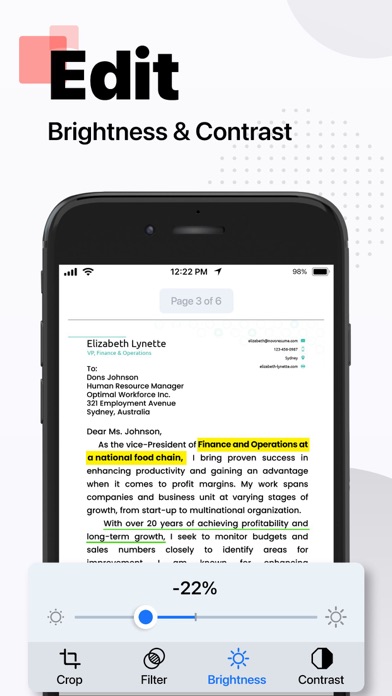
PDF Scanner・Doc Scanner App Screenshot 1 of 9
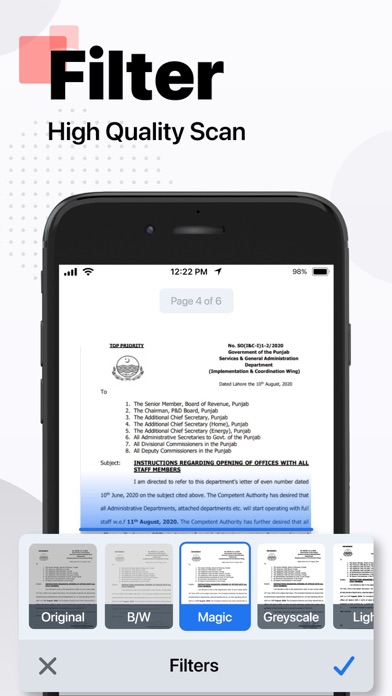
PDF Scanner・Doc Scanner App Screenshot 2 of 9
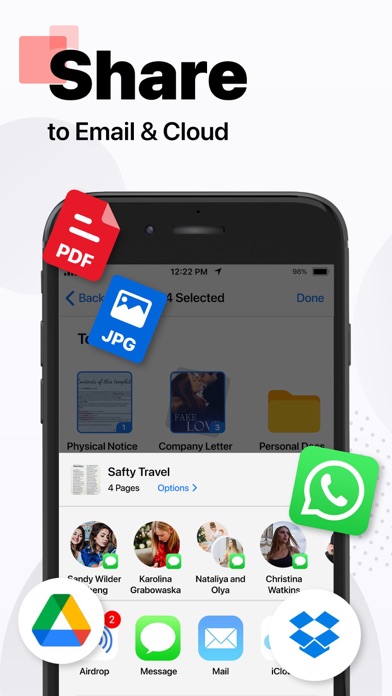
PDF Scanner・Doc Scanner App Screenshot 3 of 9
PDF Scanner・Doc Scanner App Screenshot 4 of 9
PDF Scanner・Doc Scanner App Screenshot 5 of 9
PDF Scanner・Doc Scanner App Screenshot 6 of 9
PDF Scanner・Doc Scanner App Screenshot 7 of 9
PDF Scanner・Doc Scanner App Screenshot 8 of 9
PDF Scanner・Doc Scanner App Screenshot 9 of 9
Screenshots by Hazel Mobile, from the the App Store listing
Description by Hazel Mobile Written by the developer, not by AppBrain. Click to read.
PDF scanner app is the ultimate tool for anyone who needs to scan documents and save them as PDF files. It is designed with advanced image processing technology that ensures your scans are always clear, sharp, and professional-looking. Here are some of the features that make this PDF app stand out from the rest:

1) Easy to use: It is incredibly easy to use, even if you're not tech-savvy. With just a few taps, you can quickly scan your document and save it as a PDF file.

2) High-quality scans: The app uses advanced image processing technology to ensure your scans are always high-quality, with clear text and sharp images.

3) Adjustable settings: You can easily adjust settings such as resolution, color mode, and file size to get the perfect scan every time.

4) Batch scanning: Need to scan multiple pages? No problem! DocuScan allows you to scan multiple pages and save them as a single PDF file.

5) Cloud integration: You can save your scans to the cloud for easy access from any device.

6) Share and export: DocuScan allows you to easily share your scanned documents via email, messaging apps, or social media. You can also export your scans to other file formats such as JPG or PNG.

7) Secure and private: It uses encryption to ensure your scanned documents are safe and secure. You can also set a passcode to protect your scans from prying eyes.

Wherever you are, easily scan photos, texts, and documents into high-quality PDF and JPEG files with this app. Powered by OCR technology, the scanner allows you to easily digitize books, business cards, and receipts and access them. You can quickly share your scanned documents effortlessly. DocuScan is the perfect solution for all your scanning needs.

Privacy Policy: https://hazelmobile.com/privacy-policy-ios/

Terms of Use: https://www.apple.com/legal/internet-services/itunes/dev/stdeula/

We’d love to hear from you! Please help us make our DocuScan: PDF Scanner & Maker App even better.
Official page on the App Store
Popular Productivity Apps Apps other people are watching Price drops on Google Play Top new apps Today's trending apps
PDF Scanner・Document Scanner icon PDF Scanner・Document Scanner
QR Scanner & Reader Barcode icon QR Scanner & Reader Barcode
Photo to PDF - Image Converter icon Photo to PDF - Image Converter
Document Scanner by Lufick icon Document Scanner by Lufick
Atom PDF - OCR & Edit Document icon Atom PDF - OCR & Edit Document
Overview Alternatives Reviews Rankings Technology
AppBrain Intelligence premium content

Subscribe now to get full and unlimited access to AppBrain Intelligence. You'll have access to:

  • App Intelligence dashboard (performance timeline, competitor comparison, country rankings, insight cards)
  • Detailed ranking data per app
  • Full timeline per developer
  • Device market shares data per country
  • Unlimited keyword tracking
1 Month

$75/mo
(billed every month)

SAVE 0%
Subscribe
3 Months

$65/mo
($195 billed every 3 months)

SAVE 13%
Subscribe
1 Year

$57.50/mo
($690 billed every year)

SAVE 23%
Subscribe
Each subscription will automatically renew 3 days before the expiration date for the same time period. Subscriptions can be cancelled at any time before the renewal.

AppBrain is an app data site, we track rankings, ratings, installs for all apps and games on Google Play and the App Store. AppBrain doesn't host app files or APKs, all install links go directly to the official store. All trademarks are owned by their respective owners.

More apps

  • Top Android apps being viewed
  • View Juwa 2.0 Casino 777 Slots
  • Car Locator Charger
  • Blush Screw Sort: Secret Girls

App statistics

  • Android statistics
  • Google Play Developer stats
  • Trending Android Apps
  • Trending iOS apps
  • Top popular Apps
  • Buy the best Android phone
  • Buy & sell app businesses

About AppBrain

  • Contact
  • Privacy
  • Documentation
  • DMCA takedowns
  • Blog
  • How to improve the earnings of your ad units
© 2010-2026 - AppBrain