

PDF Scanner
PDF Scanner is made and published by Nikunj Kavathiya. AppBrain is an independent app data site and isn't affiliated with Nikunj Kavathiya. The app name, icon, screenshots and description belong to Nikunj Kavathiya and are shown as published on the App Store.
AppBrain's verdict
- Last updated
- July 17, 2026
Rankings
App Store top chartsApp Store Rankings for PDF Scanner
Competitors
Similar apps and more from Nikunj KavathiyaMore from Nikunj Kavathiya


Releases
Updates seen on the App Store- Version
- 1.6
- Launched
- February 2026
No changelog data
User feedback
Ratings and reviews on the App StoreComments on PDF Scanner for iOS
We don't have enough comments to show example comments. Please check back later.
Technology
Found in the app by AppBrain- Price
- Free
- App size
- 4.19 MB
- Content rating
- Everyone
Technologies used by PDF Scanner
About the app and developer
About PDF Scanner
PDF Scanner is an utilities app developed by Nikunj Kavathiya.
User Ratings
The app has no ratings yet.
App Information
PDF Scanner is freely available from the App Store. The app size is 4.19 MB. The latest version available is 1.6. The last update was on July 17, 2026.
Technical Requirements
The app has a content rating of Everyone. The app has been available on the App Store since February 2026.
Developer information for Nikunj Kavathiya
Address:
Store listing
By Nikunj Kavathiya, from the App Store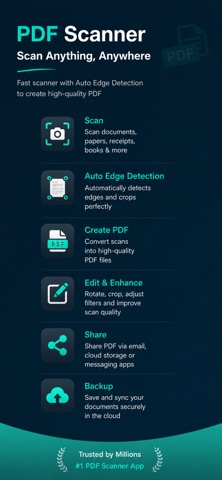

Description by Nikunj Kavathiya Written by the developer, not by AppBrain. Click to read.
Cam Scanner - PDF Docs Scanner
Doc Scanner – Turn your iPhone into a powerful document scanner. Document Scanner – Scanner App lets you scan documents, receipts, notes, IDs, books, and contracts with crystal-clear quality. Create high-quality PDF scans, apply smart enhancements, and share files anytime, anywhere.
Doc Scanner – Perfect for students, professionals, businesses, and freelancers.
# Key Features
# Smart Document Scanner
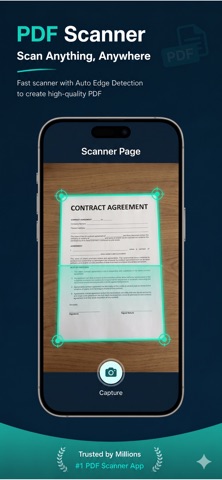
* Scan documents using your iPhone camera
* Automatic edge detection & perspective correction
* High-quality PDF & JPG output
# AI Image Enhancement
* Auto crop & rotate pages
* Remove shadows & noise
* Enhance text for sharp readability
# PDF Scanner & Creator
* Convert scans into PDF files
* Merge multiple pages into one PDF
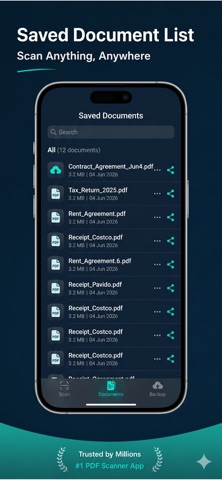
* Reorder, rename, and manage documents easily
# OCR Text Recognition
* Extract text from scanned documents
* Copy, edit, and search text instantly
* Supports multiple languages
# Secure & Private
* Face ID / Touch ID protection
* Local file storage for privacy
* Password-protected PDFs
# Easy Sharing & Export
* Share scans via Email, WhatsApp, Drive, iCloud
* Export PDFs or images instantly
* Print documents directly from the app
# Why Choose Document Scanner – Scanner App?
- Fast & lightweight scanner app
- Works offline – no internet required
- Perfect for office, school & home
- Clean iOS-style design & smooth performance
- Best alternative to CamScanner & Adobe Scan
# Use Cases
* Scan office documents & contracts
* Digitize receipts & bills
* Scan notes, books & assignments
* Create PDFs for work or study
* Store important documents securely
# Keywords
Document Scanner, Scanner App, PDF Scanner, Scan Documents, Mobile Scanner, OCR Scanner, PDF Maker, iOS Scanner App, Camera Scanner, Receipt Scanner
Terms of Use (EULA):, please visit
https://www.apple.com/legal/internet-services/itunes/dev/stdeula/
For Privacy Policy, please visit
https://www.freeprivacypolicy.com/live/6c9c96f5-1ee8-43df-803e-951b788544ca
We'd love to hear your feedback: nikkavathiya.gamedev@gmail.com