

PDF Scanner : Doc scan & sign
PDF Scanner : Doc scan & sign is made and published by Dajax LLC. AppBrain is an independent app data site and isn't affiliated with Dajax LLC. The app name, icon, screenshots and description belong to Dajax LLC and are shown as published on the App Store.
AppBrain's verdict
- Rating on App Store
- 1.00
- 1 ratings
- Last updated
- July 14, 2026
It doesn't have enough ratings yet to judge what users think.
Rankings
App Store top chartsApp Store Rankings for PDF Scanner : Doc scan & sign
Competitors
Similar apps and more from Dajax LLCAlternatives to PDF Scanner : Doc scan & sign


More from Dajax LLC




Releases
Updates seen on the App Store- Version
- 0.9
- Launched
- July 2026
No changelog data
User feedback
Ratings and reviews on the App StoreComments on PDF Scanner : Doc scan & sign for iOS
We don't have enough comments to show example comments. Please check back later.
Technology
Found in the app by AppBrain- Price
- Free
- App size
- 1.99 MB
- Content rating
- Everyone
Technologies used by PDF Scanner : Doc scan & sign
About the app and developer
About PDF Scanner : Doc scan & sign
PDF Scanner : Doc scan & sign is a productivity app developed by Dajax LLC.
What is the rating of PDF Scanner : Doc scan & sign?
PDF Scanner : Doc scan & sign is rated 1.00 out of 5 stars, based on one rating ratings.
Is PDF Scanner : Doc scan & sign free?
PDF Scanner : Doc scan & sign is free. The app size is 1.99 MB. The latest version available is 0.9. The last update was on July 14, 2026.
What are the requirements for PDF Scanner : Doc scan & sign?
The app has a content rating of Everyone. The app has been available on the App Store since July 2026.
Developer information for Dajax LLC
Address:
Frequently asked questions about PDF Scanner : Doc scan & sign
Is PDF Scanner : Doc scan & sign free?
Yes. PDF Scanner : Doc scan & sign is free on the App Store.
Is PDF Scanner : Doc scan & sign still available?
Yes. PDF Scanner : Doc scan & sign is on the App Store, and the last update we saw was on July 14, 2026.
How large is PDF Scanner : Doc scan & sign?
PDF Scanner : Doc scan & sign is 1.99 MB.
Is PDF Scanner : Doc scan & sign suitable for children?
App Store rates the content of PDF Scanner : Doc scan & sign as suitable for everyone.
How do people rate PDF Scanner : Doc scan & sign?
PDF Scanner : Doc scan & sign has one rating of 1.00 stars on the App Store.
Who made PDF Scanner : Doc scan & sign?
PDF Scanner : Doc scan & sign was developed by Dajax LLC. It is listed in the productivity category on the App Store.
What are the best alternatives to PDF Scanner : Doc scan & sign?
People looking at PDF Scanner : Doc scan & sign also look at these productivity apps: Home Inventory: AI Organizer, ReceiptVault: Receipt Scanner, Expert Chase: AI for Life, SmartLists: Voice AI Todo List, monolog - Your Second Brain.
Store listing
By Dajax LLC, from the App Store



Description by Dajax LLC Written by the developer, not by AppBrain. Click to read.
SCAN
• Capture documents with automatic edge detection
• Every scan becomes a searchable PDF — text is recognized on-device
• Color, grayscale, and black & white filters; rotate and reorder pages
• Find any document by searching the words inside it
EDIT
• Add text, images, and your own signature to any PDF
• Fill PDF forms (real form fields, not overlays)
• Erase parts of a page — truly removed, not hidden
• Import PDFs from anywhere, including password-protected ones
• Protect any document with a password
COLLECT SIGNATURES
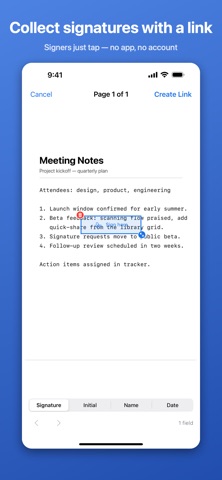
• Place Signature, Initial, Name, and Date fields on your document
• Share a private link — your signer opens it in any browser, no app or account needed
• They draw their signature once and it fills every field; dates stamp automatically
• The signed result appears back in your document, locked against editing, with a green "Signed" badge
• Signers can revisit their link for 14 days to view what they signed
PRIVATE BY DESIGN
• Your library lives on your device — scans never leave your phone unless you share them
• Only documents you send for signature are uploaded, and they're deleted from the server no later than 14 days after signing
• No account, no analytics, no ads, no data sold — ever
Whether it's a lease, a permission slip, a contract, or a receipt: scan it, fix it up, get it signed.