

PDF Scanner & OCR: DocyScan
PDF Scanner & OCR: DocyScan is made and published by Pedro Gregorio. AppBrain is an independent app data site and isn't affiliated with Pedro Gregorio. The app name, icon, screenshots and description belong to Pedro Gregorio and are shown as published on the App Store.
AppBrain's verdict
- Last updated
- October 12, 2026
Rankings
App Store top chartsApp Store Rankings for PDF Scanner & OCR: DocyScan
Competitors
Similar apps and more from Pedro GregorioMore from Pedro Gregorio


Releases
Updates seen on the App Store- Version
- 1.04
- Launched
- January 2025
No changelog data
User feedback
Ratings and reviews on the App StoreComments on PDF Scanner & OCR: DocyScan for iOS
We don't have enough comments to show example comments. Please check back later.
Technology
Found in the app by AppBrain- Price
- Free
- App size
- 9.46 MB
- Content rating
- Everyone
Technologies used by PDF Scanner & OCR: DocyScan
About the app and developer
About PDF Scanner & OCR: DocyScan
PDF Scanner & OCR: DocyScan is a business app developed by Pedro Gregorio.
What is the rating of PDF Scanner & OCR: DocyScan?
PDF Scanner & OCR: DocyScan has no ratings yet.
Is PDF Scanner & OCR: DocyScan free?
PDF Scanner & OCR: DocyScan is free. The app size is 9.46 MB. The latest version available is 1.04. The last update was on October 12, 2026.
What are the requirements for PDF Scanner & OCR: DocyScan?
The app has a content rating of Everyone. The app has been available on the App Store since January 2025.
Developer information for Pedro Gregorio
Address:
Frequently asked questions about PDF Scanner & OCR: DocyScan
Is PDF Scanner & OCR: DocyScan free?
Yes. PDF Scanner & OCR: DocyScan is free on the App Store.
Is PDF Scanner & OCR: DocyScan still available?
Yes. PDF Scanner & OCR: DocyScan is on the App Store, and the last update we saw was on October 12, 2026.
How large is PDF Scanner & OCR: DocyScan?
PDF Scanner & OCR: DocyScan is 9.46 MB.
Is PDF Scanner & OCR: DocyScan suitable for children?
App Store rates the content of PDF Scanner & OCR: DocyScan as suitable for everyone.
Who made PDF Scanner & OCR: DocyScan?
PDF Scanner & OCR: DocyScan was developed by Pedro Gregorio. It is listed in the business category on the App Store.
Store listing
By Pedro Gregorio, from the App Store



Description by Pedro Gregorio Written by the developer, not by AppBrain. Click to read.
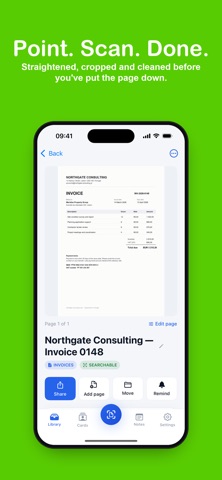
Built for people who deal with paper all day: invoices, receipts, contracts, letters and business cards.
SCAN
Get a crisp PDF with straight edges and no shadows. Pick Enhanced, Black and White or Grayscale, or keep the original. Add pages to a document any time.
FIND
Every word on every page is read on your iPhone the moment you scan. Search by a name, an invoice number or an amount and the right document comes up.
SHARE
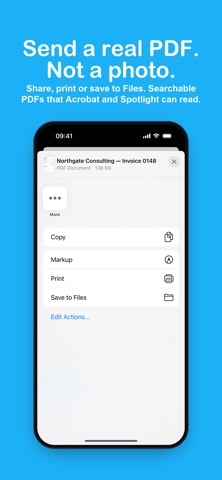
Send a real PDF, not a photo. Share it, print it or save it to Files. Pro exports searchable PDFs that any PDF reader and Spotlight can search.
FILE
Folders for invoices, receipts, contracts and personal documents are ready on your first run. Export a whole folder as one PDF.
BUSINESS CARDS
Scan a card and DocyScan lifts the name, company, email and phone. Save it to Contacts in one tap.
REMINDERS AND NOTES
Put a date on a contract or a renewal and get a nudge before it matters. Attach a note to any scan.
PRIVATE BY DESIGN
There is no account and no cloud. Scans, text and folders stay on your iPhone. Text recognition runs on the device, so it works with no signal. No ads.
DocyScan is free to use. DocyScan Pro removes the limits and adds text search inside scans, searchable PDF export, business cards to Contacts, reminders and folder export. Monthly and yearly plans, cancel any time.
Terms of use: https://www.apple.com/legal/internet-services/itunes/dev/stdeula/
Privacy policy: https://www.termsfeed.com/live/a6bd5bda-db4e-4b64-afd7-9cb6f96df456
Policy: https://www.termsfeed.com/live/a6bd5bda-db4e-4b64-afd7-9cb6f96df456
Terms:https://www.apple.com/legal/internet-services/itunes/dev/stdeula/