

PDF Scanner: Optic Scan
PDF Scanner: Optic Scan is made and published by SUNG HSIANG CHAO. AppBrain is an independent app data site and isn't affiliated with SUNG HSIANG CHAO. The app name, icon, screenshots and description belong to SUNG HSIANG CHAO and are shown as published on the App Store.
AppBrain's verdict
- Rating on App Store
- 5.00
- 1 ratings
- Last updated
- January 20, 2026
It doesn't have enough ratings yet to judge what users think.
Rankings
App Store top chartsApp Store Rankings for PDF Scanner: Optic Scan
Competitors
Similar apps and more from SUNG HSIANG CHAOAlternatives to PDF Scanner: Optic Scan


More from SUNG HSIANG CHAO


Releases
Updates seen on the App Store- Version
- 1.8.0
- Launched
- December 2025
No changelog data
User feedback
Ratings and reviews on the App StoreComments on PDF Scanner: Optic Scan for iOS
We don't have enough comments to show example comments. Please check back later.
Technology
Found in the app by AppBrain- Price
- Free
- App size
- 4.05 MB
- Content rating
- Everyone
Technologies used by PDF Scanner: Optic Scan
About the app and developer
About PDF Scanner: Optic Scan
PDF Scanner: Optic Scan is a business app developed by SUNG HSIANG CHAO.
User Ratings
PDF Scanner: Optic Scan is rated 5.00 out of 5 stars. The rating is based on one rating ratings.
App Information
PDF Scanner: Optic Scan is freely available from the App Store. The app size is 4.05 MB. The latest version available is 1.8.0. The last update was on January 20, 2026.
Technical Requirements
The app has a content rating of Everyone. The app has been available on the App Store since December 2025.
Developer information for SUNG HSIANG CHAO
Address:
Store listing
By SUNG HSIANG CHAO, from the App Store


Description by SUNG HSIANG CHAO Written by the developer, not by AppBrain. Click to read.
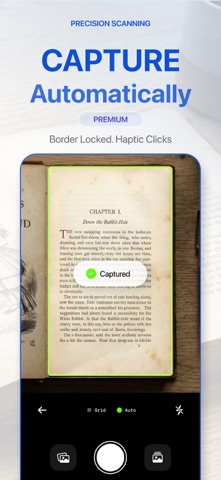
Optic is a fast PDF scanner and doc scanner built for people who just want the file done. Capture, auto-crop, enhance, and export with almost zero thinking.
KEY FEATURES
• One-tap scanning with fast auto edge detection
• Scan to PDF or JPG, single or multi-page
• OCR text recognition for searchable PDFs and copyable text
• Smart filters: Color, B/W, Greyscale, High-contrast
• Fix perspective and straighten pages for a “flat” look
• Batch scan and reorder pages in seconds
• Export and share: Files, Mail, Messages, AirDrop, cloud drives
• Create compact PDFs that stay crisp and easy to share
MADE FOR
Receipts, invoices, contracts, books, notes, forms, ID cards, whiteboards, and school handouts.
PRIVACY BY DESIGN
Your documents are yours. We’re built to minimize data collection and keep scanning simple.
Upgrade note: Some advanced features (like Auto-Scan, unlimited OCR and exports) may require a subscription, depending on your plan.
By using this app, you agree to the standard Apple Terms of Use (EULA).
Privacy Policy: https://pdf-scanner.app/privacypolicy
Terms of Use (EULA): https://www.apple.com/legal/internet-services/itunes/dev/stdeula/
Support: support@pdf-scanner.app