

PDF Scanner Pro: Sign PDF
PDF Scanner Pro: Sign PDF is made and published by ZHONGZHI YOLO HK LIMITED. AppBrain is an independent app data site and isn't affiliated with ZHONGZHI YOLO HK LIMITED. The app name, icon, screenshots and description belong to ZHONGZHI YOLO HK LIMITED and are shown as published on the App Store.
AppBrain's verdict
- Rating on App Store
- 4.17
- 23 ratings
- Last updated
- March 26, 2026
It doesn't have enough ratings yet to judge what users think.
Rankings
App Store top chartsApp Store Rankings for PDF Scanner Pro: Sign PDF
Competitors
Similar apps and more from ZHONGZHI YOLO HK LIMITEDAlternatives to PDF Scanner Pro: Sign PDF





More from ZHONGZHI YOLO HK LIMITED


Releases
Updates seen on the App Store- Version
- 4.1.1
- Launched
- May 2023
No changelog data
User feedback
Ratings and reviews on the App StoreComments on PDF Scanner Pro: Sign PDF for iOS
We don't have enough comments to show example comments. Please check back later.
Technology
Found in the app by AppBrain- Price
- Free
- App size
- 76.0 MB
- Content rating
- High
Technologies used by PDF Scanner Pro: Sign PDF
About the app and developer
About PDF Scanner Pro: Sign PDF
PDF Scanner Pro: Sign PDF is a productivity app developed by ZHONGZHI YOLO HK LIMITED.
User Ratings
PDF Scanner Pro: Sign PDF is rated 4.17 out of 5 stars. The rating is based on 23 ratings.
App Information
PDF Scanner Pro: Sign PDF is freely available from the App Store. The app size is 76.03 MB. The latest version available is 4.1.1. The last update was on March 26, 2026.
Technical Requirements
The app has a content rating of High Maturity. The app has been available on the App Store since May 2023.
Developer information for ZHONGZHI YOLO HK LIMITED
Address:
Store listing
By ZHONGZHI YOLO HK LIMITED, from the App Store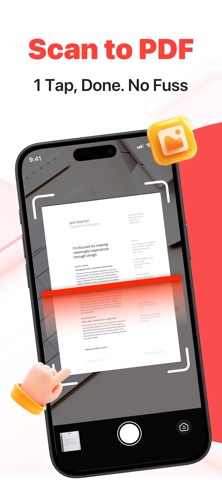

Description by ZHONGZHI YOLO HK LIMITED Written by the developer, not by AppBrain. Click to read.
Discover the most advanced all-in-one Scanner App and powerful pdf converter! Turn your mobile device into a portable scanner app that automatically recognizes text (OCR) and lets you scan documents, scan to pdf, and convert photo to pdf in seconds.
Say goodbye to bulky copy machines and embrace a paper-free life with this ultra-fast, scanner app. If you’re wondering how scan documents with iPhone or asking can I turn a photo into a pdf on iPhone, this app makes it simple to turn picture into pdf, photo to pdf iPhone, or image to pdf iPhone instantly. All your scanned documents are securely stored on your device—never sent to external servers.
FEATURES
FREE PDF & DOCUMENT SCANNER APP
Powerful scanner app and free scanner app uses your device’s camera to digitize all kinds of paper documents: receipts, notes, invoices, whiteboard discussions, business cards, certificates.
OPTIMIZE SCAN QUALITY
Enjoy smart cropping and auto-enhancing features that ensure your photo scans are clear and sharp, with premium colors and resolutions, making photo to pdf and picture to pdf conversions look professional.
VARIOUS SCANNING MODES
Document Scanner: Scan physical paper documents with 100% precision using the state-of-the-art auto side detection feature, converting them into PDF files with instant scan to pdf support.
ID Card & Passport Scanner: Quickly and easily scan ID documents with this dedicated mode.
Cam Scanner: Use your camera to scan in real-time and convert photo to pdf or turn picture into pdf immediately.
PDF CONVERTER
Create PDFs from anything and convert documents in multiple formats to PDF with our advanced pdf converter, turn into pdf free
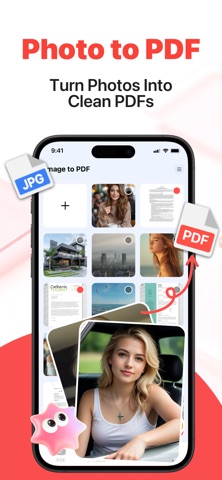
Photo to PDF: Capture photos and convert photo to pdf or photo to pdf iPhone effortlessly.
Image to PDF: Upload images and convert image to pdf or image to pdf iPhone in seconds.
Picture to PDF: Take pictures and turn picture into pdf or picture to pdf instantly.
Scan to PDF: Scan any paper document and scan to pdf without extra steps.
Supported formats: PDF, JPG, DOC, DOCX, TXT, XLS, XLSX,, PPT.
Easily convert jpg to pdf, jpg to pdf, convert photo to pdf, photo to pdf, image to pdf, picture to pdf.
SIGN & STAMP ON THE GO
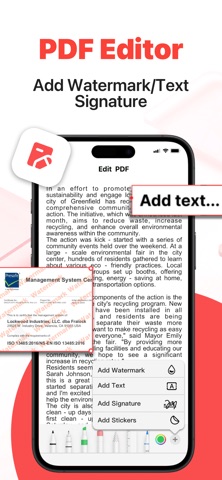
Draw, scan, or import your signature into the app. With just a few taps, you can sign and convert any document into a PDF, ready to share instantly after you scan documents.
BUILT-IN PDF EDITOR
Polish your scans effortlessly with our built-in editor, offering features like cropping, brightness adjustment, contrast tuning, text extraction, text editing, and more after you convert photo to pdf or turn picture into pdf.
DATA SECURITY
Rest easy knowing your data is private. All documents are stored and processed only on your device, with no uploads to servers. We ensure 100% data security by restricting any outgoing data, making this app the most secure choice for your files.