

PDF Scanner: Scan PDF Editor
PDF Scanner: Scan PDF Editor is made and published by Payal Amreliya. AppBrain is an independent app data site and isn't affiliated with Payal Amreliya. The app name, icon, screenshots and description belong to Payal Amreliya and are shown as published on the App Store.
AppBrain's verdict
- Rating on App Store
- 5.00
- 1 ratings
- Last updated
- October 10, 2026
- Size
- 160.4 MB
It doesn't have enough ratings yet to judge what users think.
User feedback
Ratings and reviews on the App StoreComments on PDF Scanner: Scan PDF Editor for iOS
We don't have enough comments to show example comments. Please check back later.
Store listing
By Payal Amreliya, from the App Store


Description by Payal Amreliya Written by the developer, not by AppBrain. Click to read.
Create PDFs from images, scan paper documents, annotate and sign PDFs, merge or split files, organize pages, add page numbers, compress documents, convert PDF pages to images, and protect important files—all without switching between multiple apps.
CREATE PDF FROM PHOTOS
Convert photos and images into PDF documents in seconds.
Select multiple JPG, JPEG, or PNG images and combine them into one PDF. Reorder pages before exporting and customize page size, orientation, margins, and image fit for the result you need.
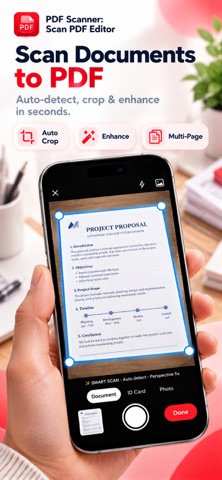
SCAN DOCUMENTS TO PDF
Turn your iPhone or iPad into a convenient document scanner.
Scan paper documents, receipts, notes, forms, contracts, letters, and other pages using your camera. Automatically crop and enhance scans, apply document filters, arrange pages, and save them as PDF files.
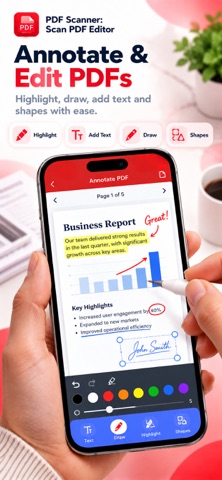
ANNOTATE PDF DOCUMENTS
Review and mark up PDF files directly in the app.
Highlight important content, draw on pages, add text, and use annotation tools and shapes to make notes or mark changes without creating a new document from scratch.
SIGN PDF FILES
Add signatures directly to PDF documents.
Choose a PDF, create or import your signature, position it where needed, and save the signed document for sharing or storage.
MERGE PDF FILES
Combine multiple PDF documents into a single file.
Choose the PDFs you need, arrange them in the correct order, and create one organized document for work, school, forms, reports, or personal records.
SPLIT PDF DOCUMENTS
Split large PDF files into smaller documents.
Select individual pages or page ranges and extract only the pages you need into separate PDF files.
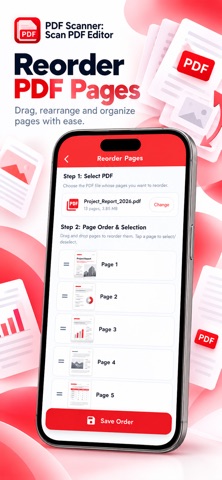
ORGANIZE PDF PAGES
Take control of every page in your document.
Reorder PDF pages with drag and drop, rotate pages, crop unwanted areas, or delete pages you no longer need.
ADD PAGE NUMBERS
Add clean page numbering to PDF documents.
Choose the number format, starting number, font size, and page-number position, including top or bottom placement.
PDF TO JPG & IMAGE CONVERTER
Convert PDF pages into high-quality JPG images.
Export all pages or select a specific page range, adjust image quality, and save the resulting images for easy sharing and reuse.
COMPRESS PDF FILES
Reduce PDF file size when you need smaller documents for sharing or storage.
Preview the estimated output size and choose the compression option that works best for your document.
ADD TEXT & WATERMARKS
Personalize PDF pages with text and watermarks.
Add labels, notes, ownership marks, or other information directly to your documents.
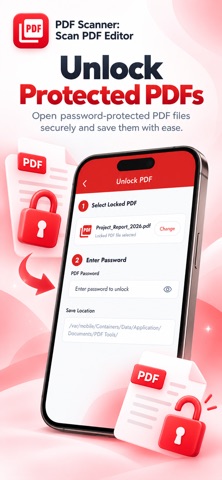
PASSWORD PROTECT & UNLOCK PDFs
Keep important PDF documents protected.
Add password protection to secure a PDF, or unlock a protected PDF when you know the correct password.
MANAGE YOUR PDF FILES
Keep your documents organized in one place.
Quickly find recent files, search your documents, browse PDFs and images, mark favorites, and access the files you use most.
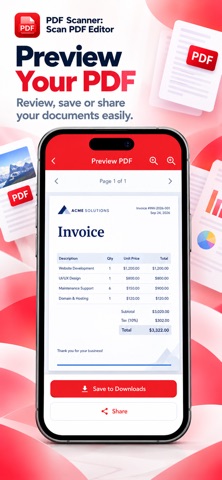
PREVIEW, SAVE & SHARE
Preview your finished PDF before exporting.
Choose a filename and save location, store documents in Files, or share PDFs and images with other apps directly from your iPhone or iPad.
ONE PDF TOOLKIT FOR EVERYDAY DOCUMENTS
Whether you need to scan a document, create a PDF from photos, edit PDF pages, sign a form, annotate a file, merge documents, split pages, compress a PDF, convert PDF to JPG, reorder pages, or protect a document with a password, everything is available in one PDF toolkit.
Download PDF Scanner and handle everyday PDF and document tasks from one place.
Terms of Use (EULA):
https://www.apple.com/legal/internet-services/itunes/dev/stdeula/
Safety and technology
Found in the app by AppBrain- Price
- Free
- App size
- 160.4 MB
- Content rating
- Everyone
Technologies used by PDF Scanner: Scan PDF Editor
Releases
Updates seen on the App Store- Version
- 2.0.4
- Launched
- January 2026
No changelog data
Alternatives
Similar apps and more from Payal AmreliyaAlternatives to PDF Scanner: Scan PDF Editor


More from Payal Amreliya


Rankings
App Store top chartsApp Store Rankings for PDF Scanner: Scan PDF Editor
About the app and developer
About PDF Scanner: Scan PDF Editor
PDF Scanner: Scan PDF Editor is a productivity app developed by Payal Amreliya.
What is the rating of PDF Scanner: Scan PDF Editor?
PDF Scanner: Scan PDF Editor is rated 5.00 out of 5 stars, based on one rating ratings.
Is PDF Scanner: Scan PDF Editor free?
PDF Scanner: Scan PDF Editor is free. The app size is 160.39 MB. The latest version available is 2.0.4. The last update was on October 10, 2026.
What are the requirements for PDF Scanner: Scan PDF Editor?
The app has a content rating of Everyone. The app has been available on the App Store since January 2026.
Developer information for Payal Amreliya
Address: