

PDF Scanner: Smart Scan
PDF Scanner: Smart Scan is made and published by antonio jesus pujol diaz. AppBrain is an independent app data site and isn't affiliated with antonio jesus pujol diaz. The app name, icon, screenshots and description belong to antonio jesus pujol diaz and are shown as published on the App Store.
AppBrain's verdict
- Last updated
- October 19, 2026
Rankings
App Store top chartsApp Store Rankings for PDF Scanner: Smart Scan
Competitors
Similar apps and more from antonio jesus pujol diazMore from antonio jesus pujol diaz


Releases
Updates seen on the App Store- Version
- 1.0.0
- Launched
- October 2026
No changelog data
User feedback
Ratings and reviews on the App StoreComments on PDF Scanner: Smart Scan for iOS
We don't have enough comments to show example comments. Please check back later.
Technology
Found in the app by AppBrain- Price
- Free
- App size
- 13.2 MB
- Content rating
- Everyone
Technologies used by PDF Scanner: Smart Scan
About the app and developer
About PDF Scanner: Smart Scan
PDF Scanner: Smart Scan is a productivity app developed by antonio jesus pujol diaz.
User Ratings
The app has no ratings yet.
App Information
PDF Scanner: Smart Scan is freely available from the App Store. The app size is 13.16 MB. The latest version available is 1.0.0. The last update was on October 19, 2026.
Technical Requirements
The app has a content rating of Everyone. The app has been available on the App Store since October 2026.
Developer information for antonio jesus pujol diaz
Address:
Store listing
By antonio jesus pujol diaz, from the App Store

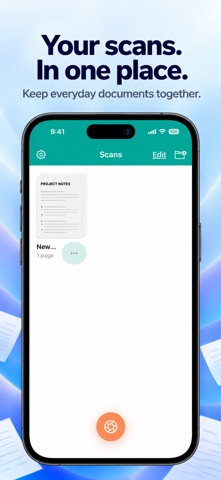


Description by antonio jesus pujol diaz Written by the developer, not by AppBrain. Click to read.
PDF Scanner: Smart Scan helps you capture receipts, notes and forms, tidy up each page, and keep your paperwork together. Scan with your camera or import a photo, then edit and share from your iPhone.
CAPTURE CLEAR PAGES
Use automatic or manual capture, adjust page borders and correct perspective. Combine multiple pages into one document.
EDIT, MARK UP AND SIGN
Crop and rotate pages, apply filters and adjust the image. Add annotations or a signature, and put pages in the right order before sharing.
KEEP DOCUMENTS ORGANIZED
Name your documents and arrange them in folders so everyday paperwork is easier to find.
EXPORT YOUR WAY
Share documents as PDF or JPG, save them to Files, send them by email or print with AirPrint. Choose your paper size and add a password to an exported PDF when needed.
ON-DEVICE TEXT RECOGNITION
Scanner PRO can recognize text from your scans so you can copy and use it. OCR is processed on your device. Review recognized text for accuracy.
EXTRA APP PROTECTION
With Scanner PRO, protect access to the app with a four-digit PIN. No app account is required.
FREE ACCESS AND SCANNER PRO
Create and save two documents in total without a subscription. A saved multipage document counts as one. Canceled or failed scans do not use the allowance, and deleting a document does not restore it. Editing and exporting your existing saved documents remain available without PRO.
Scanner PRO includes:
• Unlimited Document Scans
• Text Recognition (OCR)
• PIN App Protection
Choose a monthly, three-month or annual auto-renewable subscription. All plans unlock the same PRO features. Eligible new subscribers can receive a three-day free trial on the monthly plan only. The three-month and annual plans do not include a trial.
Your local price and billing period are shown before purchase. Payment is charged to your Apple Account. Subscriptions renew automatically unless canceled at least 24 hours before the trial or current period ends. Manage or cancel in your Apple Account settings. Restore Purchases is available in Settings and on the subscription screen.
Privacy Policy:
https://pdf-scanner-help.epicoia.chatgpt.site/privacy/
Terms of Use (Apple Standard EULA):
https://www.apple.com/legal/internet-services/itunes/dev/stdeula/