Download Android Apps and Games
AppBrain
  • Apps
  • Apps being viewed right now Trending apps today Most popular apps All-time most downloaded apps Top rated apps
  • Intelligence ▾
    Intelligence overview → Track any Android app or your whole market
    Track & analyze
    Keyword Tracker & OptimizerTrack & improve Play rankings App Performance ReportOne-off PDF for any app StatisticsFree Android & Play market stats
    Promote your app
    Featured Apps App Links
  • Intelligence
  • Pricing
  • Dashboard
  • Sign up
  • Log in
Last updated on: 2026-06-26
App Store Apps > Utilities > PDF Shuffler: Scan, OCR, Tools
PDF Shuffler: Scan, OCR, Tools icon

PDF Shuffler: Scan, OCR, Tools

1.3
Arseni Laputska
0.00
0 reviews
Free

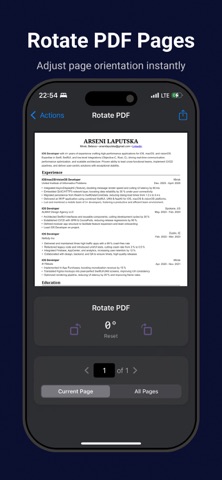
PDF Shuffler: Scan, OCR, Tools Screenshot 1 of 9
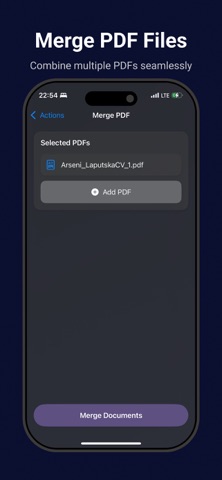
PDF Shuffler: Scan, OCR, Tools Screenshot 2 of 9
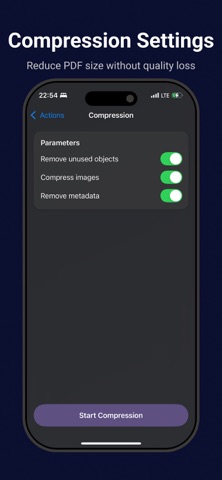
PDF Shuffler: Scan, OCR, Tools Screenshot 3 of 9
PDF Shuffler: Scan, OCR, Tools Screenshot 4 of 9
PDF Shuffler: Scan, OCR, Tools Screenshot 5 of 9
PDF Shuffler: Scan, OCR, Tools Screenshot 6 of 9
PDF Shuffler: Scan, OCR, Tools Screenshot 7 of 9
PDF Shuffler: Scan, OCR, Tools Screenshot 8 of 9
PDF Shuffler: Scan, OCR, Tools Screenshot 9 of 9
Download from the App Store

About PDF Shuffler: Scan, OCR, Tools

PDF Shuffler: Scan, OCR, Tools is an overall app developed by Arseni Laputska.

Download Statistics

User Ratings

The app has no ratings yet.

App Information

PDF Shuffler: Scan, OCR, Tools is FREE to download. The APK download size is 145.67 MB. The latest version available is 1.3. The last update was on June 18, 2025.

Technical Requirements

The app has a content rating of Everyone. The app has been available on Google Play May 2025.

Description
Take Control of Your Documents – Anywhere, Anytime, 100% Offline. PDF Shuffler turns your iPhone into a powerful all-in-one PDF office without ever needing internet. Scan paperwork to PDF in seconds, run lightning-fast OCR to extract text, and merge or split PDFs with a tap – all on-device. No clouds, no logins, no worries: your documents stay private on your phone. Join professionals and students who have ditched bulky scanners and slow online tools. Whether you’re at work, home, or on the go, PDF Shuffler lets you scan, edit, and organize PDFs offline – ensuring confidentiality and convenience.

KEY FEATURES (all fully functional offline):
• Document Scanner
Use your camera to scan documents, receipts, IDs, or books into crystal-clear PDFs. Advanced edge detection and auto-crop ensure perfect scans every time, even in low light. Batch-scan multiple pages effortlessly – go paperless in a snap.

• OCR Text Recognition
Instantly perform OCR on your scans in 20+ languages. Copy or search through text from paper documents with industry-leading accuracy. Works offline so your data never leaves your device.

• PDF Organizer
Easily reorder, rotate, or delete pages in your PDFs with our intuitive page organizer. Merge multiple PDFs into one file or split a large PDF into separate documents in seconds.

• PDF Converter
Convert images (JPG, PNG) to PDF and vice versa (PDF to JPG export). Turn an existing PDF into an editable text file or Word document with one tap.

• Compress & Optimize
Shrink PDF file sizes while preserving readability. Choose from multiple compression levels to reduce file size for sharing or storage without sacrificing quality.

• Annotate & Sign
Mark up your PDFs with highlights, notes, or freehand drawings. Insert your electronic signature or use the scan-to-sign feature to sign documents on the fly.

• Completely Offline
All features—from scanning to OCR to PDF editing—happen on your device. No Wi-Fi or cellular data needed, and nothing is uploaded to any server.

• Organize & Share
Create custom folders to organize your scans and PDFs. When you’re ready, send files via email, iMessage, or AirDrop. Integration with the iOS Files app lets you upload to iCloud, Dropbox, or Google Drive once you’re online.

• Fast and Easy to Use
PDF Shuffler’s clean, intuitive interface is designed for productivity. Open the app and start scanning in one tap.

WHO IS IT FOR?
Busy professionals, students, teachers, accountants, lawyers—or anyone who works with documents—will love the convenience.

YOUR PRIVACY, GUARANTEED
We never transmit your documents to a server. Your scans and OCR results stay locally on your device unless you choose to share them. No account required. You own your data.

Ready to experience the fastest offline PDF scanner and editor on the App Store? Download PDF Shuffler today and transform the way you manage documents—no internet, no subscriptions (basic features are free), just pure productivity.

Terms of Use: https://www.apple.com/legal/internet-services/itunes/dev/stdeula/
Show more Show less

More data about PDF Shuffler: Scan, OCR, Tools

Price Free to download
Rating No ratings
Ranking Not ranked
Version 1.3
App download size 145.7 MB
Suitable for Everyone

Alternative downloads for the PDF Shuffler: Scan, OCR, Tools app

Cam2PDF Scanner icon Cam2PDF Scanner
Diler Singh
0.0
Free
Documents Organizer Offline icon Documents Organizer Offline
Bohdan Solovei
0.0
Free
KPlayerAir icon KPlayerAir
BoHoon Kim
0.0
Free
Local LLM: Private Secure Chat icon Local LLM: Private Secure Chat
Pocket Bits LLC
3.0
$9.99
4 ratings
Eyesense Training icon Eyesense Training
Penraeth
0.0
Free
Scanner App to PDF Offline icon Scanner App to PDF Offline
Hopebest Inc Limited
0.0
Free
ITAD Summit 2025 icon ITAD Summit 2025
INTERNATIONAL E-RECYCLING ALLIANCE, INC.
0.0
Free
Drum Touch icon Drum Touch
Cherub Technology Co. Ltd
2.3
Free
3 ratings

Changelog of PDF Shuffler: Scan, OCR, Tools

No changelog data

Developer information for Arseni Laputska

Arseni Laputska

Address:

Share PDF Shuffler: Scan, OCR, Tools

Comments on PDF Shuffler: Scan, OCR, Tools for iOS

We don't have enough comments to show example comments. Please check back later.

App Store Rankings for PDF Shuffler: Scan, OCR, Tools

This app is not ranked

Technologies used by PDF Shuffler: Scan, OCR, Tools

Today's trending apps Apps other people are watching Apps on sale Popular Overall Top new apps
Cam2PDF Scanner icon Cam2PDF Scanner
Documents Organizer Offline icon Documents Organizer Offline
KPlayerAir icon KPlayerAir
Local LLM: Private Secure Chat icon Local LLM: Private Secure Chat
Eyesense Training icon Eyesense Training
Scanner App to PDF Offline icon Scanner App to PDF Offline
ITAD Summit 2025 icon ITAD Summit 2025
Drum Touch icon Drum Touch

Back to top
AppBrain Intelligence premium content

Subscribe now to get full and unlimited access to AppBrain Intelligence. You'll have access to:

  • App Intelligence dashboard (performance timeline, competitor comparison, country rankings, insight cards)
  • Detailed ranking data per app
  • Full timeline per developer
  • Device market shares data per country
1 Month

$75/mo
(billed every month)

SAVE 0%
Subscribe
3 Months

$65/mo
($195 billed every 3 months)

SAVE 13%
Subscribe
1 Year

$57.50/mo
($690 billed every year)

SAVE 23%
Subscribe
Each subscription will automatically renew 3 days before the expiration date for the same time period. Subscriptions can be cancelled at any time before the renewal.

AppBrain is a directory focused on discovering great apps and games. We give statistics, rankings and search options that Google Play and the App Store don't have. All trademarks are owned by their respective owners. AppBrain doesn't offer APKs or binaries, and always lets users install the official version from Google Play or the App Store.

More apps

  • Top Android apps being viewed
  • My Work in Progress - Gym Log
  • BIG WIN Racing: Race Master
  • SIPA Online stats

Android Statistics

  • Android statistics
  • Google Play Developer stats
  • Trending Android Apps
  • Top popular Apps
  • Buy the best Android phone

About AppBrain

  • Contact
  • Privacy
  • Documentation
  • DMCA takedowns
  • Articles
  • Blog
  • Android Interstitial Ads: Best practices to optimize your app's earnings
© 2010-2026 - AppBrain