




AppBrain's verdict
- Rating on App Store
- 4.55
- 11 ratings
- Last updated
- October 10, 2026
- Size
- 70.1 MB
It doesn't have enough ratings yet to judge what users think.
User feedback
Ratings and reviews on the App StoreComments on PDF Signer: Fill & Sign Docs for iOS
We don't have enough comments to show example comments. Please check back later.
Store listing
By Umer Ahmed, from the App StoreDescription by Umer Ahmed Written by the developer, not by AppBrain. Click to read.
SIGN PDF DOCUMENTS IN SECONDS
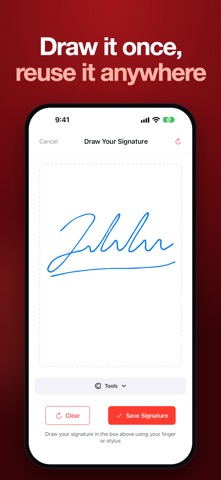
• Draw your signature with your finger or Apple Pencil and save it for one-tap reuse
• Add initials, dates, names, email and phone fields
• Drop checkboxes and text anywhere on the page
• Drag fields exactly where you need them
• Sign multi-page PDFs and documents with multiple signers
FILL & SIGN PDF FORMS
• Fill in PDF forms, applications and contracts
• Type text directly onto any document
• Turn photos from your gallery into a PDF and sign it
• Export and share the signed PDF by email, WhatsApp, Drive or any app
ORGANISE YOUR DOCUMENTS
• Track every document: Draft, Pending, Signed
• Search, sort and filter in grid or list view
• Save documents you use often as reusable templates
• Get reminders so nothing goes unsigned
PRIVATE & SECURE
• Your documents stay on your device – nothing is uploaded to our servers
• Works offline, no sign-up or login required
AVAILABLE IN 20 LANGUAGES
PERFECT FOR
• Freelancers & small business owners signing contracts and invoices
• Real estate agents, landlords and tenants signing leases
• Students and parents signing forms and permission slips
• Employees signing NDAs, offer letters and HR documents
• Anyone who needs an easy e-signature app or PDF signer
Why PDF Signer? Instead of printing a document, signing it by hand and scanning it back, just open the PDF, add your electronic signature and send it – all in under a minute. It's the easiest way to e-sign documents on iPhone and iPad.
PREMIUM
Upgrade to unlock unlimited signing, unlimited templates and priority support.
Privacy Policy: https://umerahmedd.github.io/esign-privacy-policy/privacy-policy.html
Terms of Service: https://umerahmedd.github.io/esign-terms-and-condition/terms-of-service.html
Safety and technology
Found in the app by AppBrain- Price
- Free
- App size
- 70.1 MB
- Content rating
- Everyone
Technologies used by PDF Signer: Fill & Sign Docs
Releases
Updates seen on the App Store- Version
- 1.6
- Launched
- September 2025
No changelog data
Alternatives
Similar apps and more from Umer AhmedAlternatives to PDF Signer: Fill & Sign Docs


More from Umer Ahmed


Rankings
App Store top chartsApp Store Rankings for PDF Signer: Fill & Sign Docs
About the app and developer
About PDF Signer: Fill & Sign Docs
PDF Signer: Fill & Sign Docs is an utilities app developed by Umer Ahmed.
User Ratings
PDF Signer: Fill & Sign Docs is rated 4.55 out of 5 stars. The rating is based on 11 ratings.
App Information
PDF Signer: Fill & Sign Docs is freely available from the App Store. The app size is 70.09 MB. The latest version available is 1.6. The last update was on October 10, 2026.
Technical Requirements
The app has a content rating of Everyone. The app has been available on the App Store since September 2025.
PDF Signer: Fill & Sign Docs is made and published by Umer Ahmed. AppBrain is an independent app data site and isn't affiliated with Umer Ahmed. The app name, icon, screenshots and description belong to Umer Ahmed and are shown as published on the App Store.
Developer information for Umer Ahmed
Address:
Frequently asked questions about PDF Signer: Fill & Sign Docs
Is PDF Signer: Fill & Sign Docs free?
Yes. PDF Signer: Fill & Sign Docs is free on the App Store.
Is PDF Signer: Fill & Sign Docs still available?
Yes. PDF Signer: Fill & Sign Docs is on the App Store, and the last update we saw was on October 10, 2026.
How large is PDF Signer: Fill & Sign Docs?
PDF Signer: Fill & Sign Docs is 70.09 MB.
Is PDF Signer: Fill & Sign Docs suitable for children?
App Store rates the content of PDF Signer: Fill & Sign Docs as suitable for everyone.
How do people rate PDF Signer: Fill & Sign Docs?
PDF Signer: Fill & Sign Docs scores 4.55 out of 5 stars, from 11 ratings on the App Store.
Who made PDF Signer: Fill & Sign Docs?
PDF Signer: Fill & Sign Docs was developed by Umer Ahmed. It is listed in the utilities category on the App Store.
What are the best alternatives to PDF Signer: Fill & Sign Docs?
People looking at PDF Signer: Fill & Sign Docs also look at these utilities apps: Watch Scanner & Valuator, Photo Cleaner-Smart Cleanup, CountX: Countdown & Days Until, Contacts To XLSX, CSV, Outlook, vvrl - ShortURL.