

PDF Snap: Photo Converter
PDF Snap: Photo Converter is made and published by 晓洪 梁. AppBrain is an independent app data site and isn't affiliated with 晓洪 梁. The app name, icon, screenshots and description belong to 晓洪 梁 and are shown as published on the App Store.
AppBrain's verdict
- Last updated
- September 14, 2026
Rankings
App Store top chartsApp Store Rankings for PDF Snap: Photo Converter
Competitors
Similar apps and more from 晓洪 梁More from 晓洪 梁


Releases
Updates seen on the App Store- Version
- 1.6.3
- Launched
- March 2025
No changelog data
User feedback
Ratings and reviews on the App StoreComments on PDF Snap: Photo Converter for iOS
We don't have enough comments to show example comments. Please check back later.
Technology
Found in the app by AppBrain- Price
- $2.99
- App size
- 3.14 MB
- Content rating
- Everyone
Technologies used by PDF Snap: Photo Converter
About the app and developer
About PDF Snap: Photo Converter
PDF Snap: Photo Converter is an utilities app developed by 晓洪 梁.
What is the rating of PDF Snap: Photo Converter?
PDF Snap: Photo Converter has no ratings yet.
Is PDF Snap: Photo Converter free?
PDF Snap: Photo Converter costs $2.99. The app size is 3.14 MB. The latest version available is 1.6.3. The last update was on September 14, 2026.
What are the requirements for PDF Snap: Photo Converter?
The app has a content rating of Everyone. The app has been available on the App Store since March 2025.
Developer information for 晓洪 梁
Address:
Frequently asked questions about PDF Snap: Photo Converter
Is PDF Snap: Photo Converter free?
No. PDF Snap: Photo Converter costs $2.99 on the App Store.
Is PDF Snap: Photo Converter still available?
Yes. PDF Snap: Photo Converter is on the App Store, and the last update we saw was on September 14, 2026.
How large is PDF Snap: Photo Converter?
PDF Snap: Photo Converter is 3.14 MB.
Is PDF Snap: Photo Converter suitable for children?
App Store rates the content of PDF Snap: Photo Converter as suitable for everyone.
Who made PDF Snap: Photo Converter?
PDF Snap: Photo Converter was developed by 晓洪 梁. It is listed in the utilities category on the App Store.
Store listing
By 晓洪 梁, from the App Store

Description by 晓洪 梁 Written by the developer, not by AppBrain. Click to read.
PDF Snap processes your selected files on-device. Your documents and images are not uploaded to our servers. It is a one-time purchase with no subscription.
Main features
• Photos to PDF: Choose images from Photos or Files, set the page size and orientation, and create a standard or scan-style PDF.
• PDF compression: Choose clarity-first, balanced, or stronger compression. Preview the estimated size before processing to balance readability and file size.
• PDF merge: Combine PDF files and images into one document, reorder items, set a file name, and add a text watermark.
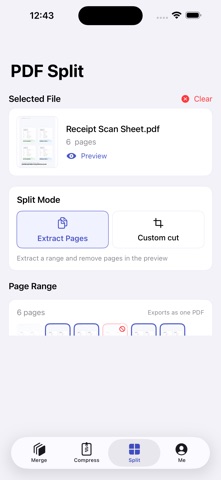
• PDF split and page extraction: Select a page range and save only the pages you need as a new PDF.
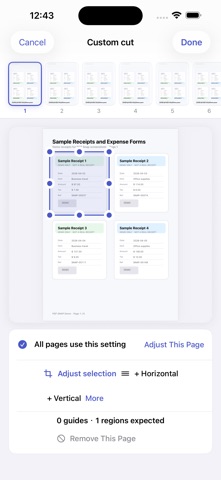
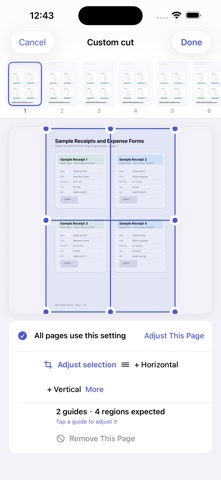
• Crop and guide-line slicing: Remove blank margins or unrelated areas, or drag split lines to turn several receipts, forms, or screenshots on one page into separate PDF pages.
• Local history and export: Preview and rename results on your device, save them to Files, or use the iOS share sheet.
Useful for
• Turning photos, receipts, and screenshots into one PDF
• Combining contracts, class notes, or work attachments
• Reducing a PDF before email, chat, or form upload
• Extracting selected pages from a long document
• Cropping scan margins or unrelated content
• Separating several receipts captured on one page
PDF Snap is a one-time purchase with no subscription. Other than a manual Check for Updates action, core document processing does not depend on a network connection.