AppBrain
AppBrain
  • Apps
  • Apps being viewed right now Trending apps today Most popular apps All-time most installed apps Top rated apps iPhone and iPad apps
  • Intelligence ▾
    Intelligence overview → Track any Android app or your whole market
    Track & analyze
    Keyword Tracker & OptimizerTrack & improve Play rankings App Performance ReportOne-off PDF for any app StatisticsFree Android & Play market stats
    Promote your app
    Featured Apps App Links
  • Intelligence
  • Pricing
  • Dashboard
  • Sign up
  • Log in
App Store Apps > Productivity > PDF Works: Convert, Edit, Scan
PDF Works: Convert, Edit, Scan icon

PDF Works: Convert, Edit, Scan

1.11.0
Yunsaeng Kim
0.00
0 reviews
Free

PDF Works: Convert, Edit, Scan Screenshot 1 of 10
PDF Works: Convert, Edit, Scan Screenshot 2 of 10
PDF Works: Convert, Edit, Scan Screenshot 3 of 10
PDF Works: Convert, Edit, Scan Screenshot 4 of 10
PDF Works: Convert, Edit, Scan Screenshot 5 of 10
PDF Works: Convert, Edit, Scan Screenshot 6 of 10
PDF Works: Convert, Edit, Scan Screenshot 7 of 10
PDF Works: Convert, Edit, Scan Screenshot 8 of 10
PDF Works: Convert, Edit, Scan Screenshot 9 of 10
PDF Works: Convert, Edit, Scan Screenshot 10 of 10
Screenshots by Yunsaeng Kim, from the the App Store listing
View on the App Store

About PDF Works: Convert, Edit, Scan

PDF Works: Convert, Edit, Scan is a productivity app developed by Yunsaeng Kim.

User Ratings

The app has no ratings yet.

App Information

PDF Works: Convert, Edit, Scan is freely available from the App Store. The app size is 20.90 MB. The latest version available is 1.11.0. The last update was on November 13, 2026.

Technical Requirements

The app has a content rating of Everyone. The app has been available on the App Store since August 2026.

PDF Works: Convert, Edit, Scan is made and published by Yunsaeng Kim. AppBrain is an independent app data site and isn't affiliated with Yunsaeng Kim. The app name, icon, screenshots and description belong to Yunsaeng Kim and are shown as published on the App Store.

Description by Yunsaeng Kim (from the App Store)
You don't need another app for every PDF job. Scanning, fixing, signing, translating and sending all happen in PDF Works. Documents are processed on your iPhone and iPad, not uploaded to a server.

PAPER AND PHOTOS TO PDF
Scan a receipt or a contract, or put several photos in one file. The app suggests a file name from the title and date on page one.
• Scan filters, OCR for searchable PDFs, photos rotated one by one
• TXT, text-focused RTF and images to PDF
• Web pages as A4, Letter or one long page, also from Safari
• Handwriting with a pen or Apple Pencil

PAGES
• Merge, reorder, delete, rotate or extract pages, with undo
• Insert blank pages or another PDF, crop margins
• Split by file size or outline
• N-up sheets, booklets, fit to A4 or Letter
• Save pages as JPEG or PNG

READING
Pick up where you left off, leave bookmarks, and let Read Aloud highlight each sentence at your own speed.
• Dark background, inverted colors, one page at a time
• Translate on your device: TXT, translated PDF, side-by-side or original-layout PDF
• Summarize & Ask: Apple Intelligence summarizes, answers cite pages
• Tables to Excel (XLSX) or CSV

WRITE AND SIGN
Sign a contract, fill in a form, add text and highlights. Draw your signature or use a photo.
• Forms, signatures and annotations saved editable or fixed
• Watermarks, headers, page and document numbers
• Your own seal, a signature library, latest signature in one tap

BEFORE YOU SEND IT
• Both sides of an ID card on one page, with a purpose watermark
• Redact sensitive areas, edit or remove document info
• Compress by quality or target size, compare two PDFs, extract text and images, edit the outline, print

PASSWORDS AND STORAGE
• Add or remove a known password, in batches too
• Passwords in the Keychain, App Lock
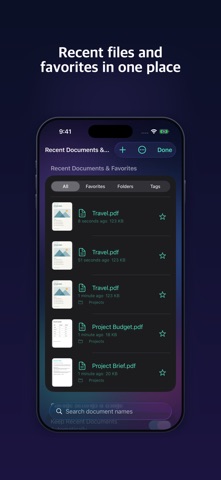
• Recent documents and favorites, folders, tags, sorting, drafts to resume edits
• Run tools from Shortcuts, Siri and Spotlight
• Tool search, customizable tabs, built-in guides

Pro
One purchase unlocks saving, sharing, printing and the advanced tools. No subscription. Restore Purchases is supported.

PLEASE NOTE
• Processing is on your device. Web pages connect to their sites, and sharing or cloud saving sends the file to your chosen service.
• Translation uses Apple's on-device translation (iOS 18 or later). Language pairs vary by system, and a language model may download first.
• A translated PDF with the original layout can look off on complex pages and has no links or form fields.
• Summarize & Ask needs iOS 26 or later and a device with Apple Intelligence supported and turned on. AI can be wrong, so check the original.
• Table extraction depends on the table and document. Open the saved table and check it.
• ID masking covers the back digits of Korean resident registration numbers. Check it and any other sensitive data before saving.
• Compression results and target sizes vary by document. Text comparison needs extractable text, so scans may need OCR.
• Export Office and HWP/HWPX files to PDF in a compatible app first.
• Remove passwords only from documents you may handle and know the password for. Unknown ones aren't recovered.
• Recent Documents keeps up to 200 PDFs / 500 MB, then drops the oldest without a favorite, folder, tag or draft. You can turn it off.

27 TOOLS
• Create PDF (5): Scan Document, Photos to PDF, Document to PDF, Web Page to PDF, ID Copy
• Edit (8): Edit & Merge Pages, Extract & Split Pages, Sign & Annotate, Fill Forms, Watermark/Header/Numbering, N-up & Booklet, Edit Outline, Edit Document Info
• Security (2): Passwords, Redact
• Extract · Convert (6): Extract Text, Extract Tables, Extract Images, PDF to Images, OCR, Compress
• Read (4): Preview & Search, Translate Document, Summarize & Ask, Compare Documents
• Export (2): Print, Rename & Save
Translate and Summarize & Ask have the requirements above.

Support: https://www.supracore.co.kr/support/pdf-works/
Privacy: https://www.supracore.co.kr/support/pdf-works/privacy.html
Show more Show less

Alternatives to PDF Works: Convert, Edit, Scan

ScanMyFile icon ScanMyFile
Jean-Pierre LESUEUR
0.0
Free
Paperjet: Printer App & Scan icon Paperjet: Printer App & Scan
Pavlo Nosov
0.0
Free
ExplorePDF: Read, Fill & Sign icon ExplorePDF: Read, Fill & Sign
AvanSaber Inc
0.0
Free
PSMailbox icon PSMailbox
Argonaut Quality Systems Inc.
3.5
Free
4 ratings
Sync with Files icon Sync with Files
Pixegram, LLC
5.0
Free
1 ratings
Docu Boss for OneDrive icon Docu Boss for OneDrive
Tech Positive
4.9
Free
9 ratings
IDrive360 icon IDrive360
IDrive Incorporated
4.6
Free
12 ratings
Portfolio Website Builder icon Portfolio Website Builder
Pixegram, LLC
5.0
Free
1 ratings

More from Yunsaeng Kim

TransWindow: Screen Translator icon TransWindow: Screen Translator
Yunsaeng Kim
0.0
Free

Changelog of PDF Works: Convert, Edit, Scan

No changelog data

Developer information for Yunsaeng Kim

Yunsaeng Kim

Address:

Share PDF Works: Convert, Edit, Scan

Comments on PDF Works: Convert, Edit, Scan for iOS

We don't have enough comments to show example comments. Please check back later.

App Store Rankings for PDF Works: Convert, Edit, Scan

This app is not ranked

Technologies used by PDF Works: Convert, Edit, Scan

Price drops on Google Play Top new apps Popular Productivity Apps Apps other people are watching Today's trending apps
ScanMyFile icon ScanMyFile
Paperjet: Printer App & Scan icon Paperjet: Printer App & Scan
ExplorePDF: Read, Fill & Sign icon ExplorePDF: Read, Fill & Sign
PSMailbox icon PSMailbox
Sync with Files icon Sync with Files
Docu Boss for OneDrive icon Docu Boss for OneDrive
IDrive360 icon IDrive360
Portfolio Website Builder icon Portfolio Website Builder
AppBrain Intelligence premium content

Subscribe now to get full and unlimited access to AppBrain Intelligence. You'll have access to:

  • App Intelligence dashboard (performance timeline, competitor comparison, country rankings, insight cards)
  • Detailed ranking data per app
  • Full timeline per developer
  • Device market shares data per country
  • Unlimited keyword tracking
  • AI assistant access via MCP (Claude, Cursor or any MCP client)
1 Month

$75/mo
(billed every month)

SAVE 0%
Subscribe
3 Months

$65/mo
($195 billed every 3 months)

SAVE 13%
Subscribe
1 Year

$57.50/mo
($690 billed every year)

SAVE 23%
Subscribe
Each subscription will automatically renew 3 days before the expiration date for the same time period. Subscriptions can be cancelled at any time before the renewal.

AppBrain is an app data site, we track rankings, ratings, installs for all apps and games on Google Play and the App Store. AppBrain doesn't host app files or APKs, all install links go directly to the official store. All trademarks are owned by their respective owners.

More apps

  • Top Android apps being viewed
  • High School Fighting Game stats
  • Telestop - portal puzzle games
  • ThingsBook

App statistics

  • Android statistics
  • Google Play Developer stats
  • Trending Android Apps
  • Trending iOS apps
  • Top popular Apps
  • Buy the best Android phone
  • Buy & sell app businesses

About AppBrain

  • Contact
  • Privacy
  • Documentation
  • DMCA takedowns
  • Blog
  • How to improve the earnings of your ad units
© 2010-2026 - AppBrain