

PDF2Office for iWork 2017
PDF2Office for iWork 2017 is made and published by Recosoft. AppBrain is an independent app data site and isn't affiliated with Recosoft. The app name, icon, screenshots and description belong to Recosoft and are shown as published on the App Store.
AppBrain's verdict
- Last updated
- December 1, 2023
- Size
- 17.0 MB
User feedback
Ratings and reviews on the App StoreComments on PDF2Office for iWork 2017 for iOS
We don't have enough comments to show example comments. Please check back later.
Store listing
By Recosoft, from the App Store

Description by Recosoft Written by the developer, not by AppBrain. Click to read.
PDF2Office for iWork is a powerful and easy-to-use tool for converting PDF files to editable Pages, Keynote and Numbers formats.
“I fully endorse this product without hesitation.”
Tom Piper, appleJAC MUG
-------------------------------------------------------------------------
*** Covered by Macworld magazine at Macworld 2010! ***
The new PDF2Office for iWork 2017 is the Mac PDF Converter for converting PDFs to editable iWork formats. If you need to recreate the PDF file or re-use the PDF data in Pages, Keynote or Numbers there is no other tool for you but PDF2Office for iWork.
PDF2Office for iWork is easy to use.
1. Simply drag and drop the pdf file into the application,
2. Select the target file type, and click the “Convert” button.
PDF2Office for iWork is very powerful and quick, converting PDF to Pages, PDF to Keynote and PDF to Numbers formats in a matter of seconds.
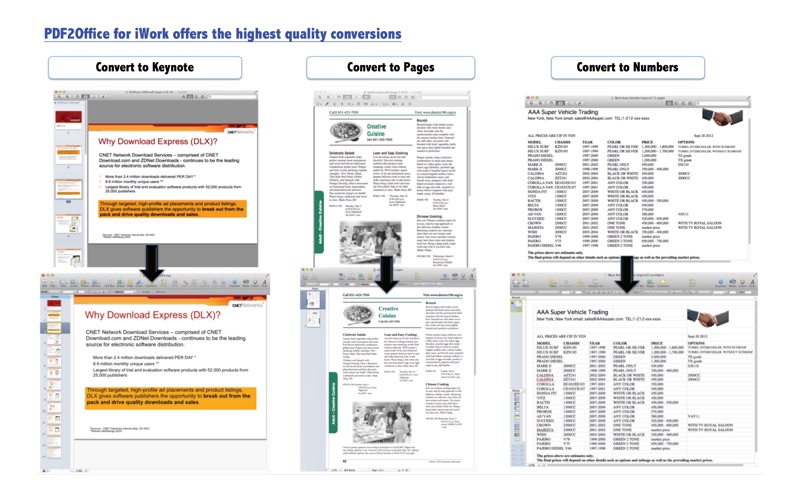
PDF2Office for iWork recreates the layout of the document, forms paragraphs for easy editing; applies styles; regroups independent graphic elements, extracts and places the images accurately, and also creates tables!….all automatically !!
PDF2Office for iWork has several powerful options to fine-tune the file conversion. Don’t have the font? No problem. Simply specify a font to substitute in your conversion. You can also choose to convert the entire PDF file or a range of pages.
Recosoft Corporation, the developer of PDF2Office for iWork and other PDF2Office series products has been presenting PDF converter solutions for over 15 years on the Mac and are the leaders in this field.
--------------------------------------------------------------------------
FEATURES
• Converts PDF files to fully editable Pages, Keynote, and Numbers files
• Amazingly accurate - Recreates the layout of the PDF file, forms paragraphs, applies styles, places images, graphics, and creates tables automatically !!
• Batch Convert PDFs - Batch converts PDFs to the Numbers, Pages and Keynote formats with a simple-click.
• Powerful options - PDF2Office for iWork provides options to fine-tune the conversion result. You can opt to exclude graphics, specify a specific range of pages to convert and also specify font substitutions.
• iOS Optimization - A “Format for iOS” option optimizes the resulting files for viewing/editing on the iPAD, iPhone and iPod.
• Lightning Quick - PDF2Office for iWork will convert the PDF file within seconds.
• Password Protected PDF documents - Convert password-protected PDF documents (The original password is required to open password protected PDF documents)
• Multi-Language/Asian Language Support - Supports English/Japanese/Chinese/Korean/Western European/Greek/Russian-language data contained in PDF documents
--------------------------------------------------------------------------
View the PDF2Office for iWork v1.0 coverage at Macworld 2010!
http://www.macworld.com/article/1146407/photopresenter_pdfoffice.html
WHAT'S NEW IN VERSION 2017 edition
• Completely re-written from the ground-up taking advantage of modern macOS technologies
• Full Preview of PDF files and thumbnail preview
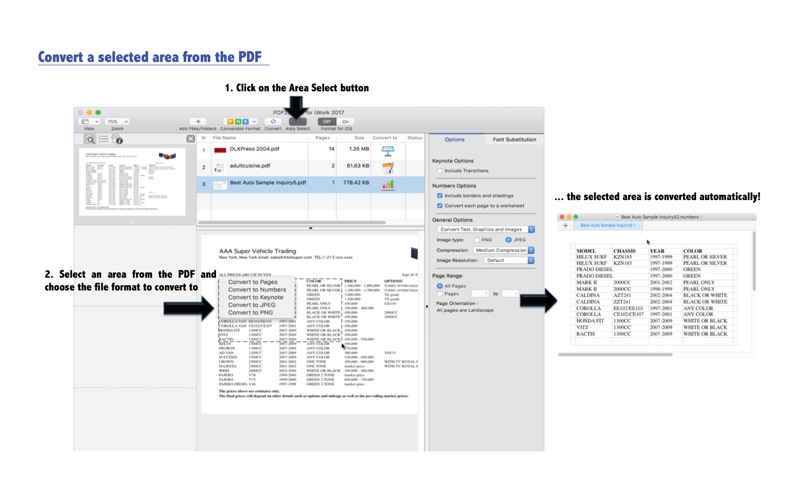
• Area Select tool to mark the area you want to convert
• Batch Conversion
• The v7.0 New PDF Reconstruction Engine
• Enhanced Toolbar Area
Visit www.recosoft.com and discover the entire range of PDF converters and solutions that are available from Recosoft.
PDF2Office Professional
PDF2Office for iPad
PDF2Office 2017
PDF2ID
ID2Office
PDF2Office, PDF2ID, and ID2Office are registered trademarks or trademarks of Recosoft Corporation in the US and/or other countries. Any other products with similar names are not endorsed, affiliated or created by Recosoft Corporation.
Note: Layout reconstruction varies depending on document and may not be 100% accurate. PDF2Office does not perform Optical Character Recognition. An image in a PDF file is treated as an image.
Safety and technology
Found in the app by AppBrain- Price
- Free
- App size
- 17.0 MB
- Content rating
- Everyone
Technologies used by PDF2Office for iWork 2017
Releases
Updates seen on the App Store- Version
- 3.5.8
- Launched
- September 2017
No changelog data
Alternatives
Similar apps and more from RecosoftMore from Recosoft


Rankings
App Store top chartsApp Store Rankings for PDF2Office for iWork 2017
About the app and developer
About PDF2Office for iWork 2017
PDF2Office for iWork 2017 is a business app developed by Recosoft.
What is the rating of PDF2Office for iWork 2017?
PDF2Office for iWork 2017 has no ratings yet.
Is PDF2Office for iWork 2017 free?
PDF2Office for iWork 2017 is free. The app size is 16.96 MB. The latest version available is 3.5.8. The last update was on December 1, 2023.
What are the requirements for PDF2Office for iWork 2017?
The app has a content rating of Everyone. The app has been available on the App Store since September 2017.
Developer information for Recosoft
Address: