

PDF2Words is made and published by 中山 王. AppBrain is an independent app data site and isn't affiliated with 中山 王. The app name, icon, screenshots and description belong to 中山 王 and are shown as published on the App Store.
AppBrain's verdict
- Last updated
- April 14, 2026
- Size
- 1.72 MB
User feedback
Ratings and reviews on the App StoreComments on PDF2Words for iOS
We don't have enough comments to show example comments. Please check back later.
Store listing
By 中山 王, from the App Store

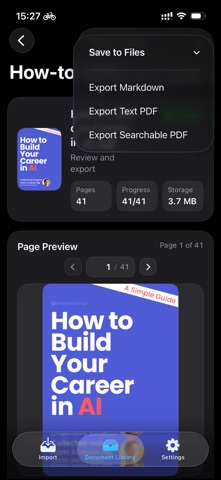


Screenshots by 中山 王, from the the App Store listing
Description by 中山 王 Written by the developer, not by AppBrain. Click to read.
PDF2Words helps you turn scanned PDFs, image-based PDFs, and document copies into text you can search, copy, and export. It fits lecture notes, contracts, scanned books, research material, and archived records that need cleanup before reuse.
What you can do with PDF2Words
- Import scanned or image-based PDFs
- Automatically detect pages that need OCR
- Review recognized text page by page against the original page
- Export as Markdown, text-only PDF, or searchable PDF
- Reuse embedded text when the source PDF already contains selectable text
Common use cases
- Convert lecture notes and scanned books into reusable text
- Make contracts, reports, and research material searchable
- Organize archive scans for lookup and filing
- Export PDF content to Markdown for note-taking, drafting, or excerpts
Product notes
- Designed to rely on Apple's on-device OCR where supported
- No need to send files to third-party AI services
- Available on iPhone, iPad, and Mac
- Recognition quality depends on scan quality and the text recognition support available on your device and OS
Privacy Policy: https://wonderfulsuccess.github.io/PDF2Words-site/privacy.html
Terms of Use (EULA): https://www.apple.com/legal/internet-services/itunes/dev/stdeula/
What you can do with PDF2Words
- Import scanned or image-based PDFs
- Automatically detect pages that need OCR
- Review recognized text page by page against the original page
- Export as Markdown, text-only PDF, or searchable PDF
- Reuse embedded text when the source PDF already contains selectable text
Common use cases
- Convert lecture notes and scanned books into reusable text
- Make contracts, reports, and research material searchable
- Organize archive scans for lookup and filing
- Export PDF content to Markdown for note-taking, drafting, or excerpts
Product notes
- Designed to rely on Apple's on-device OCR where supported
- No need to send files to third-party AI services
- Available on iPhone, iPad, and Mac
- Recognition quality depends on scan quality and the text recognition support available on your device and OS
Privacy Policy: https://wonderfulsuccess.github.io/PDF2Words-site/privacy.html
Terms of Use (EULA): https://www.apple.com/legal/internet-services/itunes/dev/stdeula/
Safety and technology
Found in the app by AppBrain- Price
- Free
- App size
- 1.72 MB
- Content rating
- Everyone
Technologies used by PDF2Words
Releases
Updates seen on the App Store- Version
- 1.0
- Launched
- April 2026
No changelog data
Alternatives
Similar apps and more from 中山 王Alternatives to PDF2Words


More from 中山 王


Rankings
App Store top chartsApp Store Rankings for PDF2Words
This app is not ranked
About the app and developer
About PDF2Words
PDF2Words is an utilities app developed by 中山 王.
User Ratings
The app has no ratings yet.
App Information
PDF2Words is freely available from the App Store. The app size is 1.72 MB. The latest version available is 1.0. The last update was on April 14, 2026.
Technical Requirements
The app has a content rating of Everyone. The app has been available on the App Store since April 2026.
Developer information for 中山 王
Address: