PdfCraft: PDF Scanner is a productivity app developed by Necati Berk Ozcelik.
User Ratings
The app has no ratings yet.
App Information
PdfCraft: PDF Scanner is FREE to download. The download size is 6.26 MB. The latest version available is 1.0.3. The last update was on December 2, 2025.
Technical Requirements
The app has a content rating of Everyone. The app has been available on the App Store since November 2025.
Description
PDF Craft – Your Complete PDF Productivity Toolbox
PDF Craft offers all the essential tools you need to convert, manage, and edit your PDF documents in one powerful application. With its modern interface and fast processing features, you can complete all your PDF tasks quickly and efficiently.
Key Features
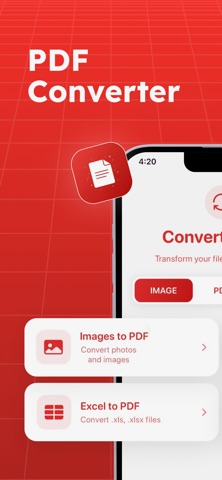
PDF Conversion - Convert images to PDF (JPG, PNG, HEIC) - Convert Word, Excel, and PowerPoint files to PDF - Convert PDF files to Word, Excel, PowerPoint, or image formats - Supports over 20 file types
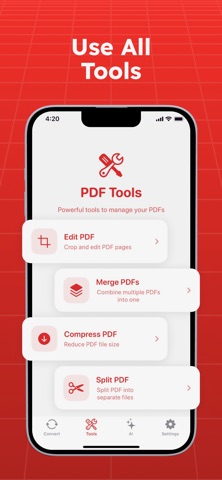
PDF Tools - Combine multiple PDFs into a single document - Split large PDFs into separate files - Compress PDF files while maintaining visual quality - Reorder pages in any PDF file - Unlock password-protected PDF files - Add text, signatures, and annotations
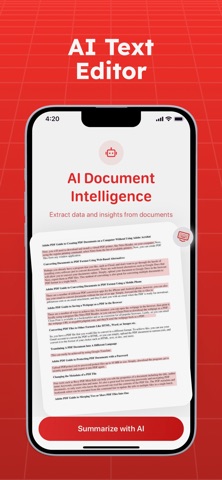
AI-Powered Capabilities - Create summaries of long documents - Automatically extract data from invoices and receipts - Identify dates, amounts, vendor information, and more
Advanced File Conversion - Convert between image formats (JPG, PNG, GIF, TIFF, BMP, SVG) - Create images from Office files - Convert HTML, SVG, and other formats to PDF - ZIP Archiving support
Why Choose PDF Craft?
Easy to Use
Designed with a clean and intuitive interface that allows users to perform all PDF operations without requiring technical knowledge.
Fast Processing
Cloud-based processing ensures fast performance, even with large documents.
Secure and Private
PDF Craft does not store or retain any data and does not share it with third-party applications.
Multilingual Support
Available in over 10 languages for users worldwide.
Modern and Professional Design
PDF Craft features an elegant interface with a premium red gradient theme and a SwiftUI-based layout designed for a seamless user experience.
Premium Features (PDF Craft PRO) • Unlimited conversions and tools • Prioritized processing speeds • Access to all advanced tools • AI-powered enhancements • Future premium features included
Ideal Use Cases
Business Use • Convert presentations, reports, and contracts • Merge invoices or statements • Edit and sign important documents • Optimize large PDF files
Education • Convert lecture notes to PDF • Combine study materials • Extract important information from documents • Reorganize content for structured study
Everyday Use • Convert photos to PDF • Reformat documents for sharing • Compress files for faster uploads • Unlock secure PDFs when needed
PDF Craft Premium Subscription • Unlock all paid features and enjoy the PDF Craft experience. • PDF Craft Premium is available as a weekly subscription priced according to the selected plan. • Payment will be charged to your iTunes account at confirmation of purchase. • Subscriptions automatically renew unless auto-renew is turned off at least 24-hours before the end of the current period. • Your account will be charged for renewal at the then-current price within 24-hours prior to the end of the current period. • Subscriptions can be managed and auto-renewal disabled in your Apple ID account settings after purchase. • Any unused portion of a free trial period, if offered, will be forfeited when the user purchases a subscription to that publication. • Current Premium price: Weekly subscription $3.99. • Terms of Use https://necoapplicationonline.com/terms • Privacy Policy https://necoapplicationonline.com/privacy • Support https://necoapplicationonline.com/support
Each subscription will automatically renew 3 days before the expiration date for
the same time period. Subscriptions can be cancelled at any time before the renewal.